Become a MacRumors Supporter for $50/year with no ads, ability to filter front page stories, and private forums.

knome

macrumors 6502
Original poster
Sep 7, 2006
332
0
Does anyone know if or where these are uploaded? My Snow Leopard disk refuses to install 64bit ones because i am on a 2006 Mac Pro. I've previously been running the Boot Camp 2.0 64bit drivers from the 2008 Mac Pro and they've worked just fine in vista.
 
Ah, i had to do a little toying to get the bootcampx64 to install without running the main installer. Thanks i should have looked closer at the disk.
 
Wait, so how did you exactly get the 64-bit Boot Camp 3.0 drivers to install? I keep getting an error when using the installer, but when I try the file at \Boot Camp\Drivers\Apple\BootCamp64.msi, it keeps telling me it requires "elevated priveleges" and I don't know what that means.
 
Wait, so how did you exactly get the 64-bit Boot Camp 3.0 drivers to install? I keep getting an error when using the installer, but when I try the file at \Boot Camp\Drivers\Apple\BootCamp64.msi, it keeps telling me it requires "elevated priveleges" and I don't know what that means.

You need to open it via cmd as the admin.
 
Warning

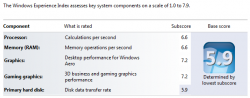
On my early 2009 iMac (3.06 Ghz with ATI HD 4850) today I installed a new BOOTCAMP partition and successfully installed the GA version of x64 Windows 7 Home Professional without issue. I then used the Snow Leopard DVD to install Apple software & drivers (running 64 bit version as Administrator from CMD prompt) and after reboot it Blue-Screened before Windows could load. I used System Restore of the Win7 DVD and that worked well to roll back all the Apple drivers. I saw similar things with Windows 7 x64 RC and Leopard on my iMac and a laptop. Just a word of caution to people, I would not do it until Apple releases the Windows 7 compatible update. If you can't wait, users are better off just using the drivers Windows 7 installs by default. I didn't have sound or iSight camera, but everything else worked great and I was fine. Performance is excellent, see my Windows Experience Index (WEI) results below.

I know there are workarounds and tricks to make the x64 Apple drivers and software work, but unless you like hassle, I wouldn't bother and just wait for proper software from Apple. It is ridiculous they don't have the drivers now, Windows 7 has been available to them for almost a year. x86/32-bit works fine, but the kernel in Win 7 is a lot stricter.

 

Attachments

  • iMac_w7_WEI.PNG
    iMac_w7_WEI.PNG
    35.5 KB · Views: 370
On my early 2009 iMac (3.06 Ghz with ATI HD 4850) today I installed a new BOOTCAMP partition and successfully installed the GA version of x64 Windows 7 Home Professional without issue. I then used the Snow Leopard DVD to install Apple software & drivers (running 64 bit version as Administrator from CMD prompt) and after reboot it Blue-Screened before Windows could load. I used System Restore of the Win7 DVD and that worked well to roll back all the Apple drivers. I saw similar things with Windows 7 x64 RC and Leopard on my iMac and a laptop. Just a word of caution to people, I would not do it until Apple releases the Windows 7 compatible update. If you can't wait, users are better off just using the drivers Windows 7 installs by default. I didn't have sound or iSight camera, but everything else worked great and I was fine. Performance is excellent, see my Windows Experience Index (WEI) results below.

I know there are workarounds and tricks to make the x64 Apple drivers and software work, but unless you like hassle, I wouldn't bother and just wait for proper software from Apple. It is ridiculous they don't have the drivers now, Windows 7 has been available to them for almost a year. x86/32-bit works fine, but the kernel in Win 7 is a lot stricter.


I have Windows 7 Professional running on my MacBook Air using Snow Leopard 10.6 Upgrade DVD boot camp drivers. I never had a blue screen except that one time cause I accidently installed the wrong IDE drivers (big screw up there) but everyhting else works.

My iSight camera works too btw.Windows 7 uses Windows Vista drivers and they are compatible both ways. Even if it's not "official", it should work.
 
I have Windows 7 Professional running on my MacBook Air using Snow Leopard 10.6 Upgrade DVD boot camp drivers. I never had a blue screen except that one time cause I accidently installed the wrong IDE drivers (big screw up there) but everyhting else works.

My iSight camera works too btw.Windows 7 uses Windows Vista drivers and they are compatible both ways. Even if it's not "official", it should work.
Is yours 32 or 64 bit Windows 7? 64 bit is the only one with an issue. I'm just saying there is a risk and would not recommend it to anyone. You are fine installing Windows 7, but if you use 64 bit Windows, the smartest thing to do is wait until Apple updates Boot Camp. My issues occurred twice with default installs.
 
Is yours 32 or 64 bit Windows 7? 64 bit is the only one with an issue. I'm just saying there is a risk and would not recommend it to anyone. You are fine installing Windows 7, but if you use 64 bit Windows, the smartest thing to do is wait until Apple updates Boot Camp. My issues occurred twice with default installs.

Both. I have both versions since I'm in the MSDN. I ended up using 32-bit on my MacBook Air since it saves me some space but I have used 64 and 32-bit native installs on my Air. Both boot camp 2.1 and 3.0 drivers work perfectly and all hardware works. Currently, I am using 64-bit on my dad's mid-2007 iMac and it runs perfectly with boot camp 2.1 drivers.
 
If you had ever got error such as "Boot Camp x64 is unsupported on this computer model." I have a 2009 early version, 3.06 GHz 4850 Video iMac.

I kept getting this error whenever I installed Windows 7 64 bit version when using bootcamp, and when I wanted to install the bootcamp updates the above error came on stating that i needed to install BootCamp 3.0 first. But wait , It was installed what the heck is going on? So I searched the web to find a solution and found one. It is working now and here is how you do it. However it is your decision whether you want to do this or not. I am just letting you know how i got around this problem. I wanted all of my 8GB of ram to be used and in order to do that i needed the 64 bit version installed of Windows.

Solution: Starts here

1. Go to Start > Computer. Then right click on your cd/dvd rom drive where the Snow Leopard dvd appears and click open.

2. From there, move to Boot Camp > Drivers > Apple and right click on the file with the name BootCamp64.msi. From the list of options appeared, select Troubleshoot compatibility.
*
3. Wait a few seconds, and a screen like the following will appear. From this screen click on the "Start the program..." button and the installation process will begin.

4. When the drivers are installed, you might be asked to restart your computer. When the computer boots, install the boot camp v3.1 and V3.2 updates for Windows 64bit and you are done. I got them from Apple, support website and transferred them to usb first before installing bootcamp.

5. Enjoy your Windows 7 64bit on your intel based mac!


So far I have had no problems and was able to install everything fine. Now i have a Windows 7 64 bit version running on my early version of iMac 2009.

If I run into problems I will post them there.
 
Sorry I am not able to try this solution as I am at work, but what I experienced was that once I made the Window partition and loaded the Windows 7 64-bit edition, the screen went to black and displayed a message
1.
2.
Select a CD-Rom Type:_

But I was not able to select either one as my keyboard and mouse did not work. Plus I don't know which option I should choose. :)

Would following the explanation above solve this issue, or do I need to do something else?

Thanks as always for any help!!

Scott

P.S. I have a 24" iMac Intel Core Duo, Model 7,1 and am running 10.6.8
 
Last edited:
Register on MacRumors! This sidebar will go away, and you'll see fewer ads.