

Become a MacRumors Supporter for $50/year with no ads, ability to filter front page stories, and private forums.

Lee_Mac

macrumors regular
Original poster
Apr 18, 2020
180
165
I understand with Liquid Glass Apple have now decided to do the floating controls/menus etc. But the decision to move the Music player's control panel down to the bottom is just plain selfish move 'just' to show Liquid Glass off. We now have a big empty space where the old control was. Plus, why have they decided to add an extra click for the volume slider. Surely any chimp know's the sis form over function?
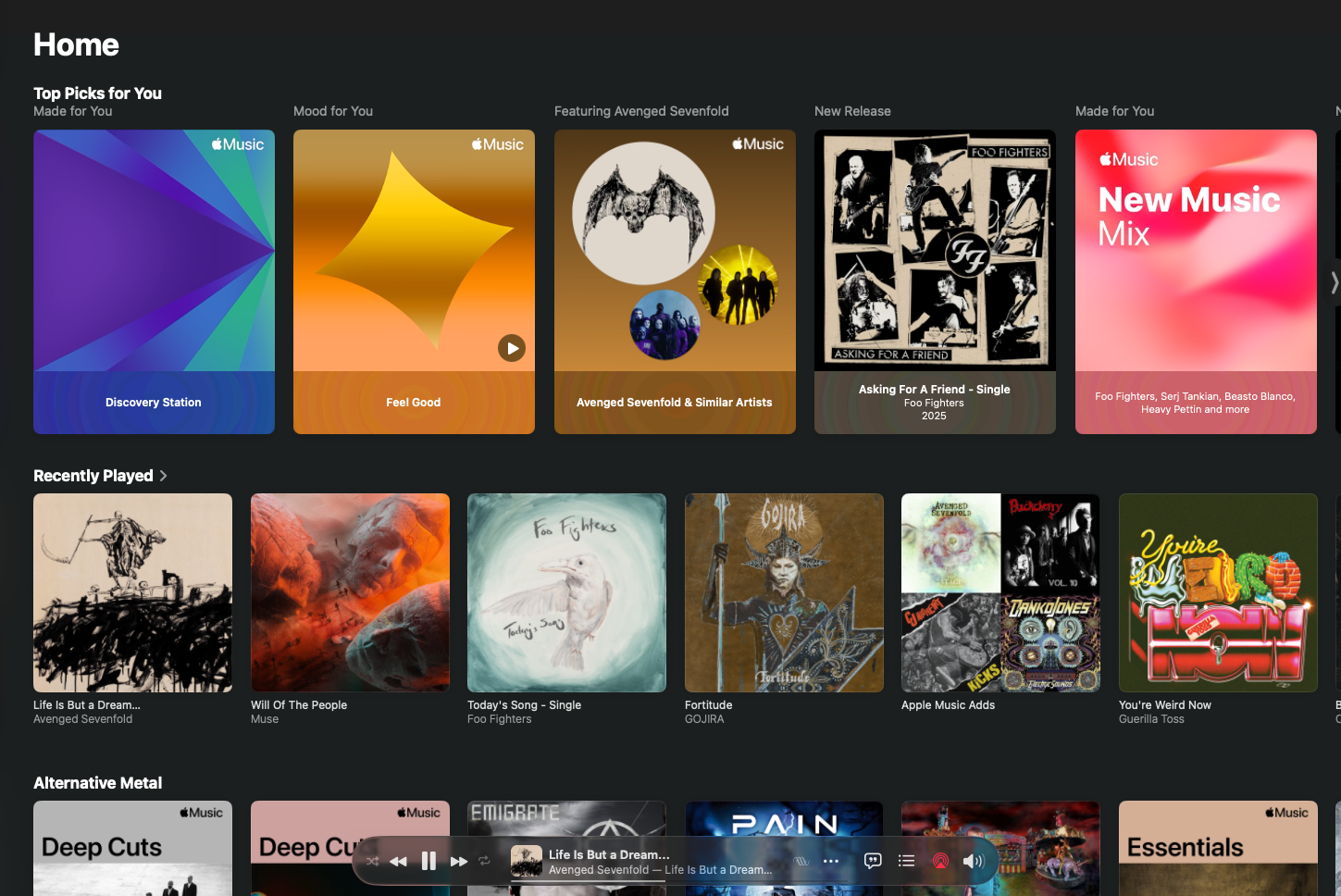
Screenshot 2025-10-25 at 21.40.28.png
 
Yep. I'm not sure what you mean about the big empty space (it seems like many or most of the app's main content views still utilize that space), but this is one of several cases where it seems the decision was to largely import the iOS app. (If you haven't opened the Contacts app since upgrading to Tahoe, then… well, brace yourself.)

Even the macOS Human Interface Guidelines emphasize controls shouldn't go at the bottom of a window. And that volume control has cost me many a click as well.
 
It's consistant with iOS and iPadOS.
It is indeed which is sort of OK on a small screen. Totally lost on an ultra wide monitor on MacOS.


Yep. I'm not sure what you mean about the big empty space (it seems like many or most of the app's main content views still utilize that space), but this is one of several cases where it seems the decision was to largely import the iOS app. (If you haven't opened the Contacts app since upgrading to Tahoe, then… well, brace yourself.)

Even the macOS Human Interface Guidelines emphasize controls shouldn't go at the bottom of a window. And that volume control has cost me many a click as well.
Not looked at the contacts app yet, I’ll make sure I’m seated when I do 🤓 They could at least left it at the top.
 
You can revert back to the older Music app layout with this command, run it in terminal:

defaults write com.apple.Music com.apple.SwiftUI.DisableSolarium -bool YES

Make sure Music is closed before you run the command.
Thanks! The new system was a real pain on larger monitors...
 
You can revert back to the older Music app layout with this command, run it in terminal:

defaults write com.apple.Music com.apple.SwiftUI.DisableSolarium -bool YES

Make sure Music is closed before you run the command.
Excellent will give that a whirl 😎
 
Yesterday I upgraded from macOS 15.7.2 to 26.1, and found this thread after seeing that Music looked messed up. I tried this solution multiple times (while Music was quit, and rebooting before re-starting Music, etc.) but it did not work. Did something change between 26.0 and 26.1 that made this fix stop working?
 
Yesterday I upgraded from macOS 15.7.2 to 26.1, and found this thread after seeing that Music looked messed up. I tried this solution multiple times (while Music was quit, and rebooting before re-starting Music, etc.) but it did not work. Did something change between 26.0 and 26.1 that made this fix stop working?
Yes it's stopped it working. I changed two of my Macs before updating but the third I tried after 26.1. Won't change the GUI. Luckily for me it's just my in house backup machine so don't use it for much other than file handling.
 
Why on Earth is it not an App Preference to decide some of this?

The Mac Music player UI belongs at the top by default.
 
Why on Earth is it not an App Preference to decide some of this?

The Mac Music player UI belongs at the top by default.
Their way or the highway lol. But you're right, some customisation with changes like this would be nice. Especially when something has been in that position for like ever. I HATED it being at the bottom, just to show off Liquid Glass is beyond laughable really. All these floating panels is a choice terrible on MacOS.
 
I think this type of App pretty much peaked at iTunes 3 or 5 ... 11 works also.

I'm mainly irritated that we can't simply keep using these Apps if we prefer them, especially for local library users and particularly now with device syncing moved over to the Finder.

(yes, I know ... 32 bit and then now they are killing Rosetta 😞🤬 -- computers need not be like this!)

1762884284506.png


1762884295539.png


1762884347659.png
 
Last edited:
What I hadn't realised that 26.1 TOTALLY breaks the terminal code tweak. I was thinking it prevented a user from apply the change since 26.1 but it does in fact revert it back to the original state. Apple, why oh why do you do this.
 
  • Sad
Reactions: turbineseaplane
Register on MacRumors! This sidebar will go away, and you'll see fewer ads.