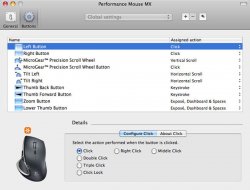
Hey guys, I just got my MX Revolution today from Newegg and I'm working on configuring it (especially the scroll, which I can't seem to nail). I've been using Logitech Control Center, which seems to do everything I need...
This is what I have so far:
L click: left click
R click: right cilck
scroll: smooth scroll in firefox/safari, alternating scroll globally
scroll click: middle click in firefox, switches scroll modes globally
quick search: Cmd key
thumb forward: Cmd - right arrow
thumb back Cmd - left arrow
thumb wheel forward: all windows
thumb wheel back: spaces
thumb wheel button: desktop
This is what I have set up for smooth scroll in firefox right now, but it seems a little too sensitive when trying to middle click

Post what your settings/preferences are!
This is what I have so far:
L click: left click
R click: right cilck
scroll: smooth scroll in firefox/safari, alternating scroll globally
scroll click: middle click in firefox, switches scroll modes globally
quick search: Cmd key
thumb forward: Cmd - right arrow
thumb back Cmd - left arrow
thumb wheel forward: all windows
thumb wheel back: spaces
thumb wheel button: desktop
This is what I have set up for smooth scroll in firefox right now, but it seems a little too sensitive when trying to middle click
Post what your settings/preferences are!