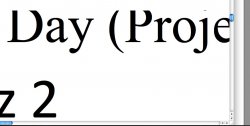
Since a couple years back, I've been experiencing a quite irritating yet mystifying issue. It's an OS-wide text rendering problem with my macOS installation. Check the attachment to see what I'm talking about. The letters of random lines of text don't render completely, and it can happen in any place/application where text can be selected and copied (so, menu items are not affected). It actually just happened to the text I am inputting right now! The workaround that I've found is to select the affected text, and it "magically" makes the disappeared parts of the letters appear. Thus, I found that cmd+A is the best way to do it. The frequency of this problem is variable but pretty high, like one line of text per minute (it always affects one line at any given time).
My 2008 Macbook Pro came with Leopard installed, and the issue started happening a year later, in fall 2009. Two years later, and Snow Leopard 10.6.8 has still not made a difference.
I know it can't be hardware, because my Windows 7 installation shows no problems at all.
Seeing that SL didn't fix the issue, I don't hold much hope about Lion. Changing resolution doesn't fix it either. What do you guys think? Is this something that only a full disk format would fix?
My 2008 Macbook Pro came with Leopard installed, and the issue started happening a year later, in fall 2009. Two years later, and Snow Leopard 10.6.8 has still not made a difference.
I know it can't be hardware, because my Windows 7 installation shows no problems at all.
Seeing that SL didn't fix the issue, I don't hold much hope about Lion. Changing resolution doesn't fix it either. What do you guys think? Is this something that only a full disk format would fix?