Become a MacRumors Supporter for $50/year with no ads, ability to filter front page stories, and private forums.

imthgimp

macrumors newbie
Original poster
Jan 29, 2026
7
1
I recently bought a A1312 emc 2390 imac. It had no os. Guy I bought from said it would get to the internet installer (alt, command, r) high sierra, but would error out trying to reach installer server. I duplicated and used mr macintosh's fix # 3. Got past server error and when the installation started, the first odd thing I noticed was time started @ 9 minutes and within a few seconds dropped to 5 minutes, and @ 3 minutes install froze. Added a usb hard drive and tried to install to it. Same result. Built a high sierra usb install stick and everything went well until the install started. 9 minutes for a few seconds and then 5 minutes and froze around 3 minutes. Attempted several times with same result. Do I have a hardware problem? Also checked time and was off a few hours, but date was same. I tried with a ventoy usb with several flavors of linux. The live distros look great, but freeze up after a few minutes. Has anyone ran across this? No artifacts on screen, no lagging mouse, or anything, just freezes after a few minutes.
 
I've seen the same symthoms that you described in newer and older macs. I believe that the usb just eject itself or looses power, or the usb chip doesn't like for long boots. who knows, it doesn't matter!.

Usually at the top bar in the Mac Os installation there is an option to view the log, try to get some info from there. Also, have you tried to install some flavor of linux in the HD? something like debian that you can install without booting a live enviroment?

The method for mac os that I use is create a bootable installer in another mac, once the installer is up, change the date using terminal to 2016 or something and install the OS. I said that because some oses fail to install for having the current day, and in particular a 2010 mini doesn't feel like it want to cooperate with internet recovery.

Also you can try a HD (Mac os installation) from another mac that it's supported by your mac by usb, firewire, just boot pressing option key and select the HD.

If the iMac has the DVD drive you can also try install an os that way, some Linux distro or Windows.

There are more methods like target disk mode that can be used to check the machine and so on but maybe these are the simplest when internet recovery doesn't work.
 
Lots of people have problems installing particularly High Sierra to an empty drive. Try installing something older your iMac supports first and then upgrade that to HS.

But, if other versions do not work either then there might be some other problem.
 
  • Like
Reactions: MBAir2010
I've seen the same symthoms that you described in newer and older macs. I believe that the usb just eject itself or looses power, or the usb chip doesn't like for long boots. who knows, it doesn't matter!.

Usually at the top bar in the Mac Os installation there is an option to view the log, try to get some info from there. Also, have you tried to install some flavor of linux in the HD? something like debian that you can install without booting a live enviroment?

The method for mac os that I use is create a bootable installer in another mac, once the installer is up, change the date using terminal to 2016 or something and install the OS. I said that because some oses fail to install for having the current day, and in particular a 2010 mini doesn't feel like it want to cooperate with internet recovery.

Also you can try a HD (Mac os installation) from another mac that it's supported by your mac by usb, firewire, just boot pressing option key and select the HD.

If the iMac has the DVD drive you can also try install an os that way, some Linux distro or Windows.

There are more methods like target disk mode that can be used to check the machine and so on but maybe these are the simplest when internet recovery doesn't work.
Are you saying to use a non-live debian or linux? I did try mx-linux that was just an installer, but fails like everything else...froze. I'll try the date thing back to '16 or something and report back. I'll create a sierra usb and try that also. Thanks for the help.
 
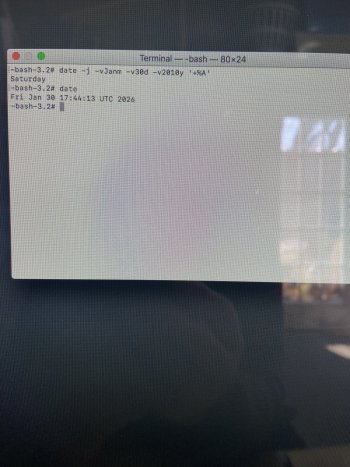
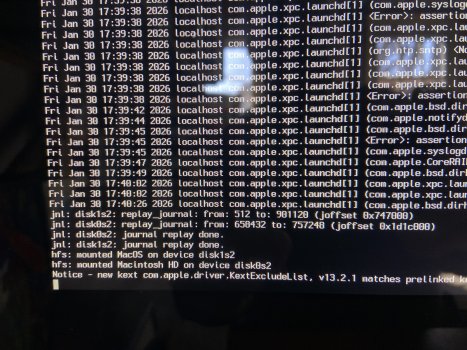
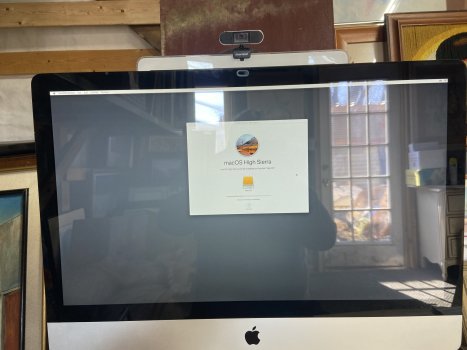
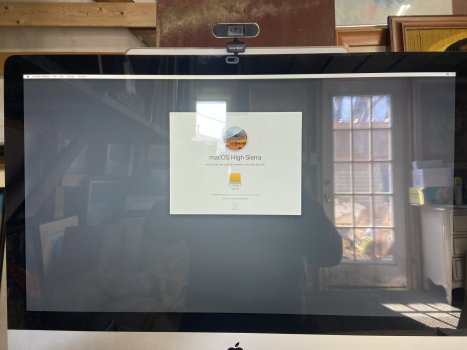
I've got a few pics to share. The first one shows where I changed the date with no effect. Could be doing it wrong though. 2nd in verbose mode. Third, start of install, and last pic showing where it froze. I also took a video from beginning of install screen till it froze. It's 3 minutes and some change if you care to view.


Attachments

  • IMG_1954.jpeg
    IMG_1954.jpeg
    908 KB · Views: 8
  • IMG_1953.jpeg
    IMG_1953.jpeg
    746.8 KB · Views: 8
  • IMG_1952.jpeg
    IMG_1952.jpeg
    331.8 KB · Views: 8
  • IMG_1951.jpeg
    IMG_1951.jpeg
    313.7 KB · Views: 8
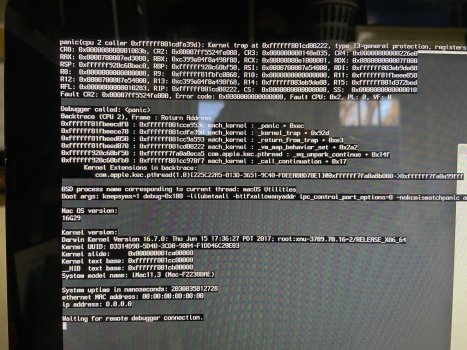
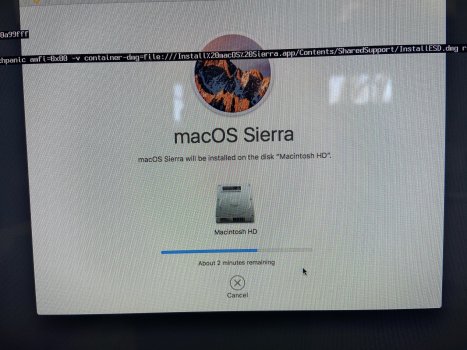
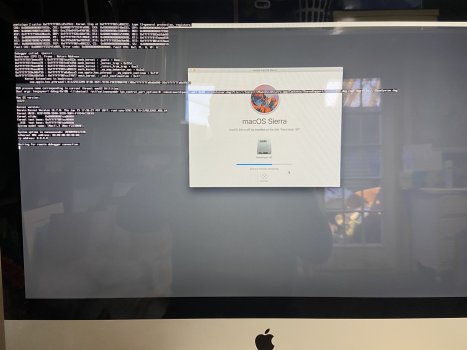
Got Sierra on usb. Started up and changed date to 1/30/2010. installer was very hpeful. went for about 25 minutes or so with no freeze and then kp'd. new pics attached.
 

Attachments

  • IMG_1959.jpeg
    IMG_1959.jpeg
    866.7 KB · Views: 10
  • IMG_1960.jpeg
    IMG_1960.jpeg
    1.1 MB · Views: 10
  • IMG_1958.jpeg
    IMG_1958.jpeg
    444.4 KB · Views: 8
How old is the hard drive in the unit? If it is the original, I would consider changing it. A kernel panic could be anything. I would start with hardware, hard drive, RAM, etc.
 
Another possibility is the battery (battery/PRAM/NVRAM), which is likely original, and more than 15 years old. Dead battery (or low voltage) can cause ususual symptoms. It's a big job to replace, as the button battery is on the back side of the logic board, and you have to completely remove the logic board to replace it.
 
How old is the hard drive in the unit? If it is the original, I would consider changing it. A kernel panic could be anything. I would start with hardware, hard drive, RAM, etc.
Tried with external and replacing internal. Both had no difference in end result. Tried with just 2 of the original sticks of ram, and then swapped with newer looking ram modules. All were 4 gb mods. Would not even get to the installer with snow leo in superdrive, and an external, got a little farther, but not to the install phase. Not completely sure, but I think the kp infered that the proc might be the issue. Will remove and re paste cooler. I'll update when I get there.
 
Another possibility is the battery (battery/PRAM/NVRAM), which is likely original, and more than 15 years old. Dead battery (or low voltage) can cause ususual symptoms. It's a big job to replace, as the button battery is on the back side of the logic board, and you have to completely remove the logic board to replace it.
I'll address tomorrow when I repaste the cpu.
 
Register on MacRumors! This sidebar will go away, and you'll see fewer ads.