

Become a MacRumors Supporter for $50/year with no ads, ability to filter front page stories, and private forums.

thenatten

macrumors newbie
Original poster
Oct 3, 2008
3
0
Hello all! im new to this forum, and i found it while I was looking for help on this subject.

I downloaded this movie:


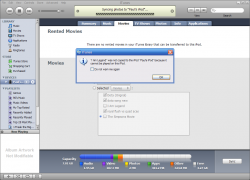
Now, it plays on quicktime, and when i opened it in my itunes movie section, it plays perfect, but when i go to put it on my itouch, sync it, u know, it shows this...

Please help me out. its extension is .MP4 all other movies ive downloaded are the same exact format name, and they work...
 

Attachments

  • not working movie.PNG
    not working movie.PNG
    119.1 KB · Views: 206
Hello all! im new to this forum, and i found it while I was looking for help on this subject.

I downloaded this movie:


Now, it plays on quicktime, and when i opened it in my itunes movie section, it plays perfect, but when i go to put it on my itouch, sync it, u know, it shows this...

Please help me out. its extension is .MP4 all other movies ive downloaded are the same exact format name, and they work...

iPod touch**

anyway: go to your movies section in iTunes, select the movie(s) you want on your iPod touch, and go to the "Advanced" menu at the top, under that menu click "Create iPod or iPhone version"

Then when it is done converting select the new movie that it created from the list of movies on the sync screen..

Let us know if you have any questions or problems.
 
thank you for that, but is there any reason its not converting, its just sitting there... lol, im sorry if i did something wrong


EDIT: Sorry for that, it was just going really slow.
 
Or, if you are only wanting a snippet of some movie file, open with Quicktime Pro, and select what you want, copy/paste to a new QT window, then select Export from the File menu. Use the Movie to iPod setting from the drop down menu on the export dialog.

After you are done exporting the movie, then add to your iTunes library.

At this point you can sync with your iPhone/Touch.
 
thank you for that, but is there any reason its not converting, its just sitting there... lol, im sorry if i did something wrong


Around your playlists you should see a new one called "Converting" or something like that (an orange image there) the movie will be placed there while it is converting, and you should see a progress bar there too...
 
to do that snippet thing, do i need quicktime pro?

if soo, is there somewhere i can get it free? or do i have to buy it.
 
to do that snippet thing, do i need quicktime pro?

if soo, is there somewhere i can get it free? or do i have to buy it.
Yes, you would need QT Pro to do the snippet thing.

It costs $29.95.

I find QT Pro very handy to take portions of videos.

Edit: Handbrake is another option. It's free.
 
Register on MacRumors! This sidebar will go away, and you'll see fewer ads.