Become a MacRumors Supporter for $50/year with no ads, ability to filter front page stories, and private forums.

md2433

macrumors member
Original poster
Jan 6, 2014
32
32
Texas
Long story short, I have many MacBooks from 2012 - 2021. Went to sidewalk sale three days back and picked up a 2018 MBP 13in. Owner said didn't know what was wrong just never boots. OK, Command R we go. SLOW SLOW Slow to get to recovery. 14 hours to reload OS. Get to starting to sign into wifi at house and get this screen. Yes I formatted SSD. Anybody have an Idea? Is this thing LOCKED?

Thank You So Much
IMG_0549.jpeg
 
Tried three cables and ten times. Does NOT go into DFU mode. I'm Lost
 
Tried three cables and ten times. Does NOT go into DFU mode. I'm Lost
... and you are using the rightmost USB-C port when you’re facing the left side of the MBP? USB-C cable has to support data and charging.
 
Left side second port. Apple cable original and aftermarket. All I get is new setup screen on broken MBP. Get through wifi set up and then the above error msg. Holding control & option and right shift while pressing power button does Nothing to the good computer on screen. Have also checked finder settings as article said to do. I really think this thing is messed up on board. I did hardware test and showed Possible SMC problem. THANK You so Much for trying to help.
 
Also tried loading Mac OS via usb flash drive and get to holding option and making sure wifi is good and all I get is a circle with line. I load via usb flash drives many times, NEVER seen this.
 
OP wrote:
"Tried three cables and ten times. Does NOT go into DFU mode."

One other thing to try:
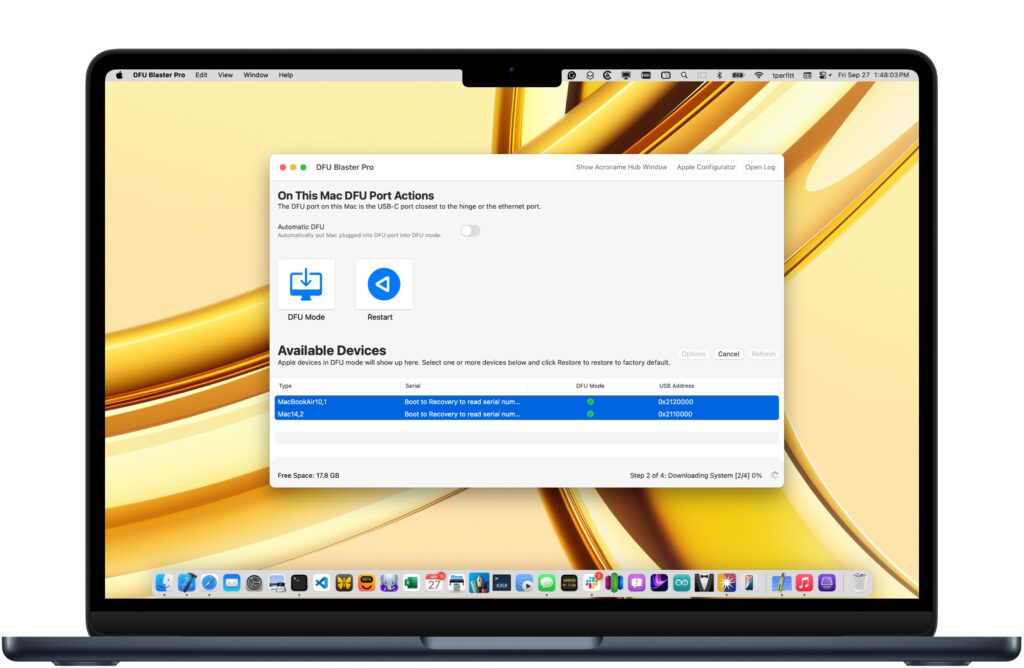
Download "DFU Blaster Pro" from here:

It runs in "free mode" and "pay for" mode.
DON'T pay for it "up front" -- just try the free mode first.
That may be all you need.

You install DFU Blaster on the "good Mac", connect it to the one that needs to go into DFU mode, and then try things that way...
 
  • Like
Reactions: md2433
Still not going and Thank You All so much! It’s in the hutch for parts now! Merry Christmas to All
 
  • Like
Reactions: macaddiict
Did you come across this? Some people in the comments claim it is SSD failure, others say it boots immediately if you just plug in a Mac OS X-compatible USB C to Ethernet adapter.

If you're patient, the guy said his laptop has been like this since day 1 purchased new, if you click Try Again enough times it boots in this video (but it sounds like it takes 15+ minutes)...

 
Last edited:
I'm going to give it a go. This is just what it's doing. I'll just keep hitting try again. Thank You
 
Just to let you know I did try fifteen times "try again" without success. I THANK YOU ALL and now it's time to put it away for the key caps that will be needed in the future. My Bride writes books and LOVES the keyboard on the MBP's and MacBook from 2017 "MacBook" with the 2018/2019 MBP's. This 2018 is in Fantastic shape with body and keyboard. I only paid $90 for it so I have tried as much as I can. Love and Blessings To All. Merry Christmas and A Very Merry New Year.
 
  • Like
Reactions: macaddiict
Register on MacRumors! This sidebar will go away, and you'll see fewer ads.