Become a MacRumors Supporter for $50/year with no ads, ability to filter front page stories, and private forums.

AlanTheBrit

macrumors member
Original poster
Apr 13, 2007
46
0
Runcorn, Merseyside UK
ONE VERY IMPORTANT POINT: The default cooling-fans "kick-in" temperature is set (by Apple) WAY TOO HIGH! (at least in my 24" Core 2 Duo 2.8GHz Extreme(X7900)): I implore you to:

Download 1) Temperature Monitor 4.2 and 2) smcfancontrol_2_1_2: I HALVED the excessive heat in my 24" using these excellent tools! My PSU was running at 84 degrees Centigrade before; and is now at 45 degrees Centigrade (with the same usage conditions).

Run Temperature Monitor 1st - and be very scared!

Now run smcfancontrol; set its sliders to mid-point and relax...
 
I think the 190° F my Mac mini was running was much worse. -_-

I try to keep it under 160° F at full load now using SMCFanControl.
 
I think the 190° F my Mac mini was running was much worse. -_-

I try to keep it under 160° F at full load now using SMCFanControl.


The core duo cpu is designed to go to 194F (90c) then power down to stay at that temp or below. Heat is not an issue. If it ever got too hot it would power down completely before melting. Todays cpus will never melt down.

I used to freak about temps too but now I just realize its the design speck and is perfectly normal.
 
I think the 190° F my Mac mini was running was much worse. -_-

I try to keep it under 160° F at full load now using SMCFanControl.

I think Apple (from admirably stylistic motives; want the new iMac to be even "cooler" than the previous iteration; even if it means running it at (medium-long term ruinous temperatures). I simply can't afford to replace this beautiful beast in 2 to 3 years time!

It IS VERY beautiful - no thicker from front to back than most display-ONLY screens...

I'm still groaning with desire at the mere sight of my glorious antidote to brutal human stupidity.

Well...
 
Hmm, I wonder if this could be an issue with the 2.8GHz or if it's an issue with certain machines only. Because I have normal readings on this 2.4Ghz, even after hours of heavy load both on the CPU and the GPU.

The power supply is normally between 50-60 celcius, and I don't think thats something to worry about. The CPU cores vary between 35 and 60 degrees while the gpu is usually about 50-60 degrees.

Do you have a badly ventilated hot room or something? I would return it if I got that high temperatures under normal conditions.
 
If that was really a problem, why do they put vents kick in at a temperature so high?
 
The core duo cpu is designed to go to 194F (90c) then power down to stay at that temp or below. Heat is not an issue. If it ever got too hot it would power down completely before melting. Todays cpus will never melt down.

I used to freak about temps too but now I just realize its the design speck and is perfectly normal.

Point taken; but, nevertheless, cooler IS cooler!

Something that's close to 212 degrees Farenheit (BOILING POINT!) is plain frightening... I'll keep using Fan Control... :))
 
The core duo cpu is designed to go to 194F (90c) then power down to stay at that temp or below. Heat is not an issue. If it ever got too hot it would power down completely before melting. Todays cpus will never melt down.

I used to freak about temps too but now I just realize its the design speck and is perfectly normal.
To the best of my knowledge it's 100° C (212° F) for the Core Duo.

I understand that it wasn't in any sort of danger but I didn't want it running that hot.
 
Hmm, I wonder if this could be an issue with the 2.8GHz or if it's an issue with certain machines only. Because I have normal readings on this 2.4Ghz, even after hours of heavy load both on the CPU and the GPU.

The power supply is normally between 50-60 celcius, and I don't think thats something to worry about. The CPU cores vary between 35 and 60 degrees while the gpu is usually about 50-60 degrees.

Do you have a badly ventilated hot room or something? I would return it if I got that high temperatures under normal conditions.

"Temperature Monitor 4.2" monitors ALL temperature zones! I.e., HD; Optical Drive; PSU etc. In the UK (currently), and in my room, the temperature is 24 degrees Fahrenheit...

Not just the CPU. ALL zones were at very high temperatures...
 
To the best of my knowledge it's 100° C (212° F) for the Core Duo.

I understand that it wasn't in any sort of danger but I didn't want it running that hot.

Actually no. The processor is made to shut down at 125c. I think that the thermal settings are governed by apple though. So at 90c it slows down and fans turn on high speed. Mine never went past 89c so that is my theory. The cpu for sure will shut down at 125c though. Check it.


Intel design spec for core duo
 
Actually no. The processor is made to shut down at 125c. I think that the thermal settings are governed by apple though. So at 90c it slows down and fans turn on high speed. Mine never went past 89c so that is my theory. The cpu for sure will shut down at 125c though. Check it.


Intel design spec for core duo

125 Centigrade is classed as a CATASTROPHIC temperature (in Intel's PDF)...
 
125 Centigrade is classed as a CATASTROPHIC temperature (in Intel's PDF)...

Lest we forget...

The present iMac is a superb tribute to the efforts of thousands of mega-intelligent and dedicated people. It's something that will remain immortal as a peak human achievement of the early 21st century.

- Unlike the Iraq disaster... "Living With War" is Neil Young's (humble UK male's personal opinion - somewhat off-topic) masterpiece on that grim subject.

If only all wars could be fought via virtual reality...
 
iStat Pro Readings

24" Aluminum iMac (2.4GHz) after seven hours of mixed use (Mail/Safari/iTunes/Keynote/Numbers/Xcode):

CPU A: 39-41C
GPU: 55-57C
GPU Diode: 55-57C
GPU Heatsink: 52-54C
Ambient: 23-24C
Memory Controller: 46-48C
HD Bay 1: 51-52C
Optical Drive: 41-45C
WDC WD3200AAJS: 51-52C
 
Lest we forget...

The present iMac is a superb tribute to the efforts of thousands of mega-intelligent and dedicated people. It's something that will remain immortal as a peak human achievement of the early 21st century.

- Unlike the Iraq disaster... "Living With War" is Neil Young's (humble UK male's personal opinion - somewhat off-topic) masterpiece on that grim subject.

If only all wars could be fought via virtual reality...

Aside from the Iraq sidebar (*cough* inappropriate political handgrenade *cough*)....

Are the new iMacs warm/hot? Maybe. Warm to me might be hot to you. But specs don't lie and unless the fine folks at Apple are smoking crack, I HAVE to assume their technicians and engineers took the design specs and made them match the tech specs. Anything less would mean a meltdown (thank yew) for their PR department.

That said....is running iStat and changing the fan kick-in points a bad thing? Nope, I'd say not at all. Unnecessary, but not bad.

Now...on to more important things....like why isn't my new iMac listed as 'prepared for shipping'? Someone get those workers BACK to work making my new (and first) iMac!!! ;)

JimmyD (HALO MacAddict due to my iPhone)
:apple::apple::apple::apple:
 
Are the new iMacs warm/hot? Maybe. Warm to me might be hot to you. But specs don't lie and unless the fine folks at Apple are smoking crack, I HAVE to assume their technicians and engineers took the design specs and made them match the tech specs. Anything less would mean a meltdown (thank yew) for their PR department.

That said....is running iStat and changing the fan kick-in points a bad thing? Nope, I'd say not at all. Unnecessary, but not bad.


JimmyD (HALO MacAddict due to my iPhone)
:apple::apple::apple::apple:

Note: I've looked into this further and my iMac 2.8GHz temperatures were grossly high compared to the norm. Note also, Apple from time to time issue "fan-fixes" for other Macs.
 
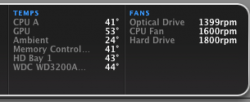
I've got the SMC fan controller running just slightly, here's what I am getting. It brought down the HDD temp a bit it seems, but I am worried about fan noise and wearing out the fans prematurely. I am not totally sure the computer needs the extra cooling yet.
 

Attachments

  • Picture 1.png
    Picture 1.png
    16 KB · Views: 3,766
I was in the Apple stor late on Friday and touched the iMacs and they were pretty cool considering they would have been on and used all day. Wonder what their setting is at?
 
I've got the SMC fan controller running just slightly, here's what I am getting. It brought down the HDD temp a bit it seems, but I am worried about fan noise and wearing out the fans prematurely. I am not totally sure the computer needs the extra cooling yet.
I fail to see how you'd be greatly increasing the mean time before failure before you replace the computer.

Fan noise is a byproduct of running the fans at a higher speed. You can either deal with it or clock the fans back down and deal with the heat.
 
I fail to see how you'd be greatly increasing the mean time before failure before you replace the computer.

Fan noise is a byproduct of running the fans at a higher speed. You can either deal with it or clock the fans back down and deal with the heat.

Doubling the RPM would double the wear and tear, I presume. If a fan only has a certain amount of hypothetical revolutions, I would hate to have a bearing seize inside an iMac and not know about it.
 
Register on MacRumors! This sidebar will go away, and you'll see fewer ads.