Hi everyone,
I am writing on behalf of my wife. We both have a macbook pro 13" (no retina) and yesterday we did the software update.
My photos app works perfectly fine, it's snappier and I had no problems at all. I only have one library with not that many pictures.
My wife instead had 2 libraries (one was practically empty) and when she initially installed photos the software asked her to choose a library and she chose the wrong one (the empty one). By closing photos and opening it again with the option key pressed she chose the correct library which is around 60gb of data.
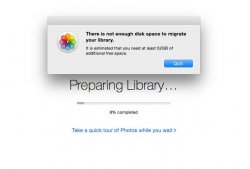
She only has 17Gb Hard Drive space. It took all night with the status "Preparing Library" and when it got to 8% an error message appeared saying "There is not enough space to migrate your library, it is estimated that you need at least 52Gb of additional free space".
I thought photos.app didn't take up any space but simply used your iphoto library.
I want to mention that before the update her iphoto app was annoyingly slow. It was laggy and to open the app she had to wait at least 3 minutes. Then if she moved her mouse inside the iPhoto app the spinning wheel would start again for another 4-5 minutes...
Can anyone help us fix this issue?
Thanks in advance.
I am writing on behalf of my wife. We both have a macbook pro 13" (no retina) and yesterday we did the software update.
My photos app works perfectly fine, it's snappier and I had no problems at all. I only have one library with not that many pictures.
My wife instead had 2 libraries (one was practically empty) and when she initially installed photos the software asked her to choose a library and she chose the wrong one (the empty one). By closing photos and opening it again with the option key pressed she chose the correct library which is around 60gb of data.
She only has 17Gb Hard Drive space. It took all night with the status "Preparing Library" and when it got to 8% an error message appeared saying "There is not enough space to migrate your library, it is estimated that you need at least 52Gb of additional free space".
I thought photos.app didn't take up any space but simply used your iphoto library.
I want to mention that before the update her iphoto app was annoyingly slow. It was laggy and to open the app she had to wait at least 3 minutes. Then if she moved her mouse inside the iPhoto app the spinning wheel would start again for another 4-5 minutes...
Can anyone help us fix this issue?
Thanks in advance.