Become a MacRumors Supporter for $50/year with no ads, ability to filter front page stories, and private forums.

MacRumors

macrumors bot
Original poster
Apr 12, 2001
70,402
42,035


In case you missed it: Spotify has been rolling out a new built-in playlist-transfer feature for its mobile app, so now you can import playlists from other streaming services directly, without the need for third-party tools.
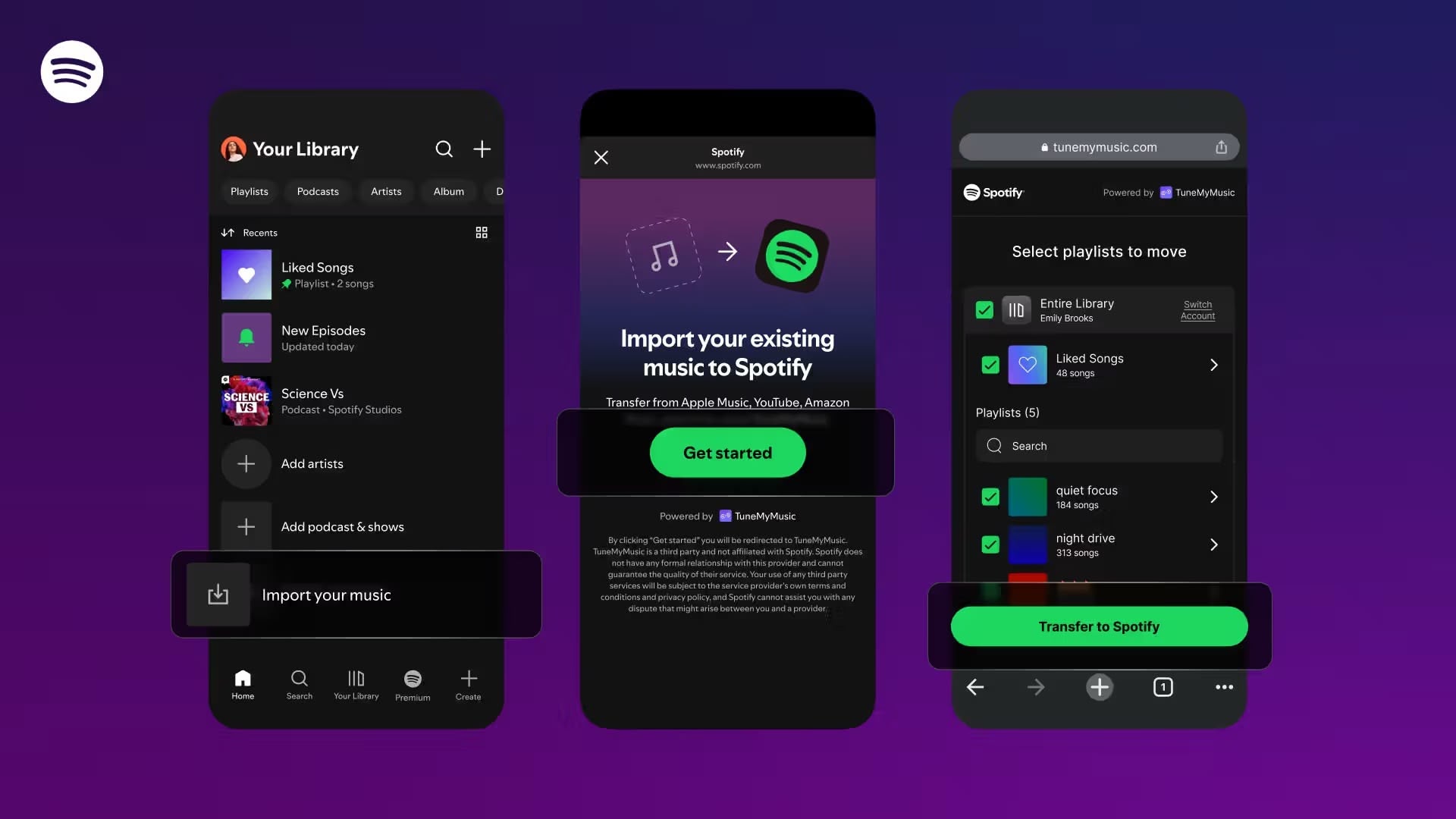
How-To-Spotify-Playlists-Transfer.jpeg

Announced by the company a week ago, the feature is powered by TuneMyMusic, and it supports all the major services including Apple Music, Amazon Music, SoundCloud, TIDAL, Pandora, and Deezer. Spotify said the tool would roll out to all users "over the coming days."

You should be able to find the new tool in the "Your Library" section of the Spotify app – swipe to the bottom of the list, then tap on the new option to "Import your music" and follow the prompts to connect with the service.

You can then choose the platform you'd like to transfer playlists from. Missing tracks can still happen when services' catalogs don't align, but for most users the process now takes only a few taps.

The rollout removes one of the biggest barriers to switching platforms. Until now, users had to rebuild playlists manually or rely on third-party apps to do so. It's a nice bonus too, since the online version of TuneMyMusic only lets you transfer 500 tracks for free – unlimited transfers require a paid plan.

Apple Music rolled out its own transfer tool globally in September, allowing users to import their playlists and libraries from competing services.

Article Link: New Spotify Feature Lets You Transfer Playlists From Other Services
 
  • Like
Reactions: Marcpek
Sorry, best we can do is more Joe Rogan and audiobooks. "App fairness" is a one-way street, so we feel Apple should "just" adopt Spotify Connect support in their speakers.

Love, Spotify.
Even just the ability to chromecast apple music from an iPhone/iPad/mac etc. I can chromecast apple music from an android but not my iPhone :(
 
I still don't see a way to transfer playlists from Spotify to Apple Music, I know Apple has a support doc for it but I haven't seen that option, anyone else have that issue?
 
I still don't see a way to transfer playlists from Spotify to Apple Music, I know Apple has a support doc for it but I haven't seen that option, anyone else have that issue?
I see the option on my iPhone. It's in Settings > Apps > Music > Transfer Music from Other Services.
 
  • Like
Reactions: p.willis
Is this a way to justify their price increase? Apple doesn’t increase prices for iMusic.
What's iMusic? Do you mean Apple Music?


Did you mean Apple TV?


because I cannot think of any Apple service that starts with i.

No. Wait. There is iCloud.


  • Love
Reactions: _Mitchan1999
Great to see this. Should make it much easier if one decides to switch services. Currently not planning to do any switching and I am very satisfied with my Apple Music subscription.
 
  • Like
Reactions: p.willis and mganu
Switching away from Spotify was easy and worthwhile.
Almost seamless transfer of 99% of my playlists. 20000 tracks.
No longer do Spotify, who long promise features, get my money. :)
 
Spotify is the best music player app, just for the equalizer alone. Everything always sounds (and looks) better on Spotify.🤷🏻‍♂️
Having said that I wish there were a way to turn off all curated content from all music apps. I just want to enjoy my library.
 
  • Haha
Reactions: p.willis
That's nice. Now fix your garbage recommendation system.

I ended up switching away because despite never having listened to a podcast, and not having any intention of starting to, my Spotify landing page in CarPlay would make me scroll past literally 5 pages of podcast recommendations to reach any actual music. After months of having to do this every single time I wanted to listen to music in the car and hoping they would either redesign the page layout, or give me the option of saying “I don’t listen podcasts” or something, I eventually gave up and left.
 
  • Like
Reactions: p.willis
Register on MacRumors! This sidebar will go away, and you'll see fewer ads.