

Become a MacRumors Supporter for $50/year with no ads, ability to filter front page stories, and private forums.

vpasq

macrumors newbie
Original poster
Dec 4, 2015
12
0
I installed macOS Sierra no problem and all seems to be working well except I don't show any option to select my Apple Watch for logging in my Mac in the Security & Privacy Settings. I have gone through all the steps in how to set up this feature (and yes two-factor authentication is enabled on all devices/Mac) but the option to activate the feature that is supposed to be showing in preferences is missing.

Anyone know WHY? (and am I the only one) Here is what mine looks like (with the missing feature for the apple watch selection)
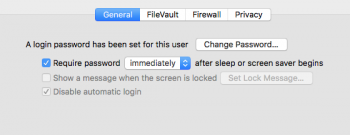
Screen Shot 2016-09-20 at 2.49.04 PM.png
 
What year is your Mac?

It only works on 2013 or later Macs.
[doublepost=1474398396][/doublepost]Wow, missed that! Mine is Mid-2012 (darn). I guess I am beginning to feel the cloud of it getting older. However, it runs like brand new with an SSD, plenty of RAM and does all I need (except unlock with my AW - (smile). Thanks for clarifying that for me.
 
Do you have two-factor authentication set up? That might be a prereq.

Otherwise, maybe the Merged Auto Unlock thread has some answers for you.
 
Do you have two-factor authentication set up? That might be a prereq.

Otherwise, maybe the Merged Auto Unlock thread has some answers for you.

Yup, the tick box was there and made me turn off 2 step verification and turn on 2 factor, which I did. As soon as I did so the whole option is missing. I'm quite pissed off at apple right now.

And yeah, I've looked over that WHOLE thread and nothing is working.
 
Yup, the tick box was there and made me turn off 2 step verification and turn on 2 factor, which I did. As soon as I did so the whole option is missing. I'm quite pissed off at apple right now.

And yeah, I've looked over that WHOLE thread and nothing is working.

Does your iMac have a wireless AC card? It must be Wireless AC and not Wireless N because that's how the watch detects the range from the computer.
 
Does your iMac have a wireless AC card? It must be Wireless AC and not Wireless N because that's how the watch detects the range from the computer.

Yes it does. I have a late 2013 iMac which meets the standards.

Okay, I've got it figured out. I had to unpair the watch from my phone, then repair it. NOW it works.
 
Last edited:
Register on MacRumors! This sidebar will go away, and you'll see fewer ads.