Become a MacRumors Supporter for $50/year with no ads, ability to filter front page stories, and private forums.

richwoodrocket

macrumors 68020
Original poster
Apr 7, 2014
2,133
112
Buffalo, NY
These past few days I've been getting numerous SMS messages failing to send, and my phone saying no service. It's happening at home where I've never had any problems until now. Randomly every few hours to every few minutes my phone will say no service. Messages fail to send and can't make calls. It's getting really annoying, and I don't know what's causing this all of a sudden. In not in an area of low signal either, because I always have LTE and 3+ dots (not that those mean anything). I've tried airplane mode on and off and that hasn't fixed it. Usually once I get no service it stays like hay for a few minutes, searches, the comes back on. Very odd. I'm on AT&T by the way.
 
Have you tried resetting your network settings, soft reboot, or restoring it? As someone mentioned above. The issue could be with the SIM card. I've had the SIM card replaced in my 5S already for similar issues. No problems with it since then. AT&T will replace it free of charge for you if you take it into one of their stores. I believe Apple can replace your SIM card as well if their store is closer to you.
 
These past few days I've been getting numerous SMS messages failing to send, and my phone saying no service. It's happening at home where I've never had any problems until now. Randomly every few hours to every few minutes my phone will say no service. Messages fail to send and can't make calls. It's getting really annoying, and I don't know what's causing this all of a sudden. In not in an area of low signal either, because I always have LTE and 3+ dots (not that those mean anything). I've tried airplane mode on and off and that hasn't fixed it. Usually once I get no service it stays like hay for a few minutes, searches, the comes back on. Very odd. I'm on AT&T by the way.

This might sound random, but, have you been on a plane recently?
 
I noticed that I didn't have any of these problems when I went to my grandmas, 15 miles away, although that may have been because I didn't use my phone too much thus not noticing it.
 
I haven't done a reset network settings. I don't want to lose my wifi passwords.

If you aren't going to call the carrier or do basic steps to resolve the issue then what else is there to discuss? Two common first steps are to reset the phone and call the carrier.

You should also try resetting the network settings. To your comment above you may create an encrypted backup in iTunes which preserves your passwords, reset network settings, test, and restore your phone. That's a lot of work to avoid reentering passwords.
 
one detail you fail to mention. exactly what version of iOS are you running.


7.1.2 sorry.

----------

If you aren't going to call the carrier or do basic steps to resolve the issue then what else is there to discuss? Two common first steps are to reset the phone and call the carrier.


You should also try resetting the network settings. To your comment above you may create an encrypted backup in iTunes which preserves your passwords, reset network settings, test, and restore your phone. That's a lot of work to avoid reentering passwords.


I have them in iCloud Keychain, will they remain in iCloud if I do a reset?
 
I have them in iCloud Keychain, will they remain in iCloud if I do a reset?

iCloud Keychain currently only holds safari passwords for sites that allow the password to be saved in such a way (banks for example don't) so don't count on it to have your passwords even in safari much less anything else. The whole idea is great but it's far from prime time.
 
iCloud Keychain currently only holds safari passwords for sites that allow the password to be saved in such a way (banks for example don't) so don't count on it to have your passwords even in safari much less anything else. The whole idea is great but it's far from prime time.


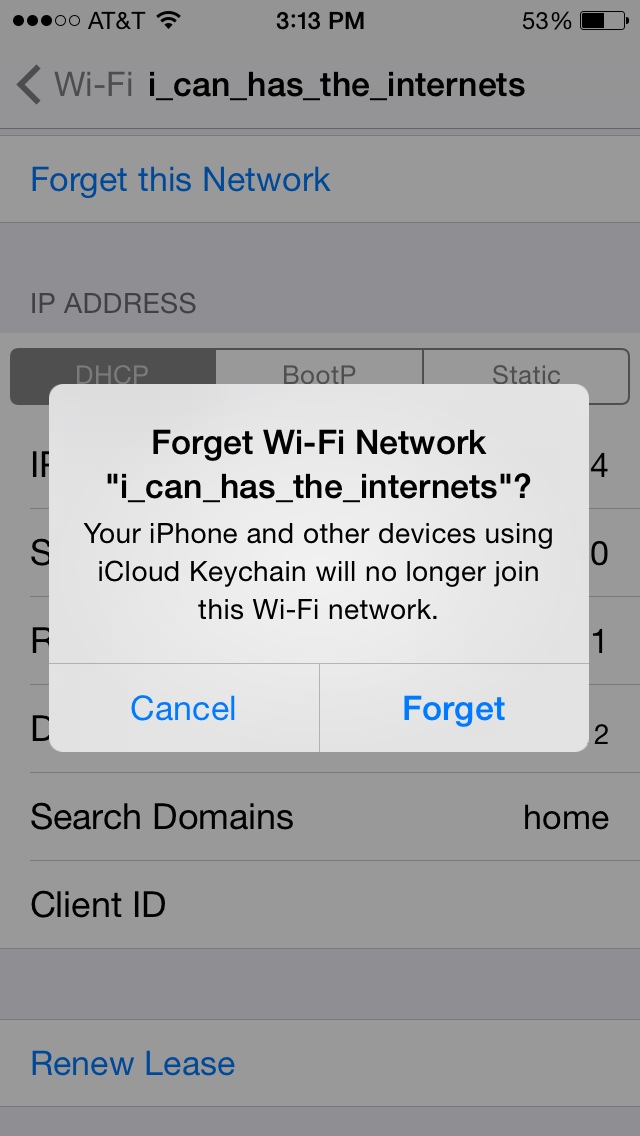
It stores wifi passwords too...
qOzZa1l.jpg


I think that my problem has gone away since I haven't seen no service or had a text fail to send today.
 
It stores wifi passwords too... Image

I think that my problem has gone away since I haven't seen no service or had a text fail to send today.

I have an idea! Sign out of iCloud on your phone, then erase the network settings.

That way it won't delete it off your account, only local, then you can sign back in.
 
Register on MacRumors! This sidebar will go away, and you'll see fewer ads.