Become a MacRumors Supporter for $50/year with no ads, ability to filter front page stories, and private forums.

Polydactyl

macrumors member
Original poster
Oct 25, 2009
90
25
I'm looking at different ways to lock/unlock my Mac. I've been using a program called Proximity to detect my iPhone via Bluetooth and lock/unlock when the phone moves in and out of BT range. Unfortunately, the unlock requires an Applescript file with the password stored in plain text.

What else is there? I've found a few things (LemonKey, Airlock), but nothing that works as advertised or without some kind of fatal flaw. I'm thinking along the lines of:

Facial recognition
USB token
Fingerprint reader
Bluetooth (a la Proximity)

No major requirement for this...I've just had it with passwords.
 
You could try saving the applescript as run only. That way there is no way to access the underlying code containing the password.
 
Jolly Jimmy: I didn't see a way to do this through the GUI. Are you referring to the CHMOD?

Miles: Interesting. Any first hand experience with this?
 
Jolly Jimmy: I didn't see a way to do this through the GUI. Are you referring to the CHMOD?

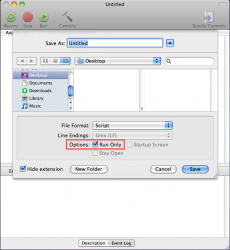
When saving the applescript tick the "Run Only" box.
 

Attachments

  • Screen shot 2011-04-25 at 01.06.05 PM.png
    Screen shot 2011-04-25 at 01.06.05 PM.png
    92.7 KB · Views: 84
When saving the applescript tick the "Run Only" box.

Doh! I used CHMOD to change permissions to execute only but that didn't work. Your solution was obviously much simpler and works nicely. Thanks.

BTW, is there any way to turn off run only if I ever need to change the script?
 
Good thing I'm a firm believer in backups!

Edit: Actually, I just figured out I could still open the script in textedit. Most of it came up as gobbledygook, but there was my password in plain text! Used CHMOD to make it read only, only to me. Still bugs me a little bit, but slightly more secure than before (but still less secure than just not having my password contained in any file.)
 
Last edited:
Actually they fixed having to put your password in plain text http://hints.macworld.com/article.php?story=20091221173111783

My problem now is when I close my Macbook Pro and I have my iPhone connected, if I leave you can just open it and it won't ask for the password until it realizes you're gone and close the mac again, is there a way to fix this? The whole point I use a password is in case it gets stolen but with this bug the thief could just open my mac and never close it again and he'll never have to enter the password.
 
Fingerprint-based security is fundamentally flawed. It is trivial to lift your fingerprint off on anything you have touched [notably your keyboard or monitor], and then use this to spoof the fingerprint reader.

See this Mythbusters segment.

Josh

It is no more or less flawed than any other authentication method against a determined attacker. Also, Mythbusters should not be used to support any argument. It is entertainment, not science.
 
It is no more or less flawed than any other authentication method against a determined attacker. Also, Mythbusters should not be used to support any argument. It is entertainment, not science.

Mythbusters episode shown as an example of spoofing, simply because it was convenient. The result has been replicated see http://www.washjeff.edu/users/ahollandminkley/Biometric/index.html, http://stdot.com/pub/ffs_article_asten_akaseva.pdf and many others findable via Google.

If you want to be truly secure, you need to have good physical security, all data encrypted [e.g. using FileVault] and some kind of two-factor authentication - requiring at least two of the following to allow login and decrypt data:

  • Something you know (e.g. a password)
  • Something you have (e.g. a token)
  • Something you are (e.g. some biometric info)
Password and token work pretty well [this is what we do at my work]. Most biometric info fails because it is easily copied: We leave fingerprints on everything we touch, a photograph can be used to spoof facial recognition, an audio recording can spoof voice recognition, etc...
 
Register on MacRumors! This sidebar will go away, and you'll see fewer ads.