

Got a tip for us?
Let us know
Become a MacRumors Supporter for $50/year with no ads, ability to filter front page stories, and private forums.
Not using my laptop for 6 months. Should I leave it plugged in?
- Thread starter madoka
- Start date
- Sort by reaction score
You are using an out of date browser. It may not display this or other websites correctly.
You should upgrade or use an alternative browser.
You should upgrade or use an alternative browser.


Plugged in. Use the app AlDente to keep your battery properly set while you are away. You can use the free version if you like.
https://apphousekitchen.com/ Excellent app.
https://apphousekitchen.com/ Excellent app.

Charge/discharge it to 50%, turn it off, and unplug it.
From Apple:

From Apple:
Store it half-charged when you store it long term.
If you want to store your device long term, two key factors will affect the overall health of your battery: the environmental temperature and the percentage of charge on the battery when it’s powered down for storage. Therefore, we recommend the following:
Depending on how long you store your device, it may be in a low-battery state when you remove it from long-term storage. After it’s removed from storage, it may require 20 minutes of charging with the original adapter before you can use it.
- Do not fully charge or fully discharge your device’s battery — charge it to around 50%. If you store a device when its battery is fully discharged, the battery could fall into a deep discharge state, which renders it incapable of holding a charge. Conversely, if you store it fully charged for an extended period of time, the battery may lose some capacity, leading to shorter battery life.
- Power down the device to avoid additional battery use.
- Place your device in a cool, moisture-free environment that’s less than 90° F (32° C).
- If you plan to store your device for longer than six months, charge it to 50% every six months.
Batteries - Maximizing Performance
Maximize the life and lifespan of the rechargeable lithium-ion batteries in your MacBook, iPod, iPhone, and iPad.
www.apple.com
Let the battery 50-70% and turn it OFF.I am leaving my Macbook Air in another country and will be gone for six months. Should I leave it plugged in or let the battery drain out?
IMO, plugging in a device for months without anyone close to watch over it is big no.


This. I would also make sure it is properly off and not just closed lid / sleeping.I would charge to 70-80% and unplug it.
I would go with Apple's official recommendation here.Charge/discharge it to 50%, turn it off, and unplug it.
From Apple:
Batteries - Maximizing Performance
Maximize the life and lifespan of the rechargeable lithium-ion batteries in your MacBook, iPod, iPhone, and iPad.www.apple.com

I do that with my old iPhone 7, and if I’m planning to be away and not use my Mac during an all day trip.Charge/discharge it to 50%, turn it off, and unplug it.
From Apple:
Batteries - Maximizing Performance
Maximize the life and lifespan of the rechargeable lithium-ion batteries in your MacBook, iPod, iPhone, and iPad.www.apple.com
Except I leave it clamshelled when travelling to still be able to track my MacBook Pro with find my.
Especially if you plan on leaving it at home and not bringing it for a tripLet the battery 50-70% and turn it OFF.
IMO, plugging in a device for months without anyone close to watch over it is big no.

If you unplug it, the battery will discharge below the safe voltage within a few weeks. This means permanent capacity damage to the battery. Don't do that. Plenty of stories of such cases.
Your best bet is to keep it plugged in. But the week before, work it such that it stays on Charging On Hold. You do that by keeping the Mac on the charger during the daytime, then shutting it down and unplugging at night. The next morning, boot the computer, then connect the charger. After about a week later, macOS will go to Charging On Hold.
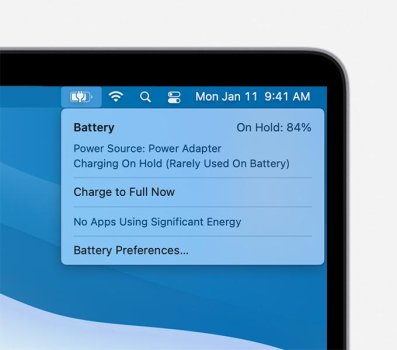
Your best bet is to keep it plugged in. But the week before, work it such that it stays on Charging On Hold. You do that by keeping the Mac on the charger during the daytime, then shutting it down and unplugging at night. The next morning, boot the computer, then connect the charger. After about a week later, macOS will go to Charging On Hold.
To those recommending this guy keep his laptop plugged in for 6 months.. LOL WHAT?
To those recommending this guy keep his laptop plugged in for 6 months.. LOL WHAT?
My M1 MBA was plugged in for 4 years and battery health was 100% when I sold it this summer. It's all about Charging on Hold.
For this long ❌ SHUT THE MBA down instead.To those recommending this guy keep his laptop plugged in for 6 months.. LOL WHAT?
If it’s still being used but you’re using external display it’s ok to leave it plugged in.
I shut down my Mac and unplug it if I was going on a long term trip and not going to bring it with me!
Sure, but you didn’t leave it unused and unattended for 4 years, right?My M1 MBA was plugged in for 4 years and battery health was 100% when I sold it this summer. It's all about Charging on Hold.
If charged to 80% and then turned off for six months, I would predict after six months the battery would be 40-50%.

@madoka this is your best suggestion for a set-and-forget solution. I'be been using the paid "Pro" version for 2 1/2 yrs and it's been flawless. The free version will do exactly that, for your purpose and to extend the longevity of your battery.Plugged in. Use the app AlDente to keep your battery properly set while you are away. You can use the free version if you like.
https://apphousekitchen.com/ Excellent app.
Register on MacRumors! This sidebar will go away, and you'll see fewer ads.