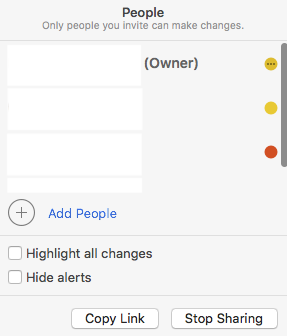
hehe299792458 macrumors 6502a Original poster Dec 13, 2008 783 3 Jul 2, 2018 #1 I created a share note within the Notes app. I shared it with 4 people. Next to each person's name, there's a round color indicator. Two oranges and one red. What do those dots mean? Attachments Screen Shot 2018-06-25 at 10.45.05 PM.png 21.8 KB · Views: 93
I created a share note within the Notes app. I shared it with 4 people. Next to each person's name, there's a round color indicator. Two oranges and one red. What do those dots mean?
cobracnvt macrumors 6502 Apr 6, 2017 285 122 Jul 2, 2018 #2 Does that signify what edits each person makes to the note?
hehe299792458 macrumors 6502a Original poster Dec 13, 2008 783 3 Jul 3, 2018 #3 cobracnvt said: Does that signify what edits each person makes to the note? Click to expand... cobracnvt said: Does that signify what edits each person makes to the note? Click to expand... I don’t think so, since multiple people share the same color
cobracnvt said: Does that signify what edits each person makes to the note? Click to expand... cobracnvt said: Does that signify what edits each person makes to the note? Click to expand... I don’t think so, since multiple people share the same color
cobracnvt macrumors 6502 Apr 6, 2017 285 122 Jul 3, 2018 #4 I think those orange colors are slightly different. Turn on "highlight all changes" and test it.