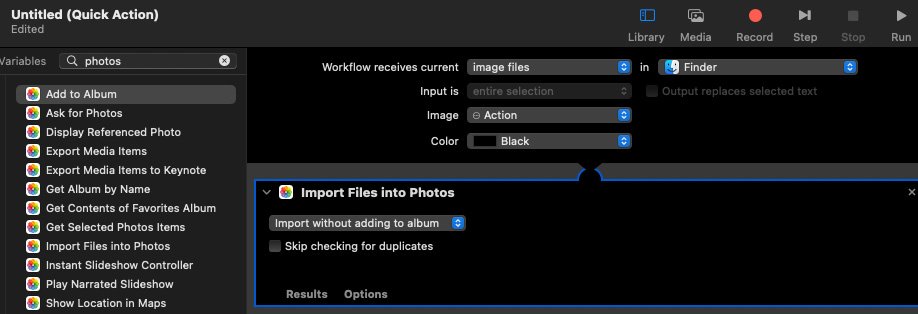
This seems to be a long-term quirk with MacOS, and seems to me a considerable oversight -
Say you have taken a photo or a photo has been sent to you and that you have placed in Downloads or on your desktop. Now say you want to do some basic photo manipulation, or simply want to view it and then add it to an existing album you have already created. You right-click the file, and click 'Open With...'
Now, 'Preview' is there - okay for basic photo tweaks, and there's going to be a list of probably any 3rd Party photo app you installed on your Mac as well as your browsers, but bizarrely, Apple's own built-in 'Photos' app is not there. For that, you need to go to the bottom of the list (past App Store) to Other, click there, and then in Applications scroll down and find Photos.
Click that and (modified 'Voila!') your photo opens in the app for your manipulation and/or moving to an Album you have created with Photos.
Apple does know it has that app in the OS, right?
I mean, I only use Photos for some image tweaking - I never keep my pics inside an album on proprietary software that can change / disappear without warning - and this does certainly underline this decision - but why not include your own app in 'Open With...'?
Say you have taken a photo or a photo has been sent to you and that you have placed in Downloads or on your desktop. Now say you want to do some basic photo manipulation, or simply want to view it and then add it to an existing album you have already created. You right-click the file, and click 'Open With...'
Now, 'Preview' is there - okay for basic photo tweaks, and there's going to be a list of probably any 3rd Party photo app you installed on your Mac as well as your browsers, but bizarrely, Apple's own built-in 'Photos' app is not there. For that, you need to go to the bottom of the list (past App Store) to Other, click there, and then in Applications scroll down and find Photos.
Click that and (modified 'Voila!') your photo opens in the app for your manipulation and/or moving to an Album you have created with Photos.
Apple does know it has that app in the OS, right?
I mean, I only use Photos for some image tweaking - I never keep my pics inside an album on proprietary software that can change / disappear without warning - and this does certainly underline this decision - but why not include your own app in 'Open With...'?