I'm going to wait to see what the Mac mini 5 new features are but I might replace my Studio with an M5 Studio. This would make for some nice, fast storage.



Got a tip for us?
Let us know
Become a MacRumors Supporter for $50/year with no ads, ability to filter front page stories, and private forums.
OWC announces 1M2 at 80 gbps (I guess it's Thunderbolt 5)
- Thread starter pshufd
- Start date
- Sort by reaction score
You are using an out of date browser. It may not display this or other websites correctly.
You should upgrade or use an alternative browser.
You should upgrade or use an alternative browser.


I don't really get this, as it competes directly with their very own Envoy Ultra, which is also a TB5 drive. Maybe it's just that the 1M2 is more easily user serviceable ie, its an enclosure rather then a complete drive, unlike the Envoy Ultra which comes as a complete 'sealed' unit (even though it can also be easily opened via 4 screws and SSD replaced/upgraded)......
Either way the 1M2 are fantastic drives - I have a couple of 8TB units that I may be tempted to sell in order to upgrade to the faster drives!
I would only get the empty enclosures though - especially if OWC still prefer to use the Aura IV drives, which are from 2022 and starting to show their age a little......stick a 990Pro or a SN850X into these enclosures and they fly!!
Either way the 1M2 are fantastic drives - I have a couple of 8TB units that I may be tempted to sell in order to upgrade to the faster drives!
I would only get the empty enclosures though - especially if OWC still prefer to use the Aura IV drives, which are from 2022 and starting to show their age a little......stick a 990Pro or a SN850X into these enclosures and they fly!!
I don't really get this, as it competes directly with their very own Envoy Ultra, which is also a TB5 drive. Maybe it's just that the 1M2 is more easily user serviceable ie, its an enclosure rather then a complete drive, unlike the Envoy Ultra which comes as a complete 'sealed' unit (even though it can also be easily opened via 4 screws and SSD replaced/upgraded)......
Either way the 1M2 are fantastic drives - I have a couple of 8TB units that I may be tempted to sell in order to upgrade to the faster drives!
I would only get the empty enclosures though - especially if OWC still prefer to use the Aura IV drives, which are from 2022 and starting to show their age a little......stick a 990Pro or a SN850X into these enclosures and they fly!!
I think that OWC has sold a ton of the 1M2 enclosures as they generally get rave reviews at Mac forums that I visit.
They are also really nice if you have, say, an M1 Max Studio with an OWC 1M2 and a Samsung 990 Pro and you upgrade to an M4 Max Studio. If you really want TB5, you can just buy the enclosure and move the 990 Pro from the TB4 enclosure to the TB5 enclosure and then sell or repurpose the TB4 enclosure.
You could make the case that they don't need the Envoy Ultra anymore too, as they usually give you more storage options on the 1M2.
I think that OWC has sold a ton of the 1M2 enclosures as they generally get rave reviews at Mac forums that I visit.
They are also really nice if you have, say, an M1 Max Studio with an OWC 1M2 and a Samsung 990 Pro and you upgrade to an M4 Max Studio. If you really want TB5, you can just buy the enclosure and move the 990 Pro from the TB4 enclosure to the TB5 enclosure and then sell or repurpose the TB4 enclosure.
You could make the case that they don't need the Envoy Ultra anymore too, as they usually give you more storage options on the 1M2.
Fair points.
I guess you could also say the Envoy Ultra is for a slightly different target market - it's a IP67 sealed unit with a 'built-in' cable, so its waterproof and dustproof etc - ie, more hardwearing. Even though the cable and SSD can be replaced if you really wanted to (albeit voiding any warranty in the process considering its not a user serviceable drive). It's also only available up to 4TB in capacity, where the 1M2 goes up to 8TB (as you highlight already).
I currently have 3 of the 1M2 drives.
2 of them came pre-populated with 8TB drives from factory (OWC Aura Pro IV SSDs).
The third I purchased as an empty enclosure and installed a single 8TB SN850x (as you can't get 8TB in the 990 Pro), which provides a little better performance, but not noticeable in actual use TBH.
I'd be tempted to at least pick up the 80Gbps 1M2 enclosure and move that SN850X across to it......

Maybe more for the mobile market where these things will be moved around lot and placed in laptop carrying backs where stuff can get in. Its odd, because we're not talking about a hard drive with spinning platters where dust can cause a head crash. I think its more marketing then anything else. As for the cable its, not soldered into the logic board, its replaceable if the need arises. I watched a teardown and while its unnecessary, its not the end of the world to replace it. My use case is such that it sits on my desk and doesn't move.I guess you could also say the Envoy Ultra is for a slightly different target market - it's a IP67 sealed unit with a 'built-in' cable, so its waterproof and dustproof etc - ie, more hardwearing.
What I found with the Envoy ultra is that it does a great job at shedding the heat, that metal enclosure is an efficient heat sink and it stays fairly cool
When you talk to their tech support they state that own has no thunderbolt 5 enclosures. Just what they tell me
Best external SSD Enclosure available at the moment IMO.
Replaced the drive in mine with a WD SN850x 8TB - and the results are slightly above those in the video. The thing flies!!
Been using it for FCPX editing and I also notice it runs noticeably cooler then the 40Gbps 1M2 - the 40Gbps used to feel hot to the touch, where's the 80Gbps version is barely Luke warm in comparison.
Replaced the drive in mine with a WD SN850x 8TB - and the results are slightly above those in the video. The thing flies!!
Been using it for FCPX editing and I also notice it runs noticeably cooler then the 40Gbps 1M2 - the 40Gbps used to feel hot to the touch, where's the 80Gbps version is barely Luke warm in comparison.
I recently bought one of these for use with a Samsung 990 Pro 4TB and am getting around 6000+ MB/s transfer speed between it and my Mac Mini M4 Pro's internal storage using a rear TB5 port 👍🏻 Very pleased.
The Samsung does test the best IMO, but I wanted a higher capacity so went with the 8TB WD SN850x.
Apparently the WD drives run a bit cooler than the Samsung, and hold longer before any throttling kicks in during really heavy usage. But I doubt you'd notice in day to day usage, unless you're really doing large file transfers.
Attachments
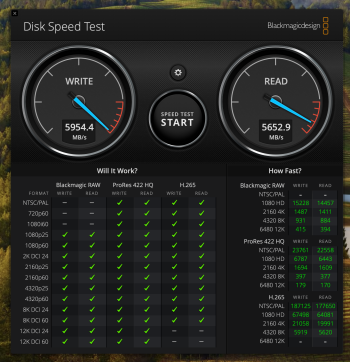

The Samsung does test the best IMO, but I wanted a higher capacity so went with the 8TB WD SN850x.
Apparently the WD drives run a bit cooler than the Samsung, and hold longer before any throttling kicks in during really heavy usage. But I doubt you'd notice in day to day usage, unless you're really doing large file transfers.
Well and this enclosure is definitely built for heat dissipation, so hopefully wouldn't be an issue.
Just passing along what I read in a different place some time back. I was told Thunderbolt 5 certification needs to be given based on the device with the drive inside of it that it will be sold with. Therefore, an enclosure that has TB5 capabilities but is sold without a drive is likely to be labeled USB 4 V2, not TB5, but an enclosure with the drive inside as sold may be labeled TB5.
I'm curious how the SSD temp.s will compare to the Envoy Ultra. The review Ifti linked for us sounds good on thermals.
I'm curious how the SSD temp.s will compare to the Envoy Ultra. The review Ifti linked for us sounds good on thermals.
Just passing along what I read in a different place some time back. I was told Thunderbolt 5 certification needs to be given based on the device with the drive inside of it that it will be sold with. Therefore, an enclosure that has TB5 capabilities but is sold without a drive is likely to be labeled USB 4 V2, not TB5, but an enclosure with the drive inside as sold may be labeled TB5.
I'm curious how the SSD temp.s will compare to the Envoy Ultra. The review Ifti linked for us sounds good on thermals.
Ah that's good to know, thanks!
I rarely measure temps TBH - I like to just go ahead and use the drive in my daily setup (mainly for editing via FCPX). I have had absolutely no issues with the Envoy Ultra or the 1M2.
What I have noticed is my original 1M2's (40Gbps versions) do run hot to the touch - I can put my hand on the top after some editing and exporting, and it physically feels very hot - not caused any issues and no throttling that I have noticed, but enough for me to feel uncomfortable enough put my desk fan on over them for a few minutes at times! This isn't a bad thing - it shows the heatsink is doing its job in drawing heat away from the SSD and dissipating to the outside.
On the flip side, the 1M2 80Gbps as well as the Envoy Ultra hardly heat up at all - was quite surprising - barely warm to the touch after the same use (and that using the same internal drive in the 1M2)......they hardly seem to break a sweat!
For those after more storage, or a RAID solution with multiple SSDs, OWC have also just updated their 4M2 enclosure too. This time round though, the fans only ramp up when needed - unlike the previous version they do not stay on all the time (I've never heard them spin up at all in fact, thanks to the internal heatsink). So this is another great drive - although its a USB4 enclosure at 40Gbps. I would have loved a TB5 version of this drive, but your explanation RE the TB5 certification going on a complete drive solution makes sense - either way, an 80Gbps version of this 4M2 would be great! Hopefully it'll come next!
I mean, look at the size of the internal heatsink in this thing!
Ah that's good to know, thanks!
I rarely measure temps TBH - I like to just go ahead and use the drive in my daily setup (mainly for editing via FCPX). I have had absolutely no issues with the Envoy Ultra or the 1M2.
What I have noticed is my original 1M2's (40Gbps versions) do run hot to the touch - I can put my hand on the top after some editing and exporting, and it physically feels very hot - not caused any issues and no throttling that I have noticed, but enough for me to feel uncomfortable enough put my desk fan on over them for a few minutes at times! This isn't a bad thing - it shows the heatsink is doing its job in drawing heat away from the SSD and dissipating to the outside.
On the flip side, the 1M2 80Gbps as well as the Envoy Ultra hardly heat up at all - was quite surprising - barely warm to the touch after the same use (and that using the same internal drive in the 1M2)......they hardly seem to break a sweat!
For those after more storage, or a RAID solution with multiple SSDs, OWC have also just updated their 4M2 enclosure too. This time round though, the fans only ramp up when needed - unlike the previous version they do not stay on all the time (I've never heard them spin up at all in fact, thanks to the internal heatsink). So this is another great drive - although its a USB4 enclosure at 40Gbps. I would have loved a TB5 version of this drive, but your explanation RE the TB5 certification going on a complete drive solution makes sense - either way, an 80Gbps version of this 4M2 would be great! Hopefully it'll come next!
I mean, look at the size of the internal heatsink in this thing!
My TB4 1M2 gets warm. It has a 990 Pro in it and I wouldn't describe it as getting hot. I do run it in the basement which is cool all-year around and can get down into the 40s (F) in the winter. I also have a cheap enclosure with a 990 EVO Plus and I have an AC fan underneath it but I don't use the drive often. When I do use the drive, I turn the fan on under it and it runs fine. If I don't run the fan, it disconnects after copying about 30 GB. What I like about that enclosure is that it runs at TB3 speeds on my iMac Pro. I tested the 1M2 on my iMac Pro and it runs at USB 3.1 speeds.
I've had the problem with other enclosures that didn't play well with TB3 on Intel Macs. This is more likely an Apple issue.
The enclosure is from Orico and it has an internal fan and a heatsink. What's crazy is that there are no holes in the enclosure. I suspect that the original design was to have holes in the enclosure to draw in cold air and exhaust hot air. But people complained about the fan noise so they fixed that by removing the holes. It's possible that they had the fan as part of the case as well. At any rate, it sounds like a workaround that an engineer designed to fix a problem without being able to do a redesign. I've considered drilling a few holes in it myself.
If you want to know if a product supports your specific hardware configuration, you need to find someone with the same configuration or you buy enclosures, try them out, and return them if they don't work or work as expected. This is the frustrating aspect. I can say that the 1M2 works really well with Apple Silicon hardware though.
That is a really neat device. A few issues to note:For those after more storage, or a RAID solution with multiple SSDs, OWC have also just updated their 4M2 enclosure too.
1.) The version without SoftRAID is roughly $240, but with it roughly $380 direct, and while Apple offers a free Apple RAID option, from what I've read before and hardly recall I got the impression many people would prefer SoftRAID. Still, for an enclosure that can hold 4 SSDs, not bad!
2.) Holding 4 SSDs and with the RAID option, the question which be which RAID version. I think most would opt for RAID 5, so if you use 4 SSDs you effectively get to use 3 with the capacity of 1 sacrificed for 'parity' (redundancy; so if 1 SSD fails, you can replace it without losing any of your data - but if 2 SSDs fail you lose it all).
3.) Which creates a problem. With most RAID arrays, the RAID system treats all discs as though they had the same capacity as the smallest of them. So, if you had 4 discs (SSDs here, but could be HDDs in a different unit), and their capacities were 1 terabyte, 4 terabyte, 4 terabyte and 4 terabyte, the RAID would treat them all as having 1 terabyte of capacity each.
4.) So if you buy this, you need to think about whether you want to start buying 4-terabyte or 8-terabyte SSDs. If you opt for 4 in a RAID 5 array, you're looking at 4x(4-1) = 12 terabytes usable space. Opt for 8 and you get 24 terabytes, but have to pay more up front. Per a quick Search you could start out with 2 drives in a RAID 1, later add another and migrate to a RAID 5, so you don't have to buy 3 or 4 up front.
That is a really neat device. A few issues to note:
1.) The version without SoftRAID is roughly $240, but with it roughly $380 direct, and while Apple offers a free Apple RAID option, from what I've read before and hardly recall I got the impression many people would prefer SoftRAID. Still, for an enclosure that can hold 4 SSDs, not bad!
2.) Holding 4 SSDs and with the RAID option, the question which be which RAID version. I think most would opt for RAID 5, so if you use 4 SSDs you effectively get to use 3 with the capacity of 1 sacrificed for 'parity' (redundancy; so if 1 SSD fails, you can replace it without losing any of your data - but if 2 SSDs fail you lose it all).
3.) Which creates a problem. With most RAID arrays, the RAID system treats all discs as though they had the same capacity as the smallest of them. So, if you had 4 discs (SSDs here, but could be HDDs in a different unit), and their capacities were 1 terabyte, 4 terabyte, 4 terabyte and 4 terabyte, the RAID would treat them all as having 1 terabyte of capacity each.
4.) So if you buy this, you need to think about whether you want to start buying 4-terabyte or 8-terabyte SSDs. If you opt for 4 in a RAID 5 array, you're looking at 4x(4-1) = 12 terabytes usable space. Opt for 8 and you get 24 terabytes, but have to pay more up front. Per a quick Search you could start out with 2 drives in a RAID 1, later add another and migrate to a RAID 5, so you don't have to buy 3 or 4 up front.
Yes that's correct RE price - You need to purchase a license to use SoftRAID - at least for creating and smart monitoring of a RAID array. There is a free version of SoftRAID, but that's more for those who have an array already running and just want to maintain it. I thought it was good for OWC to offer a 'non-license' option to purchase the enclosure, since, as you rightly mention, you can use Apple's own RAID solution, which is completely free, and also works really well. I only use SoftRAID as I already have it from other drives.....
You do not need to run RAID 5 and lose capacity either. I actually run all my enclosures in RAID 0 (striped) so I lose no storage (other then formatting) and get the highest performance, but I also ensure I have a separate backup of the data just in case a drive should fail.
While the enclosure allows drives of varying capacity - RAID arrays do not (unless you're using a hybrid RAID system). That's a limitation with RAID, not with the enclosure, but you could, for instance, have two drives in a RAID array, and the remaining two drives as JBOD units - or have all 4 drives as JBOD and not use RAID at all if you prefer, or even have two RAID 0 arrays mirrored to each other even (0+1)! It's really very flexible, so RAID 5 isn't really the most common option any more, especially for a drive like this....

The 80Gps has more mass and heightAh that's good to know, thanks!
I rarely measure temps TBH - I like to just go ahead and use the drive in my daily setup (mainly for editing via FCPX). I have had absolutely no issues with the Envoy Ultra or the 1M2.
What I have noticed is my original 1M2's (40Gbps versions) do run hot to the touch - I can put my hand on the top after some editing and exporting, and it physically feels very hot - not caused any issues and no throttling that I have noticed, but enough for me to feel uncomfortable enough put my desk fan on over them for a few minutes at times! This isn't a bad thing - it shows the heatsink is doing its job in drawing heat away from the SSD and dissipating to the outside.
On the flip side, the 1M2 80Gbps as well as the Envoy Ultra hardly heat up at all - was quite surprising - barely warm to the touch after the same use (and that using the same internal drive in the 1M2)......they hardly seem to break a sweat!
1M2 40G 5.2" x 2.8" x 0.75" @ 253 grams
1M2 80G 5.2" x 2.8" x 0.9" @ 280 grams
Edit: Updated specs. MacWorld review had the proper height numbers, OWC didn't (to date).
Last edited:
The 80Gps has more mass.
1M2 40G 5.2" x 2.8" x 0.9" @ 253 grams
1M2 80G 5.2" x 2.8" x 0.9" @ 280 grams
It's physically ever so slightly larger too
Replaced the drive in mine with a WD SN850x 8TB - and the results are slightly above those in the video. The thing flies!!
Presumably they identify as USB4 v2 in System Information.

Presumably they identify as USB4 v2 in System Information.
macOS’ identification of these drives confuses me.View attachment 2582684Yes they do.
My Qwiizlab and and Hagibis TB4/USB4 drives get recognized as USB4 drives when connected directly to my M4 Mac mini.
However, if I put a Plugable TB4/USB4 hub in between the drives and Mac mini, they get recognized as TB drives. Furthermore, they draw less power.
However, if instead of that Plugable TB4/USB4 hub, I use an LG 6K monitor with built-in TB5/USB4v2 hub, those drives are recognized as USB4.
I would presume the OWC 80 Gbps has no TB support at all though. The OWC 40 Gbps version didn’t. IIRC, on Intel TB3 systems it would drop down to USB3.
Last edited:

Even TB certified drives will identify as USB4 v2 in system profiler, such as the Envoy Ultra. It's just how Apple chooses to do it.macOS’ identification of these drives confuses me.
Register on MacRumors! This sidebar will go away, and you'll see fewer ads.