

Become a MacRumors Supporter for $50/year with no ads, ability to filter front page stories, and private forums.

dollystereo

macrumors 6502a
Original poster
Oct 6, 2004
908
115
France
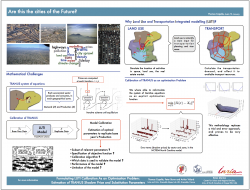
I made a presentation A0 Poster, as I am used to keynote for my presentations I said why not try pages (same interface, same palettes, basically same app).
So, everything was going good, but at the end, when I have my graphics and objects all setup in the file, the applications struggles to work.
Just resizing or moving any object produces constant lag, beach ball. It doesn't crash, but is slow, very slow.
I really like the app, the interface and the possibilities, but maybe it's just for writing plain text and small 1 page files.
I this to much work for such a "toy app"?
Pages 5.2.2 in OS X 10.9.5.
Macbook Pro i7, 8GB ram and 512GB SSD.
 

Attachments

  • poster_austinV1.png
    poster_austinV1.png
    1.4 MB · Views: 181
No one, really?
There are numerous variables that can contribute to the behavior you experienced. The size of the graphics, other apps that are running on the system, etc.

But in my limited experience with Pages 5, I'd say yes, what you are attempting to do is too much for that version of Pages... which is little more than the iOS version recompiled for OSX.

iWork '09 is an integral part of my OSX workflow and I have created very complex, graphic-heavy documents in Pages 4.3 on both my i5 iMac and MBA 11" (whatever processor is in that), both running OSX 10.9.5, and have not experienced anything like you describe.

I'll recommend what I've recommended to others... seek out a shrinkwrap copy of iWork '09. Although Apple isn't selling it anymore, you can find it for sale by reputable sellers on eBay for $10.
 
I have created very complex, graphic-heavy documents in Pages 5
with a 13 inch MBP and everything went fine.
Maybe there is an image in a format Pages doesn't like in your file.
You could try converting all images to rgb-jpeg in case the software
has buggy handling of cmyk or 1-bit files.
 
I have not seen this, I have done a few documents with graphics. I am wondering if the size of the file is chocking Pages. I would open up the documents and run activity monitor and see what pages is doing and how much memory it is using! Just an idea.

I would also look at your graphics and see how big they are and what format they are in.
 
I don't like when a great software is destroyed after an update =(.
Back to '09 then.
My images are in PDF and JPG with many pages style graphics (arrows and lines)
 
I've never attempted any document this complex with Pages 5 so I really can't add anything on that point. I've used Pages '09, Word, the Draw module in LibreOffice, and Broderbund Print Shop for projects like this. I really like your presentation though. It flows and looks very readable though I must admit I have no clue what it's content means.

Aside from that, I wanted to point out a grammar error in the title. You're mixing singular and plural using "Are This The Cities Of The Future?" It would read better as "Is This The City Of The Future?" or "Are These The Cities Of The Future?"
 
Register on MacRumors! This sidebar will go away, and you'll see fewer ads.