Hi all,
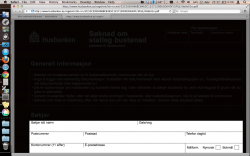
On our website, we have a number of PDF files. These are produced by another company. One of these PDFs shows up with a black (or actually dark grey; rgb(7,3,1)) background when opened on a Mac in Safari or the Preview app.
Opening these PDFs in Acrobat Reader does not show any problems, it only occurs when viewing them in the Preview app and in Safari (which uses the Preview app, it seems to me). All of our other PDFs do not have any problems.
I have been able to reproduce the problem on a MacBook running OS X 10.7.2 and Safari 5.1.2. The company that produced the PDFs says it is a configuration error on my MacBook and not their fault. I have been trying to follow a remarks from other threads that I found, but none of them solved the problem. We are now getting more and more complains from other visitors that are having the same problem.
The PDF can be found at http://www.husbanken.as/regelvrk/hb-nr.nsf/2FD1894DDA5135BCC125712D003CDE8D/$FILE/hb9s01.pdf. We have several other PDFs at http://www.husbanken.as/regelvrk/hb-nr.nsf/WebSkjema, and the other ones have no problems.
Is anybody familiar with this problem? Is there a solution, that I can send to our clients, apart from telling them to use another webbrowser and view the files in Acrobat Reader? Has something gone wrong in producing these PDFs?
Thanks,
Peter Bremer
On our website, we have a number of PDF files. These are produced by another company. One of these PDFs shows up with a black (or actually dark grey; rgb(7,3,1)) background when opened on a Mac in Safari or the Preview app.
Opening these PDFs in Acrobat Reader does not show any problems, it only occurs when viewing them in the Preview app and in Safari (which uses the Preview app, it seems to me). All of our other PDFs do not have any problems.
I have been able to reproduce the problem on a MacBook running OS X 10.7.2 and Safari 5.1.2. The company that produced the PDFs says it is a configuration error on my MacBook and not their fault. I have been trying to follow a remarks from other threads that I found, but none of them solved the problem. We are now getting more and more complains from other visitors that are having the same problem.
The PDF can be found at http://www.husbanken.as/regelvrk/hb-nr.nsf/2FD1894DDA5135BCC125712D003CDE8D/$FILE/hb9s01.pdf. We have several other PDFs at http://www.husbanken.as/regelvrk/hb-nr.nsf/WebSkjema, and the other ones have no problems.
Is anybody familiar with this problem? Is there a solution, that I can send to our clients, apart from telling them to use another webbrowser and view the files in Acrobat Reader? Has something gone wrong in producing these PDFs?
Thanks,
Peter Bremer