

Become a MacRumors Supporter for $50/year with no ads, ability to filter front page stories, and private forums.

ocsupersonic

macrumors newbie
Original poster
Nov 29, 2012
28
5
England
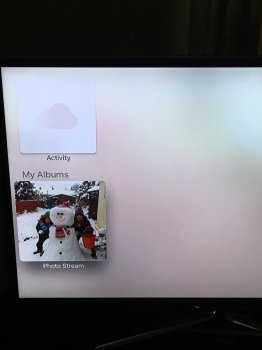
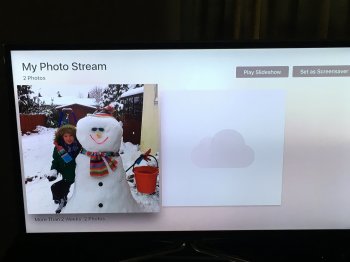
Not sure what I am doing wrong but when I open the app I get two boxes showing ( see file) "Activity" which if clicked shows an empty screen and then under that I get "My Albums" with "photo stream" underneath which once clicked on shows 2 photos ( one and a blank since I reset apple TV 4) with the option to play slideshow or set as screen saver.
I have plenty of photos on my mac and sure I can see them by switching on home sharing and going to my library's on the "computer App" but can't seem to get my head round the Photos app and why only those two (well one now) photos are the only ones showing and what is "Activity" ?
Anyway thanks in advance for any help, Im probably being a numpty and its something really stupid that im doing/not doing.
 

Attachments

  • IMG_0163.jpg
    IMG_0163.jpg
    978.9 KB · Views: 118
  • IMG_0164.jpg
    IMG_0164.jpg
    1 MB · Views: 90
The Photos app on the Apple TV will only show shared albums from your iCloud Photo Library. Why they chose to do it that way is anyone's guess, it's annoying.
 
I prefer it that way, it means you can control what pictures appear on the Apple TV very easily. No more having to that "that picture" is still sitting in your camera roll.
 
Not sure what I am doing wrong but when I open the app I get two boxes showing ( see file) "Activity" which if clicked shows an empty screen and then under that I get "My Albums" with "photo stream" underneath which once clicked on shows 2 photos ( one and a blank since I reset apple TV 4) with the option to play slideshow or set as screen saver.
I have plenty of photos on my mac and sure I can see them by switching on home sharing and going to my library's on the "computer App" but can't seem to get my head round the Photos app and why only those two (well one now) photos are the only ones showing and what is "Activity" ?
Anyway thanks in advance for any help, Im probably being a numpty and its something really stupid that im doing/not doing.

You can still access your full photo library via Computers -> [Your computer name] -> Photos. You'll need to have home sharing turned on.

I've no idea why they haven't just enabled iCloud photo library on it though. Seems weird.
 
  • Like
Reactions: nathanalf
I want full access to my iCloud Photo Library like I have on the iPad. I am certainly ok with options to restrict what I show in the settings.
 
I want full access to my iCloud Photo Library like I have on the iPad. I am certainly ok with options to restrict what I show in the settings.

Yeah I'd much have preferred that as well, I'm hoping they address it in an update. I mean I get that some people might not want naughty pics popping up when their kids are looking for photos of their birthday party.
But either, use a camera for your naughty pics instead of uploading them to the cloud. Or give an option to make them hidden.
 
Register on MacRumors! This sidebar will go away, and you'll see fewer ads.