

Become a MacRumors Supporter for $50/year with no ads, ability to filter front page stories, and private forums.

standingquiet

macrumors 6502
Original poster
Feb 13, 2010
348
0
Birmingham, AL
Guys,

Recently got the update from iPhoto to the new Photo's app on my Macbook Pro.

I have it set up so my photo's on my phone sync to my MBP automatically with the option to save original to my MBP
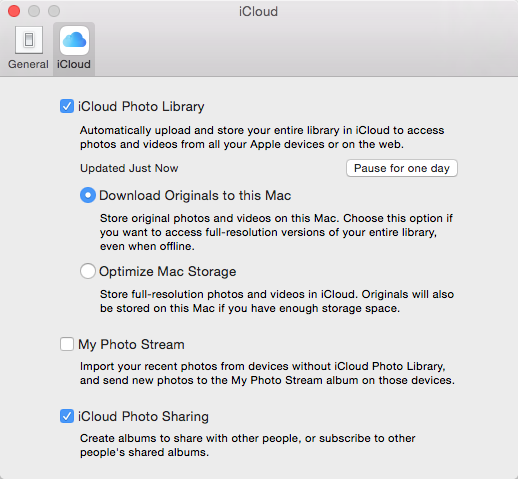
Ev1ZjLp.png


All my images and videos sync just fine but if i delete off my iPhone it removes them from my MBP even with the option to save to my MBP selected.

Am i missing something or doing something wrong? I have a 16gb iPhone and am wanting my images and videos to sync so i can delete them from my phone to save space.

Thank you in advance

Matt
 
You either want your photos/videos to sync between devices or you do not. If you do not want synchronisation, don't use iCloud Photo Library.

When iCloud Photo Library is enabled, deleted photos may be seen/recovered as follows:

Photos | File | Show Recently Deleted
 
Guys,

Recently got the update from iPhoto to the new Photo's app on my Macbook Pro.

I have it set up so my photo's on my phone sync to my MBP automatically with the option to save original to my MBP

Image

All my images and videos sync just fine but if i delete off my iPhone it removes them from my MBP even with the option to save to my MBP selected.

Am i missing something or doing something wrong? I have a 16gb iPhone and am wanting my images and videos to sync so i can delete them from my phone to save space.

Thank you in advance

Matt
That's the way iCloud Photos Library works. "Your pictures everywhere" means just that - whatever you have on one device is going to be on all, whatever you delete from one device will be removed from all. It's no different than using iCloud Contacts in that regard.

On your iPhone, select Optimize iPhone Storage. It will manage your iPhone storage usage. It watches available space, and reduces the size of the on-phone library if necessary. Not only does it use smaller-sized images for those that are stored on the iPhone. If an image hasn't been accessed in a while, the reduced-resolution image may be deleted, leaving behind only a thumbnail on the iPhone. If you do access the image, it'll be downloaded in higher resolution from the cloud. (iCloud documents have worked this way for quite a while, though replace the word "thumbnail" with "metadata.")

There are key clues in the descriptive text in your screen shot, including: "Show original photos and videos on this Mac. ...even when offline. (my emphasis) The point of downloading originals to the Mac is not to use it as the ultimate archive location (as it is for iPhoto and Aperture). The ultimate archive is the cloud. The copy kept on the Mac is for convenience - no waiting to download images you haven't viewed in a long time, and working/viewing offline with full resolution.
 
I want them to sync and save at the same time, is this not possible?
Yes, sorta. You can use iPhoto or Aperture for archiving, while you continue to use Photos for syncing. Leave My Photo Stream enabled on all your devices and in iPhoto/Aperture. It will still download images to iPhoto/Aperture. The only catches are that 1) any edits you make in Photos will not be present in iPhoto/Aperture (and vice versa), and 2) you'll have two full-resolution copies of newly-added images on your HDD (master images that were in your iPhoto/Aperture library prior to converting to Photos are actually shared by both applications. Images added after conversion are saved separately.
 
Register on MacRumors! This sidebar will go away, and you'll see fewer ads.