Hello,
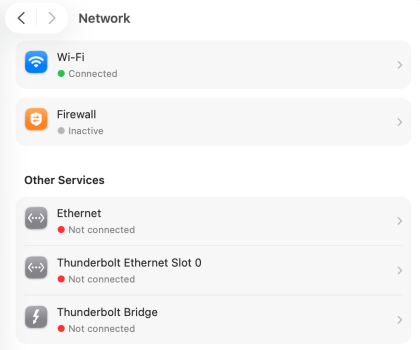
I'm trying to connect an ethernet device to my Mac Studio. It's a GPIB to ethernet bridge, connected over ethernet directly to my mac via a crossover cable. The device should connect automatically via DHCP, whereupon I should be able to open a web page to it. The mac's networking panel says ethernet is not connected, but everything else looks normal.
This all works perfectly fine on my linux machine and also a W10 box, but not my mac. Typing in its http address, which I know, does not work (it just hangs with no response). It's like there's no connection at all. Is there some basic setting that I'm missing, perhaps a security issue or something?
Thank you for any tips you may have!
I'm trying to connect an ethernet device to my Mac Studio. It's a GPIB to ethernet bridge, connected over ethernet directly to my mac via a crossover cable. The device should connect automatically via DHCP, whereupon I should be able to open a web page to it. The mac's networking panel says ethernet is not connected, but everything else looks normal.
This all works perfectly fine on my linux machine and also a W10 box, but not my mac. Typing in its http address, which I know, does not work (it just hangs with no response). It's like there's no connection at all. Is there some basic setting that I'm missing, perhaps a security issue or something?
Thank you for any tips you may have!