Become a MacRumors Supporter for $50/year with no ads, ability to filter front page stories, and private forums.

SpaceGrayAlways

macrumors 6502
Original poster
Oct 27, 2017
260
265
Somewhere
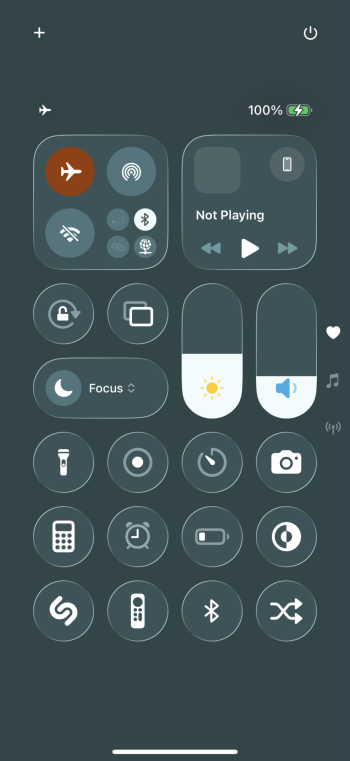
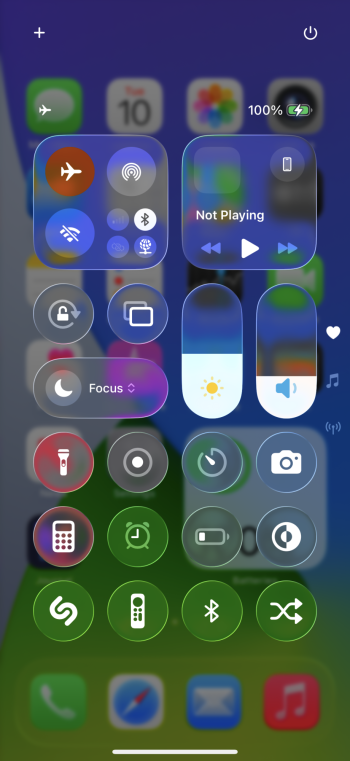
For folks that are not fans of the liquid glass appearance, it should be noted that a setting that has been available for some time remains available for use: "Reduce Transparency"

This setting can be found in Settings > Accessibility > Display & Text Size > Reduce Transparency.

Hope this helps!
 

Attachments

  • IMG_0411.jpeg
    IMG_0411.jpeg
    68.5 KB · Views: 135
  • IMG_0410.jpeg
    IMG_0410.jpeg
    80.7 KB · Views: 133
  • IMG_0402.png
    IMG_0402.png
    283.4 KB · Views: 144
  • IMG_0401.png
    IMG_0401.png
    1.1 MB · Views: 130
If Apple is able to replicate how it looks when the Start menu is launched on Windows 7 with a content/window in the background, I may upgrade my iPhone 11 Pro Max from iOS 17.7 to iOS 26
 
  • Like
Reactions: goldmac2006
That option is meant to be an accessibility for bad eye-sighted users, not as a solution for Apple completely sh**ing on liquid glass accessibility.

It‘s a nice workaround for the time being, not a final solution.
 
  • Like
Reactions: !!! and Rogifan
To be honest, both of those options look pretty bad. I know it's a beta and things should improve, but there's a long way to go before either of those should ship.
Yeah, I agree, that just looks horrible, and basic usability should not have to hide behind a toggle. The Liquid Glass notification is unreadable.

Compare both to iOS 18, much better.
 
Looks like dog sh*t on an iPad with reduced transparency (or with transparency)... iPad got the worst of it. Don't get me started on the windowing pseudo MacOS nonsense.
 
Register on MacRumors! This sidebar will go away, and you'll see fewer ads.