Become a MacRumors Supporter for $50/year with no ads, ability to filter front page stories, and private forums.

Milord

macrumors newbie
Original poster
Nov 24, 2010
15
0
Canada
I have a small question about tabs in Safari. In Chrome and Firefox, when I close multiple tabs one after another, their width stays constant, allowing me to not have to move the mouse to close them individually. In Safari it's not the case. I'd like to know if there's an app or an extension to solve this? I couldn't find anything about that on the internet. I'm sure I'm not the only one who's bothered by that!
Thanks for any help!
 
I have a small question about tabs in Safari. In Chrome and Firefox, when I close multiple tabs one after another, their width stays constant, allowing me to not have to move the mouse to close them individually. In Safari it's not the case. I'd like to know if there's an app or an extension to solve this? I couldn't find anything about that on the internet. I'm sure I'm not the only one who's bothered by that!
Thanks for any help!
No, there's no way I know of to change the tab width behavior in Safari. However, if you want to close all other tabs except the one you're on, just press Command-E.
 
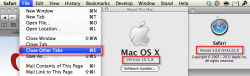
Can't do it that way on 10.5.8 and Safari 5.0.6 :(
What makes you think so?
ScreenCap 1.PNG
 
Thank you guys for your help. Still not what I'm looking for but better than nothing. I'll use that Close other tabs keyboard shortcut, which is Command + Option + W.
 
Unfortunately that isn't a preference, nor is it something that an extension or plugin could likely change.

Safari left-aligns the 'close tab' button, so you can start with the left-most tab you desire to close and just keep clicking in that same spot until they are all closed.

If you want your tabs to retain their width until you move your mouse away you need a browser like Chrome or Firefox.

Apple may implement that feature in the future, but I wouldn't hold my breath.
 
Register on MacRumors! This sidebar will go away, and you'll see fewer ads.