Become a MacRumors Supporter for $50/year with no ads, ability to filter front page stories, and private forums.

Mr1ntu05

macrumors member
Original poster
Nov 16, 2011
33
42
In Safari on MacOS 26, when I encounter the "this connection is not private" screen, I see the 'show details' button BUT if I click it nothing happens. So I can not approve visiting the site or trust a certificate. I'm stuck there.
Anyone who knows how to solve this?
THanks
 
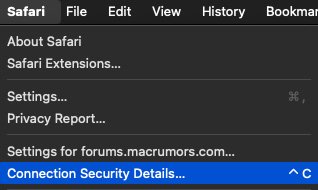
Try in the main menu Connection Security Details
Connection Security Details.jpg
 
Try accessing that funky website using OTHER browsers.
See what happens then.
 
I've had the same issue in Safari ever since upgrading to Tahoe.
Firefox and Chrome let me add the exception, but Safari only shows the buttons without letting me click them.
Have not found a way to fix this in Safari.
 
  • Like
Reactions: henry_w
I'm having the same issue since upgrading to TAHOE beta 3.
can't fix it. The "Show details" button is not clickable
 
iOS/iPadOS 26.2 has the same issue. I reported it using the feedback app during the first beta, but never received a response.
 
Register on MacRumors! This sidebar will go away, and you'll see fewer ads.