I was searching my applications and out of nowhere EVERYTHING froze and a rainbow colored ball appeared and began to spin. Entire computer locked, even tried to go to the top menu to click the Apple logo and select shut down and it wouldn't let me. Finally was forced to press power button AND hold it for 10 seconds before it finally shut down. I seem to be having more problems with the Mac than I did with Windows. What's causing this to happen and how can I solve the problem?


Got a tip for us?
Let us know
Become a MacRumors Supporter for $50/year with no ads, ability to filter front page stories, and private forums.
Screen freezing with spinning ball
- Thread starter Polaris69
- Start date
- Sort by reaction score
You are using an out of date browser. It may not display this or other websites correctly.
You should upgrade or use an alternative browser.
You should upgrade or use an alternative browser.

Restarting the machine may solve some issues. Could you list your machine and specific information like how much memory is installed? What operating system you are using? etc
Restarting the machine may solve some issues. Could you list your machine and specific information like how much memory is installed? What operating system you are using? etc
Thanks for the reply. Powerbook G4, Panther 10.3.9. 1.25GB Ram which is the Maximum. I was "forced" to restart the machine because it didn't give me any other option. I had to hold the power button for 10 seconds which is not the proper way to shut down a machine. You should be able to work on a computer without having it freeze on you out of the blue, giving no indication, text or resolution to where the problem is originating from and how to remedy it. This does not happen regularly which is even more disturbing because if it was consistent you have a better chance of pinpointing the problem. Sometimes it freezes other times it doesn't. No telling when it will happen next.


Did you try "Force Quit" ?
(Alt / Cmd / Esc)
Hi,
My Al iMac is working fine, but I want to keep this advice for future reference. I use the slim aluminum keyboard. I don't see an ALT key anywhere on it. Where should I be looking? Thanks,
Morod
Hi
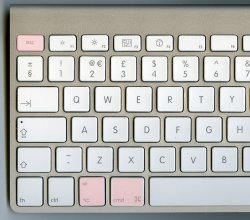
It's marked Alt on the British keyboard. Its positioned next to the Cmd (apple) key. Sorry there is a proper name for this key but I spent too long with PC's ..
Hold down the CMD and "Alt" keys together then press the escape key and choose the program you want to force quit.
It's marked Alt on the British keyboard. Its positioned next to the Cmd (apple) key. Sorry there is a proper name for this key but I spent too long with PC's ..
Hold down the CMD and "Alt" keys together then press the escape key and choose the program you want to force quit.
Sorry for double posting but I thought a photo might help. I coloured the keys in photoshop to indicate the keys needed.Hi,
My Al iMac is working fine, but I want to keep this advice for future reference. I use the slim aluminum keyboard. I don't see an ALT key anywhere on it. Where should I be looking? Thanks,
Morod
Attachments
Thanks Father Jack!
Man my eyes must be dimming or the fonts are getting smaller and smaller as I age
I found the key in question! Here it is called OPTION, but in tiny letters at the top of the key it does say alt.
So thanks again for the info, and let's hope no one needs to use it very much!
Morod
Man my eyes must be dimming or the fonts are getting smaller and smaller as I age
I found the key in question! Here it is called OPTION, but in tiny letters at the top of the key it does say alt.
So thanks again for the info, and let's hope no one needs to use it very much!
Morod
Did you try "Force Quit" ?
(Alt / Cmd / Esc)
Yes, I tried that as well but it would not give access. Let me repeat that once this rainbow colored ball appears and spins EVERYTHING on the system, keys, monitor, applications etc.. all FREEZE up! Forcing me to shut down in an unsafe mode by having to hold the power button for over 10 seconds. I want to know WHY this rainbow colored ball appears, what's prompting it and how can I resolve this problem? Thanks
I've used this short cut a few times successfully, and only once did I have to resort to "powering off"
I've used this short cut a few times successfully, and only once did I have to resort to "powering off"
I'm happy for you wish it would work for me. The problem with computers is that you never know when something will fail, most often times you won't have a clue as to what is taking place or how to remedy the problem. The average user is not a systems engineer and only wants to have a reliable computer. When grey screens pop up at the onset, followed by spinning balls and no recovery options it really takes a hold of one's nerves.
Register on MacRumors! This sidebar will go away, and you'll see fewer ads.