Become a MacRumors Supporter for $50/year with no ads, ability to filter front page stories, and private forums.

Cmd_Z_4ever

macrumors newbie
Original poster
Jul 22, 2025
29
7
Hello beautiful people, I’m trying to record the screen on my macbook. It is capturing the video but not the internal sound, and if it does then it contains both external and internal. I want to capture only internal, I’ve tried the option present there and with different combinations. But I’m unable to do it. Please help me with this.
 
You can't record both sound and video using Quicktime's screen recording function. I believe you can do it with OBS, but I haven't tried it.
 
  • Like
Reactions: MacCheetah3
Free and small:
Azayaka https://github.com/Mnpn/Azayaka
"A small and simple macOS menu bar-residing screen and system audio recorder utilising the ScreenCaptureKit API introduced in macOS 13."
Firstly..thanks for posting this. Not too familiar with the GitHub DL but just not sure how to install after clicking "Code"and how exactly accessing which folder after it unzips once in the downloads folder.

Cheers
 
Just drag the app from your downloads folder to your apps folder, and launch it from there.
And you may have to go into "Integrity and Security" or whatever the pane is called in English in System preferences and scroll down to be able to start the app on recent MacOS.

Not too familiar with the GitHub DL but just not sure how to install after clicking "Code"and how exactly accessing which folder after it unzips once in the downloads folder.

Cheers
 
Firstly..thanks for posting this. Not too familiar with the GitHub DL but just not sure how to install after clicking "Code"and how exactly accessing which folder after it unzips once in the downloads folder.
You download the Code only if you want to build it yourself.

Otherwise, download the latest release, Azayaka_1.4.zip at he moment https://github.com/Mnpn/Azayaka/releases
The app is signed, but not notarized by Apple.
You can check downloaded zipped apps for malware by uploading them to VirusTotal.
This is the report for Azayaka_1.4.zip https://www.virustotal.com/gui/file/0c498bfd055338aca208af7985b77382a66a4bbaf070e825804c10c3f1ad147a
Signature visible in the Details section.

Apple’s support pages regarding apps
Install and uninstall apps from the internet or a disc on Mac https://support.apple.com/guide/mac-help/install-and-uninstall-other-apps-mh35835/mac
Safely open apps on your Mac https://support.apple.com/en-us/102445
Open a Mac app from an unknown developer https://support.apple.com/guide/mac-help/open-a-mac-app-from-an-unknown-developer-mh40616/mac
 
You download the Code only if you want to build it yourself.

Otherwise, download the latest release, Azayaka_1.4.zip at he moment https://github.com/Mnpn/Azayaka/releases
The app is signed, but not notarized by Apple.
You can check downloaded zipped apps for malware by uploading them to VirusTotal.
This is the report for Azayaka_1.4.zip https://www.virustotal.com/gui/file/0c498bfd055338aca208af7985b77382a66a4bbaf070e825804c10c3f1ad147a
Signature visible in the Details section.

Apple’s support pages regarding apps
Install and uninstall apps from the internet or a disc on Mac https://support.apple.com/guide/mac-help/install-and-uninstall-other-apps-mh35835/mac
Safely open apps on your Mac https://support.apple.com/en-us/102445
Open a Mac app from an unknown developer https://support.apple.com/guide/mac-help/open-a-mac-app-from-an-unknown-developer-mh40616/mac
Thanks so much, your direct link to the Azayaka 1.4 zip helped a lot.

I've now got the icon on the top menu bar after allowing Gatekeeper in. I did trial it but do have some questions:

1. What is the default source folder of the sound/ screen recording (I've located where this can be changed)?

2. I now have a Azayaka-main folder on my desktop. Can this be deleted?

3. I've put Azayaka into the MacOS Applications folder.

4. As a trial I have attempted to screen/sound record a posting from a saved Facebook reel. But has it actually recorded and where did it end up on Azayaka's default destination setting?

Cheers
 
Just drag the app from your downloads folder to your apps folder, and launch it from there.
And you may have to go into "Integrity and Security" or whatever the pane is called in English in System preferences and scroll down to be able to start the app on recent MacOS.
Thank you. I made the mistake of pressing the "Code" option to this App from GitHub.
 
Right-clink on Azayaka’s icon in the Menu Bar and you have Preferences for Video, Audio, Destination, Shortcuts and start at login and countdown.

The default save location is the Desktop, you can change it from Preferences - Destination – Select output directory.

ClipGrab is a free app, notarized by Apple, that should be able to download videos from Facebook.
https://clipgrab.org/faqs/howto-download-facebook-video
 
Right-clink on Azayaka’s icon in the Menu Bar and you have Preferences for Video, Audio, Destination, Shortcuts and start at login and countdown.

The default save location is the Desktop, you can change it from Preferences - Destination – Select output directory.

ClipGrab is a free app, notarized by Apple, that should be able to download videos from Facebook.
https://clipgrab.org/faqs/howto-download-facebook-video
ClipGrap has worked quite well on YT, unfortunately right clicking FB vids (private ones also) does not give any option of copying Video URL (as YT does). I wonder if FB has somehow disabled the ability to do so? A copy paste of the address is wonky. The private one's I dearly wanted to keep says "no downloadable video could be found" after the copy-paste, some other public ones do seem to work with FB and using ClipGrap.

I'm confused. Any suggestions?
 
unfortunately right clicking FB vids (private ones also) does not give any option of copying Video URL (as YT does)
Play the video in the browser and get the URL from the address bar.
The URL for reels should look like this https://www.facebook.com/reel/1987407195161644
and for videos https://www.facebook.com/cnn/videos/1399658238232636
Remove any additional strings after the number before pasting into ClipGrab.
 
Play the video in the browser and get the URL from the address bar.
The URL for reels should look like this https://www.facebook.com/reel/1987407195161644
and for videos https://www.facebook.com/cnn/videos/1399658238232636
Remove any additional strings after the number before pasting into ClipGrab.
Thank you..pls persevere with me.

I checked and the FB reel I was interested in looks like this:

https://www.facebook.com/reel/(starting and terminating) with numbers.

Still, the ClipGrap msg upon copy/paste informs: no downloadable video could be found. No further links appear for the video URL after the numbers.

Cheers
 
Try with the trial version of Downie https://software.charliemonroe.net/downie/
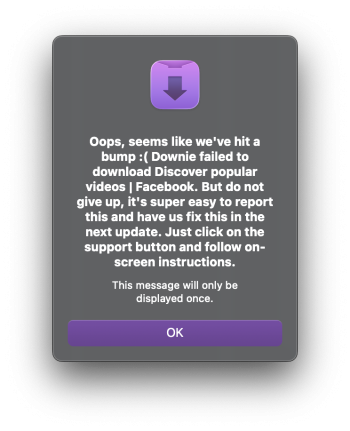
Still no luck even with Downie. Following msg is given after "processing" for a few minutes.

Downie.png
 
Register on MacRumors! This sidebar will go away, and you'll see fewer ads.