Hi all,
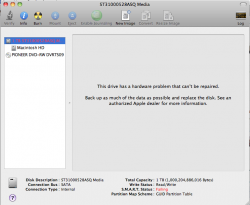
For a while now I've had a "SMART status: Failing" in RED in disk utily on my 21.5"iMac.
First things first: everything is backed up in 2 different locations, so no big stress. The iMac is not under warranty anymore.
But what is weird is that everything seems to be working great. I've seen no slowdowns in disk accesses, and tried to check disk (both with disk utility and with the hardware checking utility you can access by booting with the macOS DVD) and well they say the disk has no problems....
Are there any further investigations I can make (is there a way to "refresh" the smart status, or maybe it's done automatically), or do I just have to keep backuping and see what happens?
Thanks
ps: wasn't sure where to post as this is about a hard drive but may also be a software issue... Feel free to move the thread if it's not the good section
For a while now I've had a "SMART status: Failing" in RED in disk utily on my 21.5"iMac.
First things first: everything is backed up in 2 different locations, so no big stress. The iMac is not under warranty anymore.
But what is weird is that everything seems to be working great. I've seen no slowdowns in disk accesses, and tried to check disk (both with disk utility and with the hardware checking utility you can access by booting with the macOS DVD) and well they say the disk has no problems....
Are there any further investigations I can make (is there a way to "refresh" the smart status, or maybe it's done automatically), or do I just have to keep backuping and see what happens?
Thanks
ps: wasn't sure where to post as this is about a hard drive but may also be a software issue... Feel free to move the thread if it's not the good section