Become a MacRumors Supporter for $50/year with no ads, ability to filter front page stories, and private forums.

bowens

macrumors 6502a
Original poster
Jun 19, 2006
830
137
Florida
I have been waiting for the iPhone for a long time and now that it's here I can't afford it. Well, I could if I wanted to, but I'm not spending $500 on a phone. I really need a new phone though so I've been looking at some online and have a couple questions. I am wanting to go with Cingular because it is the best service in my area. I am just looking for something cheap for now (hopefully the iPhone will have a some cheaper models in the future and I can upgrade to one of them). On the Cingular site I found a Sony Ericsson w300i for 9.99! It has a cheap camera (not important), an MP3/AAC player, and Bluetooth wireless. I don't care about syncing up any calendars or contacts, but I do want to know if I can transfer music and photos to my Mac Mini over Bluetooth. I looked on Apples iSync page and they did not have this model listed (they had some similar models like the w600 and w800), but I don't really need to use iSync. I just want to know if this phone will connect using Bluetooth with my Mac. Will it show up as a removable drive or something?

Thanks.
 
i know the k800i works fine, I've not tried it as a drive (I think you need the cable for that, just not got round to it). but bluetooth sends files either way just fine for me.

not tried syncing anything, but sending files either way works.

* note my carrier is o2 (uk), who haven't crippled the bluetooth.
 
I just want to know if this phone will connect using Bluetooth with my Mac. Will it show up as a removable drive or something?

Thanks.


as long as your phone has bluetooth and your mac has bluetooth, it's a piece of cake..

you just pair the devices (go to bluetooth in system prefs) and away you go..

to transfer files from mac use the bluetooth transfer - simple..
 
as long as your phone has bluetooth and your mac has bluetooth, it's a piece of cake..

you just pair the devices (go to bluetooth in system prefs) and away you go..

to transfer files from mac use the bluetooth transfer - simple..

Sweet, thanks. I have never used the bluetooth on anything before. Sounds pretty easy.

Thanks.
 
My Mac HATES my SE w850i, I get kernel panics if I plug the phone in via USB cable.

But everything else works fine.

Have any of you ever used iTuneMyWalkman? It claims to sync songs with any Walkman phone using iTunes. I think I may order these phones and give it a try. I also found a plugin for iSync that will allow you to use it on the w300i.
 
My k800i worked fine with my eMac (panther) via Bluetooth and the USB cable, as did my friends W500. it comes up as a hard drive and you can drag files onto it, when you use USB. Bluwtooth is a little slow.

To send files through bluetooth, it doesnt come up as a Hard drive, rather your mac lists your phone in a dialogue box, you select it, then it sends the file over. The phone then saves it automatically.
 
Have any of you ever used iTuneMyWalkman? It claims to sync songs with any Walkman phone using iTunes. I think I may order these phones and give it a try. I also found a plugin for iSync that will allow you to use it on the w300i.

Yes I've used iTMW, its pretty easy to use, but doesn't work too well.


My k800i worked fine with my eMac (panther) via Bluetooth and the USB cable, as did my friends W500. it comes up as a hard drive and you can drag files onto it, when you use USB. Bluwtooth is a little slow.

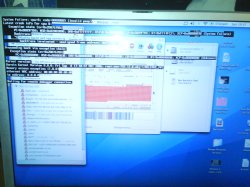
With my w850i I get the option of "Phone Mode" or "Data Storage" (Or something..), but before you've selected anything it defaults to "Phone Mode", which adds a LOT of devices to your system, including a network adaptor (REALLY handy), but adding all these devices at once causes OS X to KP (Picture Attached).

I did find a kext somewhere which stops this, but the website says it doesn't work for the w850i.
 

Attachments

  • DSC00331.JPG
    DSC00331.JPG
    208 KB · Views: 172
I just got a new Sony Ericsson W300i from Cingular and I love it. For $10, its one of the most full-featured phones I have used in a long time. I've been using a Motorolla for the past two years and the reception on the new phone is amazing.

I found a "driver" that allows the W300i to work with iSync and it is great. You can use either Bluetooth or the USB cable that Cingular packages with the phone when you buy it online. W300i iSync Plugin The phone's internal memory and flash card show up on your desktop when you plug in the phone with USB so you basically just drag and drop your MP3s and ringtones into the correct folder. Pretty easy stuff.
 
anyone know if the Sony Ericsson w950i is compatible with osx? or will i get the usual KP's i get with my 750i and 700i... does isync recognise this phone yet?
 
actually...my w950i works fine, songs transfer easily, video's too..
and surprise surprise, no Kernel panics...sweet..
 
I just got a new Sony Ericsson W300i from Cingular and I love it. For $10, its one of the most full-featured phones I have used in a long time. I've been using a Motorolla for the past two years and the reception on the new phone is amazing.

I found a "driver" that allows the W300i to work with iSync and it is great. You can use either Bluetooth or the USB cable that Cingular packages with the phone when you buy it online. W300i iSync Plugin The phone's internal memory and flash card show up on your desktop when you plug in the phone with USB so you basically just drag and drop your MP3s and ringtones into the correct folder. Pretty easy stuff.

So you can use iSync and put songs on the phone using bluetooth? You're phone came with a cable? On the Cingular site is says that it does, but I went through the Cingular Premiere site for government employees and it doesn't list a cable as being included. I talked to a csr at cingular and she said that the Cingular site was a mistake. The phone does not come with a cable. If I can transfer everything via bluetooth then I won't need a cable. Can you do this?
 
So you can use iSync and put songs on the phone using bluetooth? You're phone came with a cable? On the Cingular site is says that it does, but I went through the Cingular Premiere site for government employees and it doesn't list a cable as being included. I talked to a csr at cingular and she said that the Cingular site was a mistake. The phone does not come with a cable. If I can transfer everything via bluetooth then I won't need a cable. Can you do this?

You can use the Bluetooth File Exchange to put songs on the phone. Its a bit slow if you transfer a lot of files or large files but that's due to the bandwidth limitations of Bluetooth. All you have to do is pair your phone with your computer and go to the Send File option in the Bluetooth menu. Pick your file, pick the folder on the phone and away it goes.

One other thing...the phone will let you use MP3s as a ringtone but they must be under 600k. I usually just chop them down to 25-30 seconds or so since you won't need to hear the entire song when the phone rings anyway. Put these smaller files in the ringtones folder and the MP3s that you want to listen to in the music folder.

**Edit** My phone came with a cable. It came in a seperate package from the phone. I didn't think it would come with one either but after I placed my order, the shipping invoice had three things on it, the phone, a SIM card and the data cable. All three came in a large brown box.
 
So you can use iSync and put songs on the phone using bluetooth? You're phone came with a cable? On the Cingular site is says that it does, but I went through the Cingular Premiere site for government employees and it doesn't list a cable as being included. I talked to a csr at cingular and she said that the Cingular site was a mistake. The phone does not come with a cable. If I can transfer everything via bluetooth then I won't need a cable. Can you do this?

You wont use iSync to Bluetooth songs to your phone. Theres a Bluetooth File Exchange app on your hard drive that sends files to bluetooth devices. iSync only syncs contacts and calenders to mobile phones.

You've probably better off buying a cheap USB cable off eBay I reckon, its a bit easier and quicker. With bluetooth your phone isnt recognised as part of a network, or as a disk. It just sees it as a remote device to send things to and from.
 
I just got a new Sony Ericsson W300i from Cingular and I love it. For $10, its one of the most full-featured phones I have used in a long time. I've been using a Motorolla for the past two years and the reception on the new phone is amazing.

I found a "driver" that allows the W300i to work with iSync and it is great. You can use either Bluetooth or the USB cable that Cingular packages with the phone when you buy it online. W300i iSync Plugin The phone's internal memory and flash card show up on your desktop when you plug in the phone with USB so you basically just drag and drop your MP3s and ringtones into the correct folder. Pretty easy stuff.

I got my phones last night and tried the iSync plugin. It worked like a charm. Thanks for the link. I had already entered all of my contacts into Address Book and it only took 10 seconds or so for it to send them to my phone via Bluetooth. I told my wife this was a lot easier but she still insisted on entering her contacts into her phone manually. Oh, well.

Oh, and the phone didn't come with a usb cable and it is slow sending files via Bluetooth. Can you pick the cables up for these at Walmart or Best Buy, someplace like that?
 
Register on MacRumors! This sidebar will go away, and you'll see fewer ads.