Become a MacRumors Supporter for $50/year with no ads, ability to filter front page stories, and private forums.

roadbloc

macrumors G3
Original poster
Aug 24, 2009
8,784
215
UK
After ten long years of solid service, I think the hard drive in my G4 is finally on its last legs. Just wondering what the largest disk space it can support and if it can even support an SSD at all.

Its a PowerMac4,2 running OS X 10.4.11 :)
 
I'm not sure about the G4, but I had a G5 in which I put a OCZ Vertex 2 60 GB SATA II 2.5" SSD inside and it worked fine.
 
I had an Mtron SSD in mine, but it gotworn out after a while, maybe there are ssds with built in trim or similar?
 

That image shows revision 6 of the drive, which has trouble booting on Macs. 3.5" IDE drives are plentiful and cheap. I think WD still makes new Caviar Blue ones - I saw some in Currys recently. Otherwise, there is plenty of room inside the G4 for any 2.5" SSD + plus IDE adapter combo.

You should be able to get a 120/128GB ssd for the price of the Kingspec if you hunt around. Crucial UK had a blowout sale recently - £40 for the M500 120GB ssd (mSATA or SATA) but the prices went up yesterday.

I had an Mtron SSD in mine, but it gotworn out after a while, maybe there are ssds with built in trim or similar?

Most, if not all, SSDs today have their own garbage collection inside their controllers. TRIM is nice to have as a fallback but not an absolute necessity.
 
As an Amazon Associate, MacRumors earns a commission from qualifying purchases made through links in this post.
Can you boot off Firewire on this machine? If so, a SSD in an external enclosure may be a good option so that your not limited to PATA drives.
 
Can you boot off Firewire on this machine? If so, a SSD in an external enclosure may be a good option so that your not limited to PATA drives.

A FireWire 400 drive would be roughly 2-3 times slower than an internal PATA drive and have a higher latency.
 
the imac G4 is ide and doesn't have the 128GB limit, therefore any ide ssd or ide to msata converter

I think only the later generation iMac G4s natively support larger than 128gb. The USB 2.0 G4s most certainly do, and I think that the generation before them do as well, but the older ones do not.
 
I think only the later generation iMac G4s natively support larger than 128gb. The USB 2.0 G4s most certainly do, and I think that the generation before them do as well, but the older ones do not.

All G4 iMacs can natively read and boot from drives that are larger than 128GB in size.
 
An SSD with an IDE adapter would definitely bring new life to your G4. As insignificant as it is in real world usage, the lightning fast boot times are my favorite feature. Makes me feel like my old PowerPCs are new again.
 
I had an Mtron SSD in mine, but it gotworn out after a while, maybe there are ssds with built in trim or similar?

There are no SSDs with built in TRIM as far as I know, however they almost all have built in garbage collection instructions. TRIM has to be done by the filesystem because only the filesystem will know which blocks of data are not in use; the drive firmware doesn't have that info. Samsung was working on filesystem aware garbage collection that would know when a file is deleted and essentially act like TRIM, but this was only for NTFS filesystems and I don't even think it is being shipped yet.
 
I don't think so. I've owned 2 SSDs and one lives in my G5 right now. The Kingston SSDNow 64GB was impossible to have trim be enabled but the 120GB Crucial in my MBP was able to work with trim no problem.

Don't forget to double check if TRIM is enabled. Last time it wasn't when you thought it was and strangely mine is acting up again.

There are no SSDs with built in TRIM as far as I know, however they almost all have built in garbage collection instructions. TRIM has to be done by the filesystem because only the filesystem will know which blocks of data are not in use; the drive firmware doesn't have that info. Samsung was working on filesystem aware garbage collection that would know when a file is deleted and essentially act like TRIM, but this was only for NTFS filesystems and I don't even think it is being shipped yet.

Some SSDs have better garbage collection methods and do better on "TRIM-less" operating systems like Windows XP and OS X 10.5 and below.
 
All G4 iMacs can natively read and boot from drives that are larger than 128GB in size.

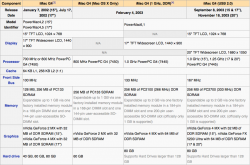
Not trying to be corrective here, but that's not necessarily true...
 

Attachments

  • Screen Shot 2014-10-23 at 11.37.46 AM.png
    Screen Shot 2014-10-23 at 11.37.46 AM.png
    183.6 KB · Views: 430
  • Screen Shot 2014-10-23 at 11.39.38 AM.png
    Screen Shot 2014-10-23 at 11.39.38 AM.png
    18.7 KB · Views: 307
Not trying to be corrective here, but that's not necessarily true...

Unofficially, all G4 iMacs can. The first models weren't marketed with the ability as it was picky. Just like how Apple says the later models can't use 2GB of memory, but they can. Although, they can be picky about what drives they take. I've never gotten a first generation G4 iMac read a 120GB+ Hitachi drive, but they accept Seagate and WD drives without a problem.

And if we want to get really technical, all G4's from the Sawtooth and newer can read drives larger than 128GB without the use of third party drives as one large partition when running 10.3 or higher because they all have the Key Largo controller. The only downside is the boot files (BootX) must be within the first 128GB because that's all the more OpenFirmware can read on those machines due to it only supporting LBA-32. To be able to do that, you just need to turn on LBA-48 support with a NVRAM entry.

Lastly, Wikipedia isn't a very good source for computer information.
 
Ah. In my Power Mac G4 Quicksilver I have a 250GB Maxtor HD, and whenever I use the native ATA bus it always says it has only 128GB or less. I normally use a PCI ATA card, not only because it is faster but also because it can handle drives over 128GB in size.

Also, I normally use EveryMac for specs and such, but I wasn't able to get a screen shot of all the different models of iMac G4.
 
Interesting article. I had a slightly different experience with my Pismo when I stuck in a 160GB drive. I have several partitions set up on this and found that OS9, Cheetah and Puma had no problems seeing the whole of the drive, mounting and accessing every partition.

From Jaguar onwards, I could only see 128GB and needed the SpeedTools driver to see the missing GBs. The SpeedTools driver has one disadvantage; it makes those volumes to which it has been applied invisible to OF so that you can only switch between them via Startup Disk rather than holding down the Option key at boot.
 
Register on MacRumors! This sidebar will go away, and you'll see fewer ads.