Become a MacRumors Supporter for $50/year with no ads, ability to filter front page stories, and private forums.

Valdaquendë

macrumors regular
Original poster
Nov 7, 2018
156
63
Oregon, USA
I am working on a 2019 Mac Pro with a Samsung 990 PRO SSD mounted on a Sonnet 4x4 PCIe card. I had formatted it (APFS), named the volume ("MacOS"), installed Sequoia on it, installed a number of apps, etc., and have been using it normally. My intention has been to routinely boot from this SSD; I have, of course, left the Apple SSD in place because you can't do without it and, though it came with Sequoia installed on it, I intended to use that volume for data.

All has gone well for the two months (interrupted by an injury and the holidays) that I've been slowly transitioning from my beloved 2011 cMP to this one. This evening, I was ready to do some major data migration. I started to exit and shut down but must have clicked the wrong button because it started to upgrade to Tahoe. I canceled it as soon as I saw it; it could not have been more than 3 seconds or so and no error or other anomaly occurred.

I booted from the Apple SSD one last time to check my apps and make sure I was leaving nothing behind. I left the Apple SSD intact. When I then attempted to boot from the 990 PRO (with the "MacOS" volume), I found that the system would not do so.

When I attempt to boot from the "MacOS" volume, the machine appears to start doing so; the system chimes and the loading thermometer appears (but does not go more than 1/8" or so). Then, the machine chimes a second time and, after a short pause, presents me with a message saying that:

"The version of MacOS on the selected disk needs to be reinstalled."

It directs me to the Recovery environment. If I choose the "MacOS" as the disk I want to reinstall Sequoia on, I get an error message telling me that

"The operation couldn't be completed. (com.apple.BuildInfo.preflight.error error 21)"

I have booted into Recovery Mode and performed Disk Repair on the "MacOS" volume; it comes out clean (with an exit code: 0) but still will neither boot nor allow OS reinstallation.

I can (and will) backup its data but I very much want to understand why this happened, so I can avoid it in future. It may be that, somehow, the canceled Tahoe upgrade left some trace behind that prevents reinstallation of Sequoia; in that case, perhaps attempting to install Tahoe using a USB drive may solve the problem; I don't know. Or maybe it's something else.

I have taken no actions yet but have left everything in situ so that if there are diagnostic suggestions or possible solutions, I can follow up. Any advice or suggestions will be very gratefully received and carefully considered.

Thanks you in advance.
 
Last edited:
I am working on a 2019 Mac Pro with a Samsung 990 PRO SSD mounted on a Sonnet 4x4 PCIe card. I had formatted it (APFS), named the volume ("MacOS"), installed Sequoia on it, installed a number of apps, etc., and have been using it normally. My intention has been to routinely boot from this SSD; I have, of course, left the Apple SSD in place because you can't do without it and, though it came with Sequoia installed on it, I intended to use that volume for data.

All has gone well for the two months (interrupted by an injury and the holidays) that I've been slowly transitioning from my beloved 2011 cMP to this one. This evening, I was ready to do some major data migration. I started to exit and shut down but must have clicked the wrong button because it started to upgrade to Tahoe. I canceled it as soon as I saw it; it could not have been more than 3 seconds or so and no error or other anomaly occurred.

I booted from the Apple SSD one last time to check my apps and make sure I was leaving nothing behind. I left the Apple SSD intact. When I then attempted to boot from the 990 PRO (with the "MacOS" volume), I found that the system would not do so.

When I attempt to boot from the "MacOS" volume, the machine appears to start doing so; the system chimes and the loading thermometer appears (but does not go more than 1/8" or so). Then, the machine chimes a second time and, after a short pause, presents me with a message saying that:

"The version of MacOS on the selected disk needs to be reinstalled."

It directs me to the Recovery environment. If I choose the "MacOS" as the disk I want to reinstall Sequoia on, I get an error message telling me that

"The operation couldn't be completed. (com.apple.BuildInfo.preflight.error error 21)"

I have booted into Recovery Mode and performed Disk Repair on the "MacOS" volume; it comes out clean (with an exit code: 0) but still will neither boot nor allow OS reinstallation.

I can (and will) backup its data but I very much want to understand why this happened, so I can avoid it in future. It may be that, somehow, the canceled Tahoe upgrade left some trace behind that prevents reinstallation of Sequoia; in that case, perhaps attempting to install Tahoe using a USB drive may solve the problem; I don't know. Or maybe it's something else.

I have taken no actions yet but have left everything in situ so that if there are diagnostic suggestions or possible solutions, I can follow up. Any advice or suggestions will be very gratefully received and carefully considered.

Thanks you in advance.

There may be some subtleties required for this, but broad strokes, what may have happened is the installer has broken a volume checksum or similar, and so the system doesn't see itself as being "unmodified"...

Reboot from the Apple SSD, Run disk utility first aid etc, test, download the Sequoia installer from the appstore, run the installer with the 990 Pro as the target, to install over your old install (make sure you have a backup).

If that doesn't work when it tries to boot back from it you may need to try it a second time, but with an erase of the 990 pro first, possibly even a delete all the volume structures first, then erase, in case there's some sneaky staging volume created which is hosing the boot process. You could try using the commandline on your Apple SSD to check the partitions on the 990 pro to see what's there.

Might also be an idea to enable verbose mode booting, so you can see what's happening during the boot process, it might stall at a certain point long enough to read the text. Have a camera handy to photograph the screen if necessary.
 
Last edited:
  • Like
Reactions: keksikuningas
Thanks! Mattspace, I had already run Disk Utility on both the device and on the volumes (MacOS and MacOS - Data); all came up clean, as mentioned last night. I will try the reinstall today, after backing up the data. A second attempt, if it doesn't take the first time, is an excellent idea.

I'd rather not erase, if I can help it, as I had already (and with some travail) gotten my Mail contents and a number of other items set up. I may consider attempting a Tahoe upgrade with the 990 as target, with the idea that that may co-opt any staging volume issue. Any thoughts?

I've not used verbose logging before but will check it out. My work on Windows systems has made me VERY conversant with "camera while booting" ... though I often "video while booting", as Windows boot errors are often faster than the trigger finger.

Bifwaff, I actually had "Install MacOS updates" turned off, though "Download" and "Security/System files" were on. I'm not sure whether I instigated this or not, at this point, but I have turned them all off (on the Apple SSD) for the moment and will, of course take precautions with the 990 once I've recovered from the current kerfuffle.

tsialex, thanks for the tip; I'll be exploring this today. I can only use it this once though, basically, as Tahoe is the last MacOS version I'll be able to run on this Intel-based 2019MP.

Thank you all.
 
UPDATE: Downloaded the latest version of Sequoia (15.7.3) and attempted a reinstall on "MacOS"; this generated the following error:

"The volume cannot be downgraded."

I infer, from that, that the unintended, "aborted-after-3-seconds" install of Tahoe has, indeed, left some staging detritus that is preventing the Sequoia reinstall.

Is there some way to clear this (by deleting cache contents or editing plists, for example) so that a reinstall of Sequoia can be performed rather than: a) attempting an upgrade to Tahoe or b) erasing and starting from scratch?
 
Last edited:
Is your 990 Pro less than half full?

If you have lots of free space, then create a new volume within the wrapper called "Sequoia2" or something like that. Use SuperDuper! (or CarbonCopyCloner) to clone your existing install to the new volume. This will copy the -data portion, but not the broken system.

Now install Sequoia on top of the clone. If you can boot into it as normal afterwards and everything works -- then you can followup by deleting your old broken volume. Followed by renaming the new volume back to "Sequoia" or whatever.
 
Awesome! Many thanks, reader50! My 2TB 990 Pro is about 18% full, as I was just in the process of setting up and getting ready to migrate data. I have CCC and, truth to tell, had contemplated using it in this way. I thought, however, that that would clone the now-problematic OS install as well, which would merely dupliucate the existing problem.

clone your existing install to the new volume
I am surprised that a clone operation would copy only the -data portion but not the OS install. I am going to try this immediately. From your phrasing, I gather that I need to simply choose the original, problematic volume (name "MacOS" in my case) and clone it to the new volume. If you mean that I should be choosing to clone only the "MacOS - Data" volume, please let me know. For now, I will try it exactly as you suggest ("clone your existing install to the new volume") first and try the Sequoia reinstall to that. If that fails, I'll try the clone of just "MacOS - Data".

Thanks very much!
 
UPDATE: I went ahead and created another volume on the 990 Pro that had the "MacOS" volume on it, naming it "Sequoia 2". I did not specify a size or quota.

Then I set up CCC to clone "MacOS" to "Sequoia 2" and started it. Toward what appeared to be the end of the copy (based upon GBs copied), the entire device disappeared, including both volumes, and does not now appear in the Finder, in the boot screen's "choose Startup Disk" or in Disk Utility even after rebooting. I am pulling the device now to put it on the bench, pull the 990 Pro and check it, along with the rest of the setup. So glad I backed up the user folder on that volume first!
 
Last edited:
UPDATE: Benched the 2019MP, pulled the Sonnet card, removed the two other 990 Pros I had installed on the card; one with a BootCamp volume I had been using for preliminary GPU experiments, the other unformatted. Then I reinstalled the card with only the 990 Pro containing the "MacOS" and "Sequoia 2" volumes and booted up. It did the same thing I described earlier; wouldn't boot from "MacOS" and reverted to Recovery Mode instead.

HOWEVER, when I chose to reinstall Sequoia on the "MacOS" volume, it displayed no error message and cheerfully started reinstalling. Weird and, if I may say so, troubling, since there is, at this point, no clear diagnostic path to indicate what originally happened or why it is now behaving with some modicum of normalcy.

One possible explanation of its current behavior: I am wondering if the "can't downgrade" error happened because the "MacOS" install of Sequoia had been updated past the Apple SSDs version. If the system reverted to the AppleSSD when it could not boot from the "MacOS" volume and then tried to run reinstallation using its own, earlier, version, it would probably generate that error.

The reinstall has an hour or two to go; will update with results when completed.
 
Last edited:
Hopefully you resolve the issue. IMO the issue was likely caused by Apple's intentionally tricking folks into installing new OS upgrades. A similar thing happened to me this morning, but I caught it before the unwanted Tahoe install began.
 
UPDATE: Wow. Weird. The reinstall completed in about an hour. When I booted into it, everything looked normal; the documents were on the desktop, etc. I was feeling kind of OK about it ... until I looked in the Applications folder and found that only the default apps were present. Then I noticed that there were TWO "MacOS" volumes mounted on the desktop. One was clearly "blessed", the other one was not. Both had the same name and displayed the same amount of used and available space. Exploration showed that the formerly-misbehaving "MacOS" is NOT the one being booted from and, in fact, it still won't boot and still bounces to Recovery Mode reinstallation. The (apparently) NEW one is the functional one.

Even weirder, the documents that appear on the desktop are on new one; the new "MacOS" volume has the same exact desktop contents as the old but none of the other user folders, except the Picture folder, contain anything. The old Pictures folder contains a 1.07GB Photos library; the new one contains a 954MB library.

My somewhat-educated guess is that, for whatever reason, the system has created a duplicate of the errant "MacOS" volume and the reinstall took place on that duplicate. So, though the Sequoia install on that volume (now named "MacOS_2") is viable and bootable, it has none of the user data ... except, for some strange reason, the desktop documents.

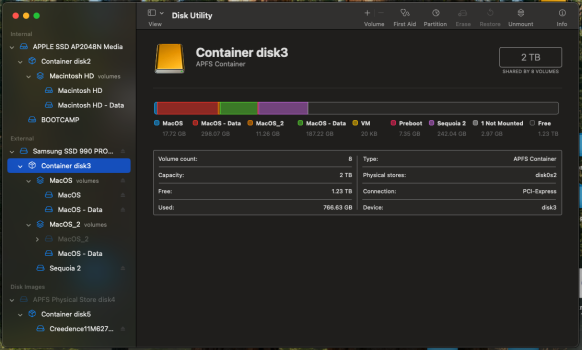
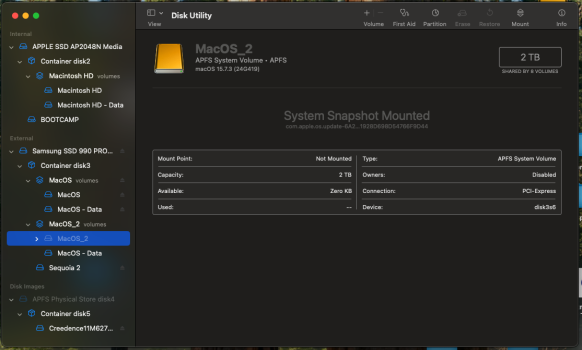
Looking at the partitioning of the 990 Pro, I cannot help but think that I've done something wrong in the volume creation process; the one container contains all three volumes ("MacOS", "MacOS_2" and "Sequoia 2") and the "MacOS_2" system volume appears to contin only a snapshot, though, again, that is the current boot volume. I'm attaching a couple of images of the Disk Utility window; if you can see what I've done wrong sn can straighten me out,I'd appreciate it.

Meanwhile "Sequoia 2", which was part of the CCC abort when the 990 Pro disappeared during the attempted clone operation, has some things and not others, as you might guess.

All in all, I'm thinking that the best way to deal with this may be to backup everything, erase the 990 Pro and (ugh) reinstall everything.

Screenshot 1.png

Screenshot 2.png
 
I wonder if your 990 Pro has an issue, or your PCIe M.2 card.

Still, assuming no hardware issue, just OS weirdness ... rename one of the MacOS volumes from within Disk Utility. Otherwise it will drive you crazy, wondering which volume you're performing operations on. Click on the name in the main data zone (beside the big icon), or right-click on a volume name in the left pane and choose "rename".

With all volumes having unique names, make sure which volume you're booting from. You can check this in Apple -> About This Mac.

If one of the other copies seems to have everything, you can use Migration Assistant to import everything from that volume. You might need to rename your (partial) user account first, to avoid a user folder conflict. So MA will import the complete version of your user folder from the other drive, along with all apps, etc. From whichever volume appears to have a complete copy.

If this approach doesn't work, you're back to wiping the drive and reinstalling clean. Then use MA to restore everything from Time Machine. Assuming you're fully backed up.

I'm sufficiently paranoid that I'd do a fresh install on a different drive, buying a new drive if you don't have a spare. Then only wipe and reuse the existing 990 Pro after confirming everything was restored from backups successfully.

Considering your luck so far, if you wipe the 990 and then find out your TM backups are incomplete - you'd be dead in the water. It would be a real bummer if you found out the hard way, TM had been excluding your user folder from backup for some reason. Or the last backup was from 4 years ago, etc.
 
  • Like
Reactions: mattspace
...
I am surprised that a clone operation would copy only the -data portion but not the OS install. I am going to try this immediately. From your phrasing, I gather that I need to simply choose the original, problematic volume (name "MacOS" in my case) and clone it to the new volume. If you mean that I should be choosing to clone only the "MacOS - Data" volume, please let me know.
An answer for future reference - I know you're past this point now:

My experience is with SuperDuper! which only copies from the -data volume from Catalina and later. I've heard good things about CCC, but never actually used it. It's possible it copies the OS volume too, but I'm under the impression that would break checksums. ie - a resulting clone would presumably not boot anyway, even if cloned from a healthy install.

If CCC lets you choose the -data sub volume by itself (SD doesn't), then I'd have used that option.
 
All in all, I'm thinking that the best way to deal with this may be to backup everything, erase the 990 Pro and (ugh) reinstall everything.

I hate to say this, because what you're doing *should* be simple, and within the capabilities of Apple's software, and people may tell you it's all easy and doable, but the fact is, Apple doesn't test edge cases, and the only setup they test for is booting a single copy of the operating system installed on the built-in storage, with all your important data kept on that built-in storage. Basically, Apple only tests Macs as if they're iPads now.

Everything from there on, you're building edge cases on edge cases.

Here's the way I would do things in your shoes...

Accept everything from the previous setup is burned, your time machine backups potentially as well. They are the past, and you need to move forward.

Wipe the 990 Pro back to bare metal after having cloned everything on it to another drive (or better as @reader50 suggests, get a new one), delete all partitions from it (which can be iffy on some versions of disk utility), reinstall your previous OS from scratch, being careful to ensure the user accounts you create are created in exactly the same order as they were on your old system, so if you first created an Admin Account "Admin", and then a User Account "User" you do so the same way, so their account IDs (501, 502 respectively) remain the same.

Your email, assuming you were using IMAP / GMAIL / iCloud with everything kept on the server will just reconnect, no local storage necessary. iMessage, if you were using messages in the cloud, likewise (all of iCloud really will be OK for this).

If you're able to clone all your documents etc to a new drive, start bringing them back manually to the new OS. If you've lost some stuff since the failed update, then use the Time Machine drive...

Set up a new Time Machine drive, set time machine to back up manually. Then connect your old time machine drive to browse it (there's a specific function IIRC for browsing a time machine volume that isn't your active backup), don't bulk recover. You do not want to bulk recover stuff, you want to strategically recover the contents of directories - ~/Documents, ~/Pictures etc, but not the actual folders themselves. The Photos library may be an issue, if the Tahoe installer touched that. I would probably only recover from before the attempted system upgrade - assume any backups since will be problems.

Manually rebuild your system back to where it was, and document how you set stuff up, take screenshots, assume migrations and system upgrades aren't a feature, and plan around that. I have a dedicated drive partition on a SATA SSD for just recording stuff I will need quickly in the event of a system failure - settings backups from all my UI utilities, password vault backups etc.

Have a look at Jeff Johnson's guide to keeping Tahoe away from your system:


A piece of software I can't recomment highly enough, is Chronosync. It's proper traditional backup software, it does file versioning, allowing you to keep replaced versions etc. I also have SuperDuper! for doing volume clones, but I rely on Chronosync. Bought it once, and they've been providing free updates for... must be over a decade now.

I also have paired TM drives, but I really only consider TM a "whoops I overwrote something" protection. My bulk Chronosync backup is the last line defence, and is kept out of the house, brought in when a backup set needs running, then put back in storage.
 
Have a look at Jeff Johnson's guide to keeping Tahoe away from your system:


This is a very bad way to block updates since you'll block ALL updates, including RSR/Background Security Improvements and XProtect/TCC/MRC updates that you surelly don't want to.

The best way is to defer major updates via profile, RSR/Background Security Improvements and XProtect/TCC/MRC still update as usual.
 
This is a very bad way to block updates since you'll block ALL updates, including RSR/Background Security Improvements and XProtect/TCC/MRC updates that you surelly don't want to.

The best way is to defer major updates via profile, RSR/Background Security Improvements and XProtect/TCC/MRC still update as usual.

Jeff is pretty contemptuous of most of Apple's security pantomime, and he's often right, but if the profiles don't involve just loading in a file someone else created, it's probably an easier / less inherently-worrying solution.
 
Reader50, I apologize for not, perhaps, being as clear as I might have: I got this machine a couple of months ago and have been slowly migrating to it from my 5,1; at this point, I only have a few apps installed and almost all the user data on it has been copied from the 5,1. So there is little concern about apps/data loss at present. I got Mail successfully moved from the Sierra install on the 5,1 - that was a bit of work - but that's the only real concern. My account is an IMAP but I had to switch ISP's 6 months ago. Moving all my archived mail was a challenge but that's the only data I would be worried about.

Now, the adventure continues ...

I worked on this last night. The first thing I did was to rename the old, malfunctioning volume to "MacOS_2". At that point, the new "MacOS" volume seemed to function properly; apps and system appeared to function normally. I had planned to basically take the path @reader50 pointed to, migrating the data from the problematic volume's user folder to the new one. But we're beyond that now ...

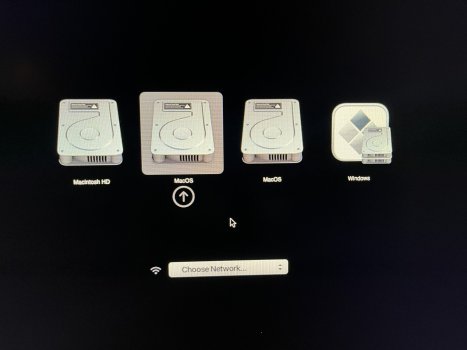
This morning, I found that it would not boot from EITHER volume; both generate the same "needs to be reinstalled" error. Even weirder, when I invoke the boot screen (opt-boot), TWO drives appear as "MacOS", even though one has been renamed to "MacOS_2" as mentioned and is displayed as such in Startup Disk, Disk Utility and on the desktop. Choosing either one of the "MacOS" disks, in the boot screen, results in this "reinstall" error, as does choosing either "MacOS" or "MacOS_2" from Startup Disk.

Also, booting into the Apple SSD and checking the 990 Pro and its volumes, I find another odd behavior. If I run First Aid on the container, the first time it fails with a "could not unmount volume(s)" error (my verbiage); a second attempt succeeds. The same is true when running FA on the constituent volumes, though it occurs much more consistently on the data volumes; in fact, I can't be sure it occurs on the OS volumes. I thought so at first but that may have been inaccurate. It consistently occurs on both the container and the data volumes and invariably completes FA with an exit code: 0 the second time around.

I don't mind a rabbit hole, as long as I can be sure there's a rabbit in there somewhere but I think any sane cost-benefit analysis has crossed its inviability threshold at this point. Either I have a defective SSD or I have a Twilight-Zone-level OS problem. In any case, I think it best to replace the 990 Pro with another, format and install it from scratch and migrate apps and data manually. That done, I'll reformat the problematic 990 Pro, test the heck-fire out of it and, if it passes, use it as the last-in-line storage option.

By the way, CCC does make a bootable clone, using Apple's built-in Apple Software Restore (ASR) utility for Big Sur and later, and you have to select the "Legacy bootable clone" option and erase the destination drive; otherwise it does a data backup like your description of SuperDuper!.

mattspace, thanks for that wonderfully detailed recovery outline; I actually copied it for future reference. I apolgize, as I do to @reader50, for not being clearer about the stage I was at with this project. It is basically a pretty bare system with mail being the only real concern; the process of moving 30 years of archived client, project and other mail from Mail in Sierra was arduous but everything else is trivial at this point. And, given this situation, I am VERY glad I hadn't moved everything onto the 2019MP, for obvious reasons. I very much appreciate your mention of Chronosync and will check that out; I've been happy with TM and have been using CCC for volume backups but this sounds like a very good utility. Thanks.

tsialex, thanks for that advice. I actually had turned off automatic updates, intending to avoid Tahoe for another month or two; how it started updating (which is kind of where this all started) I do not know. But I will make sure it reamins turned off and will be vigilant until the time comes to install it.

By the way, I have a forum-etiquette question: I've been answering all responses in a single post, when there are several at once, as I have done here. Is it considered better to answer them singly, perhaps for ease of following the strands in the thread?

Thank you all.

Boot Creen.jpeg
 
Last edited:
It is basically a pretty bare system with mail being the only real concern; the process of moving 30 years of archived client, project and other mail from Mail in Sierra was arduous but everything else is trivial at this point. And, given this situation, I am VERY glad I hadn't moved everything onto the 2019MP, for obvious reasons. I very much appreciate your mention of Chronosync and will check that out; I've been happy with TM and have been using CCC for volume backups but this sounds like a very good utility. Thanks.

I spent a few months with a High Sierra Mac Mini acting as a fileserver to my largely empty 7,1 as part of the migration process after my cMP up and died, so I can sympathise with the long drawn out move process.

If I could give you one other bit of advice right now, please don't store your email archive on your computer - the "on my mac" option. I've lost so much of my old mail archives that were stored locally, after mail.app basically destroyed the messages while storing them locally - it munged messages together, headers partially damaged, wrong headers on wrong messages - years worth of messages gone.

Get your mail up onto an IMAP server, and keep it in that. Freron's Mailmate is a much more reliable IMAP app than Apple's mail, it will give you a canonical view of the server. Apple mail will just inexplicably refuse to show some messages, especially when dealing with older email etc.
 
By the way, I have a forum-etiquette question: I've been answering all responses in a single post, when there are several at once, as I have done here. Is it considered better to answer them singly, perhaps for ease of following the strands in the thread?
I'm pretty sure the best forum etiquette is answering our questions. It's very hard to help people who ignore our questions about their details. It doesn't bother me if answers are in separate posts.
 
I found this interesting; it doesn't seem to match my problem but is interesting nonetheless:

Sonnet 4x4 card issues on macOS, especially Sonoma, often involve NVMe SSDs failing to mount after reboots, caused by a macOS PCIe/NVMe driver glitch affecting many brands, not just Sonnet. Common fixes include physically reseating the card, power cycling the Mac, resetting SMC/PRAM, or using Disk Utility's First Aid, but the problem frequently recurs, requiring users to repeatedly cycle power or reset the system, as Apple hasn't released a definitive fix for this widespread OS-level bug.

Common Problems & Symptoms
  • Drives disappear: NVMe drives on the Sonnet card vanish from Finder and Disk Utility after booting or sleeping.
  • Boot loops: The Mac Pro may endlessly reboot, failing to recognize the card.
  • Intermittent recognition: Drives might show up after several restarts but not consistently.
  • Affects Mac Pro 2019/2023: Most reported on these models (7,1), but also seen in other PCIe-equipped Macs.
 
mattspace, I will check that out. I've been a tech with 1,150 or so clients, over the decades (and tons of projects, correspondences, etc), so my email archive is actually larger than the server space provided by my current ISP. Your point is a good one, though, and I will explore increasing that space and moving my archived email to it.

What would you suggest with regard to backing up IMAP mail? My concern about IMAP (as well as cloud services) has always been that if they are down (or you are not connected to the internet) you are down as well. I have seen this many times with OneDrive users (and occasionally with iCloud users) who have inadvertently let their user documents be moved, rather than copied, to the cloud.
 
mattspace, I will check that out. I've been a tech with 1,150 or so clients, over the decades (and tons of projects, correspondences, etc), so my email archive is actually larger than the server space provided by my current ISP. Your point is a good one, though, and I will explore increasing that space and moving my archived email to it.

What would you suggest with regard to backing up IMAP mail? My concern about IMAP (as well as cloud services) has always been that if they are down (or you are not connected to the internet) you are down as well. I have seen this many times with OneDrive users (and occasionally with iCloud users) who have inadvertently let their user documents be moved, rather than copied, to the cloud.

The way macOS mail works for IMAP is it keeps a local copy of what's on the server, but as far as I can tell the server is canonical. What breaks, in my experience, is mail when it is not reflecting / under the purview of a mail server, and is just kept as files on disk.

As an option, you could run a mail server on your mac, and move your archived messages to accounts on that (or get more space at your mail host).
 
UPDATE: Well, this is worse (or more fundamental) than I thought. Yesterday morning, I pulled the 990 Pro and replaced it with a fresh one; initialized, formatted, tested it and installed Sequoia on it. Everything seemed OK; I rebooted a number of times, imported my email into Mail and installed Firefox and LibreOffice. I also reset SMC, reset PRAM, booted into Safe Mode, etc., just in the cause of keeping things neat and tidy. Everything went swimmingly.

Until a couple of hours ago.

At that point, it started doing exactly what the original 990 Pro was doing: failing to boot with a message that the OS needs to be reinstalled AND an inability to perform that reinstall due to the "com.apple.BuildInfo.preflight.error error 21"

I have installed no utilities or other system-modifying software whatever; basically, this machine is straight vanilla with the following:

My email has been moved onto the system
Installed GnuCash (a freeware, open source finance app)
Installed Firefox (latest version)
Installed LibreOffice (latest version)

So my revised theories (grasping at every available straw and in no particular order) are as follows:
1) The Apple driver glitches mentioned above are causing this failure
2) There is some conflict involving the seemingly-innocuous apps mentioned above
3) There is some problem with the Mail data that is causing this
4) There is some conflict between the SSDs themselves and Sonnet card
5) There is some conflict between the Sonnet card and the system
6) There is a problem with the Sequoia update to 15.7.3

The system worked fine, in the exact configuration it has been, from November up to the time I composed the original post, so it's hard to believe that the card, the SSD or the apps (which were more numerous on the original SSD and included GPU tests, benchmarking utilities, system monitoring apps and fan controls, etc.) suddenly started causing this. Mail files were there, too, so I'm inclined to discount that.

Unless someone can think of another possible cause, that leaves either the driver glitches or some problem (driver or other) related to the system update from the earlier version of Sequoia to 15.7.3; the two may be related/concurrent. That update took place on the 12th of this month.

I would very much like to understand what is going on here. If it's the glitchy PCIe/NVme driver issue it doesn't look like the descriptions I've seen, as the drives do not unmount, disappear/reappear or boot-loop. What is happening seems to actually change the boot status or build status of the volume's OS install in such a way that the system will no longer recognize it as valid. Or reinstallable, for that matter. I am contacting Sonnet with this problem to see if they have any insight to offer.

I now have the original SSD (safely tucked away) and, now, another SSD with an install which exhibits this problem. The only other thing I can think of to try, at this point, is to try an upgrade to one of them to Tahoe, though most likely, I'll get the same preflight error. I've, also installed yet another SSD and installed Sequoia on it; it has not glitched yet but it is probably just a matter of time ...

While I await further advice and hope for word from Sonnet I'm going to do a complete install on the Apple SSD with the idea that I can at least, perhaps, achieve (with any luck) a stable, functional system. If a solution emerges, I can always clone the Apple SSD to one of the 990 Pros and go from there.

Any insights or advice would be gladly received. Thank you all for the time and energy you've spent so far; I very much appreciate it.
 
Last edited:
UPDATE: As I mentioned, I downloaded the Tahoe installer and ran it on the second 990 Pro. It ran, allowing me to select the SSD without error and installing on the previously-non-functional 990 Pro without error or problem.

It seems to be running normally, though I won't know until I've given it a workout by installing and running demanding apps, etc. Nor will I really trust this install until I've seen it perform well and stably for awhile.

I wouldn't have chosen to upgrade to Tahoe yet but this experiment may have succeeded in reviving the install's functionality. Perhaps this may help someone else with this sort of problem.
 
Last edited:
Register on MacRumors! This sidebar will go away, and you'll see fewer ads.