Become a MacRumors Supporter for $50/year with no ads, ability to filter front page stories, and private forums.

spinnerlys

Guest
Original poster
Sep 7, 2008
14,328
7
forlod bygningen
Hello,

I've jumped aboard the iPod Touch hype too and find it to be a wonderful machine.

But for the life of me I can't figure out how to sync only a part of the iPod.

I have a new contact Info, but when I sync, everything else gets synced, and then the Backup process gets started too.

Is there a way, kinda having a button "Sync only the contents of this Tab", to only sync one section of the iPod?

Thanks in advance.
 
Did you try to change settings on the "Info" tab when your device is connected to iTunes? This has settings for enabling or disabling parts of the sync process.

image.php
 
You mean Calendars, Contacts, Mail, MobileMe and WebBrowser?

What I'm looking for is the ability to sync only one Tab (e.g. Movies, TV Shows, Applications, Podcasts, Photos OR Info), not deselecting all the time.

I think it is not possible right now, but maybe it is with some work.
 
You mean Calendars, Contacts, Mail, MobileMe and WebBrowser?

What I'm looking for is the ability to sync only one Tab (e.g. Movies, TV Shows, Applications, Podcasts, Photos OR Info), not deselecting all the time.

I think it is not possible right now, but maybe it is with some work.
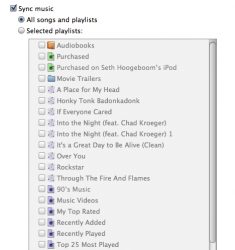
This you can do. (see attachment below) all you have to do is click "Sync [insert tab here]" and the whole tab will be synced. Or you can click Selected playlist, movies, photo albums, ect and check what you want to sync and uncheck what you don't.
 

Attachments

  • Picture 1.png
    Picture 1.png
    53 KB · Views: 63
"This you can do. (see attachment below) all you have to do is click "Sync [insert tab here]" and the whole tab will be synced."

Sorry WB2Colorado, but I don't understand that. I only have one Sync button, no "Sync Applications" or "Sync Information" or "Sync Music" buttons.

And the attachment only shows me how I can select playlists to sync.
But I don't sync my music.

Thanks for an answer.
 
Sorry WB2Colorado, but I don't understand that. I only have one Sync button, no "Sync Applications" or "Sync Information" or "Sync Music" buttons.

And the attachment only shows me how I can select playlists to sync.
But I don't sync my music.

Thanks for an answer.
So, you do have all of these tabs, right?

Summery, Music, Movies, TV Shows, Podcasts, Photos, Info and Applications
 

Attachments

  • Picture 2.png
    Picture 2.png
    14.7 KB · Views: 64
"This you can do. (see attachment below) all you have to do is click "Sync [insert tab here]" and the whole tab will be synced."

Sorry WB2Colorado, but I don't understand that. I only have one Sync button, no "Sync Applications" or "Sync Information" or "Sync Music" buttons.

And the attachment only shows me how I can select playlists to sync.
But I don't sync my music.

Thanks for an answer.

click on the device in iTunes. it should bring up a splash page with general information on that device. Within that, you "should" see multiple tabs that let you change more specific settings.

image.php
 
click on the device in iTunes. it should bring up a splash page with general information on that device. Within that, you "should" see multiple tabs that let you change more specific settings.

image.php
Like he said, there should be a sidebar in the iTunes window that shows your playlists and all the stuff you have like your applications and TV shows. your iPod touch should show up there under "Devices"
 

Attachments

  • Picture 3.png
    Picture 3.png
    53.8 KB · Views: 67
I think we misunderstand each other right now.

I see my iPod, it syncs perfectly, but it syncs everything (even if there's no reason). I just want to know if it is possible only to sync the selected Apps or sync the Information. Not both and everything else.

Maybe it will be there in iTunes 9, right with "hide Mail at start".
 
Yes I have those tabs.
I'll make a screen shot shortly.

Screen shots:

2905287600_287b503122_o.png


As you can see there's only the Sync button to sync it all, but no "Sync that" or "Sync this" button.
No, no, I don't mean the Sync button in the bottom right corner, look at the top of the tab where you see all the playlist or applications that will be synced and you should see "Selected Applications" Or "Selected playlist"
 
Wait.

You want to only sync "Contacts" or "Calendars" or ETC one item at a time? I guess I don't understand why, as the sync process is relatively quick as it stands.

Or are you trying to copy a calendar or contacts form your iPod touch to someone else's, (wihtout the music and such) ?
 
No, no, I don't mean the Sync button in the bottom right corner, look at the top of the tab where you see all the playlist or applications that will be synced and you should see "Selected Applications" Or "Selected playlist"

This might help you spinnerlys (attachment)

Snapshot2008-10-0111-14-48.jpg


that is what you want. It's the same for all tabs like Applications or Podcasts or Photos
 
840quadra - you got it right.

It doesn't take that long to sync all, but sometimes it is a pain in the ass to wait while the Mac and iPod communicate what has to go where and such stuff.
So I thought it would be nice only to sync one portion/Tab.
And everytime the fricking back up starts, so I have to cancel it again and again. I feel optionless.

The playlist thingie doesn't help.

And what does the backing up mean? What is backed up and where does the back up go?

Thanks for all the help.
 
Register on MacRumors! This sidebar will go away, and you'll see fewer ads.