

After getting a new Air I simply went into the backup files on Time Machine and manually copy-pasted them into respective folders in the new computer.
I don't like to take a backup of the entire disc. If I needed to restore at some point I will manually install all the apps I have. All I want from the backup are my word files, pdf's and the like.
Pictures and films I manually copy-paste on to the external.
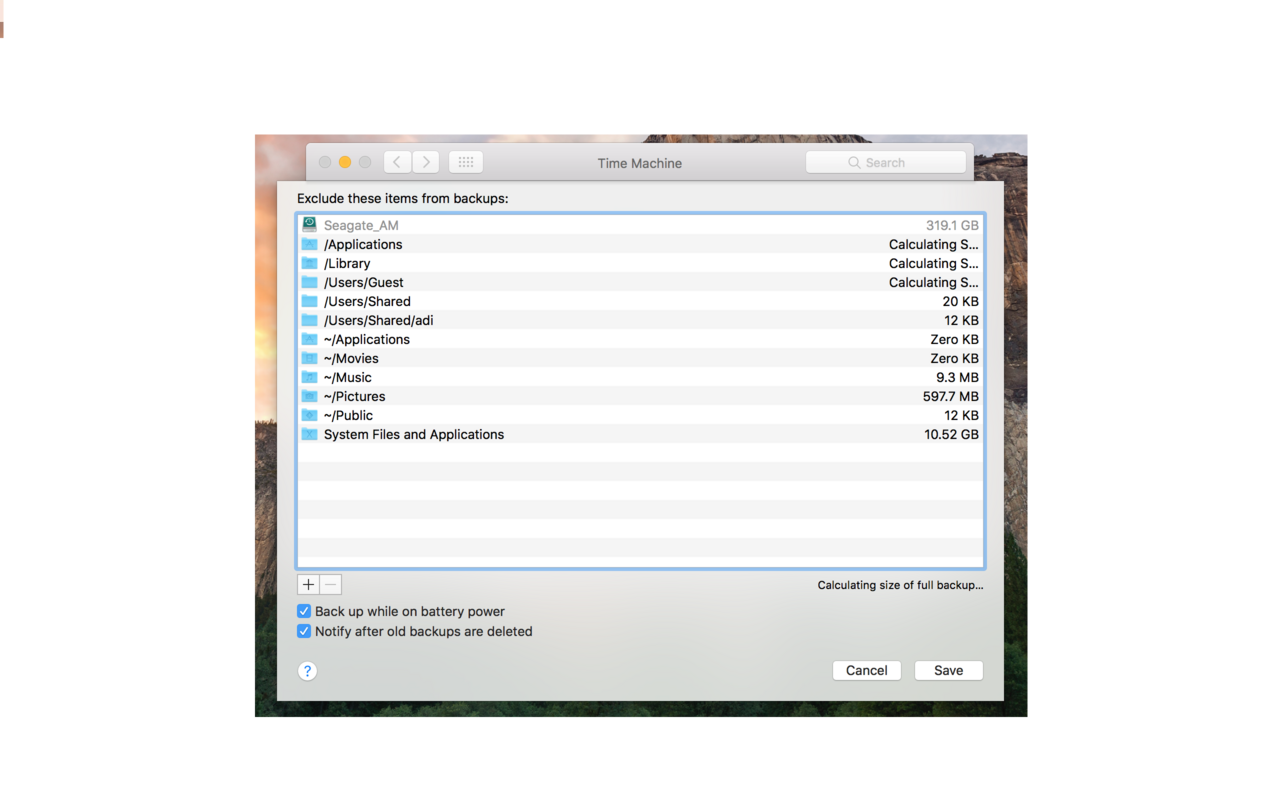
I have therefore excluded several folders from being automatically backed up on Time Machine (see picture).
1- Is it okay to do this? Could I face any issues with restoring data in the future?
2- Are there any important files (in the Library folder?) that I really must leave to be automatically backed up? Or, is it okay to exclude such system folders completely?
3- Once I hear back from you I will setup the external as the primary backup drive on the new computer. Will this delete the older backups?
Anything that I should be careful of while setting up this drive for the new computer?
I don't like to take a backup of the entire disc. If I needed to restore at some point I will manually install all the apps I have. All I want from the backup are my word files, pdf's and the like.
Pictures and films I manually copy-paste on to the external.
I have therefore excluded several folders from being automatically backed up on Time Machine (see picture).
1- Is it okay to do this? Could I face any issues with restoring data in the future?
2- Are there any important files (in the Library folder?) that I really must leave to be automatically backed up? Or, is it okay to exclude such system folders completely?
3- Once I hear back from you I will setup the external as the primary backup drive on the new computer. Will this delete the older backups?
Anything that I should be careful of while setting up this drive for the new computer?

