I find Time Machine to be quite slow and seems to back up lots of files even though I've just done a backup and barely created any new files since my previous backup. It also seems that it hogs the disk I/O as synchronizing other drives at the same time (using Chronosync) as Time Machine is running makes both tasks very slow. I'm on a Mac Pro 5.1 running OSX 10.6.8.
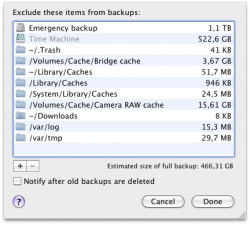
The Mac Pro has several internal drives installed, and one of those is used for Time Machine. Mind you, it's a 3TB Western Digital "green" drive, so it's not super-fast but I believe backups shouldn't take this long, and it shouldn't back up so many files when I haven't really done much work on the computer. For the latter I've excluded a lot of folders and another internal backup drive. So are there other folders I can also leave out or something else I should check?
The Mac Pro has several internal drives installed, and one of those is used for Time Machine. Mind you, it's a 3TB Western Digital "green" drive, so it's not super-fast but I believe backups shouldn't take this long, and it shouldn't back up so many files when I haven't really done much work on the computer. For the latter I've excluded a lot of folders and another internal backup drive. So are there other folders I can also leave out or something else I should check?