

Got a tip for us?
Let us know
Become a MacRumors Supporter for $50/year with no ads, ability to filter front page stories, and private forums.
To sync Pages for iPad to a PC computer...
- Thread starter Cocorico
- Start date
- Sort by reaction score
You are using an out of date browser. It may not display this or other websites correctly.
You should upgrade or use an alternative browser.
You should upgrade or use an alternative browser.


From the view of all documents tap on edit then select the document to share, tap on the export button (top left) , choose email, then you can choose to send it as a word document.
Thanks Mike 
I know that trick but there is a problem : if you have drawings or photos in your Pages file all is mixed up (texts and pictures) and it is not possible to send this kind of mail with a PDF file (only Word format)...
I know that trick but there is a problem : if you have drawings or photos in your Pages file all is mixed up (texts and pictures) and it is not possible to send this kind of mail with a PDF file (only Word format)...
Last edited:

Thanks Mike
I know that trick but there is a problem : if you have drawings or photos in your Pages file all is mixed up (texts and pictures) and it is not possible to send this kind of mail with a PDF file (only Word format)...
Not sure why you are having problem emailing your document as PDF. I just tried and it worked fine.

Thanks Mike
I know that trick but there is a problem : if you have drawings or photos in your Pages file all is mixed up (texts and pictures) and it is not possible to send this kind of mail with a PDF file (only Word format)...
I also just tested this with one that has text and pictures and I was able to send it as a PDF just fine. Why do you think it's not possible?
Thanks
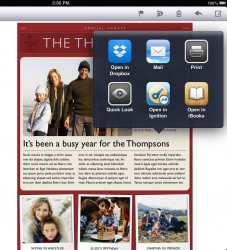
Actually when I click on the PDF file in my mail app there is no Dropbox icon to open it !
It is not like that when I do that on a Word file : there is the Dropbox icon so that I can open it with it and put it on Dropbox !
==> I send the mail to myself (as a video tutorial showed on the web).
Do you do the same thing ?
I just realize that I am using Dropbox with mails. And you don't...You use an other way.
Can you please tell me how you do it ?What is the email adress on wich you send the mail ?
Actually when I click on the PDF file in my mail app there is no Dropbox icon to open it !
It is not like that when I do that on a Word file : there is the Dropbox icon so that I can open it with it and put it on Dropbox !
==> I send the mail to myself (as a video tutorial showed on the web).
Do you do the same thing ?
I just realize that I am using Dropbox with mails. And you don't...You use an other way.
Can you please tell me how you do it ?What is the email adress on wich you send the mail ?
Last edited:
Personal Computer Computer?
Really? That's all you have to add to this thread?
No !
I have this option if the Pages file is Word but not if it is a PDF file
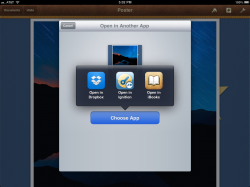
While in Pages, find the PDF you want stored in Dropbox. With the PDf open, open the wrench in the top right corner and select 'Share and Print'. Now select "Open in Another App'. Do you see Dropbox there? Please post a screenshot so I can see what you have as an option.
Is your Dropbox app on the iPad the most recent release?
Personal Computer Computer
Excuse me Ashwood, I am French.
----------
=>> to Hazycloud :
No I have not this option in that other way
(I don' t know how to post a screenshot. How do you do it ?)
Is your Dropbox app on the iPad the most recent release?
==> Yes
Attachments
Last edited:
Excuse me Ashwood, I am French.
Not a problem but it sometimes is helpful to know what operating system you are using.
What options do you have in pages? Are these PDFs that were created in Pages? What options do you get with a Pages file?
-Yes these PDF were created in Pages.
-The options I get in Pages are the one of the most recent release.
You can attach a screenshot from the paperclip icon at the top of your new post(s).
I don't really understand what is the purpose...Don't you see it in my old post (#14) ?
Last edited:
-Yes these PDF were created in Pages.
-The options I get in Pages are the one of the most recent release.
I don't really understand what is the purpose...Don't you see it in my old post (14) ?
What options do you get with another Pages file other than PDF? Have you ever been able to send PDFs to Dropbox from Pages?
I said that since you had asked how to post a screenshot. I see it in your old post.
------------
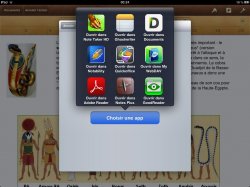
Try deleting a few of the other apps that show up. Apparently there is a limit of how many apps are shown in the 'Open In' dialogue.
http://ipadinsight.com/ios/is-the-open-in-feature-in-ios-limited-to-10-apps/
https://discussions.apple.com/thread/3871760?start=0&tstart=0
Last edited:
I've got it ! (Is that correct English)
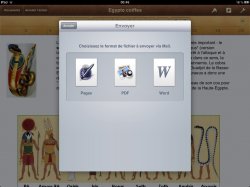
It works if I select "Pages" in place of PDF.
For your question about the number of app : I do not think it is the problem because when my Pages file is Word the Dropbox icon appears.
Anyway thanks again, thanks to you I have the solution !
Good night !
(Is that correct English) It works if I select "Pages" in place of PDF.
For your question about the number of app : I do not think it is the problem because when my Pages file is Word the Dropbox icon appears.
Anyway thanks again, thanks to you I have the solution !
Good night !
I've got it !
It works if I select "Pages" in place of PDF.
For your question about the number of app : I do not think it is the problem because when my Pages file is Word the Dropbox icon appears.
Anyway thanks again, thanks to you I have the solution !
Good night !
It's possible that is the issue as you have more apps installed that support PDFs than Word docs. Will you try removing an app to see if that helps? Someone else may find this thread with the same issue.
It's possible that is the issue as you have more apps installed that support PDFs than Word docs. Will you try removing an app to see if that helps? Someone else may find this thread with the same issue.
Agreed that this is probably the cause of the problem. If you have 10 apps that open PDF, but only 5 that opens Word doc, then all the apps that opens Word will show up in the "Open In" menu, but the 10th PDF app won't show up in "Open In." So if you have more than 9 PDF apps, you have to delete them until Dropbox shows up.
Hello
Now I have an other question : when I am with my PC, how do I recover my Pages files saved in my Ipad in Dropbox ?
The reason of my question is that I have a Dropbox folder on my Pc and I do not find the files that I have "opened in" Dropbox on my mail app.
From what I read they should be in it...
On the other side they are indeed in the Dropbox web site.
==> I notice that there are no little green cercle with white notche on the files that are in my Dropbox Folder in my Pc that should show they are syncronized. Why ?
>>> Well I have reinstalled Dropbox on my Pc.
Now I can see the little greens circles with a notche!
An other question :
The last files that have been syncronized are in a "Attachment" folder that is in the Dropbox folder.
So to up to date evey time one must drag these files and drop in the main folder "Dropbox" ?
Now I have an other question : when I am with my PC, how do I recover my Pages files saved in my Ipad in Dropbox ?
The reason of my question is that I have a Dropbox folder on my Pc and I do not find the files that I have "opened in" Dropbox on my mail app.
From what I read they should be in it...
On the other side they are indeed in the Dropbox web site.
==> I notice that there are no little green cercle with white notche on the files that are in my Dropbox Folder in my Pc that should show they are syncronized. Why ?
>>> Well I have reinstalled Dropbox on my Pc.
Now I can see the little greens circles with a notche!
An other question :
The last files that have been syncronized are in a "Attachment" folder that is in the Dropbox folder.
So to up to date evey time one must drag these files and drop in the main folder "Dropbox" ?
Last edited:
Register on MacRumors! This sidebar will go away, and you'll see fewer ads.