

Hey Guys
Very noobish question here, I have only just got my mac and I've had to install clamXav to pass my universities safety requirements. I thought that I could just uninstall the program by removing it from the applications folder.. I done this but there is still this option when right clicking on files image below
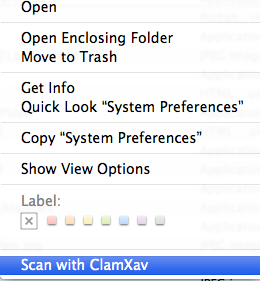
how do I remove this option,, I guess I uninstalled it incorrectly 🙁, thanks for the help 🙂
Very noobish question here, I have only just got my mac and I've had to install clamXav to pass my universities safety requirements. I thought that I could just uninstall the program by removing it from the applications folder.. I done this but there is still this option when right clicking on files image below
how do I remove this option,, I guess I uninstalled it incorrectly 🙁, thanks for the help 🙂

