

Become a MacRumors Supporter for $50/year with no ads, ability to filter front page stories, and private forums.

Koreos

macrumors member
Original poster
Mar 4, 2008
56
0
Hello everyone,

I've noticed that since the last update more or less, my MacBook (summer 2008 version) CPU's temperature is around 65 degrees celsius when it is idle. I am getting this info through the widget iStat Pro.

I am concerned about my laptop's health since next semester I have to take it with me and use it for the whole day in campus.

Is there other people with the same problem? Any tips about how to fix it?

Thank you.
 
Hello everyone,

I've noticed that since the last update more or less, my MacBook (summer 2008 version) CPU's temperature is around 65 degrees celsius when it is idle. I am getting this info through the widget iStat Pro.

I am concerned about my laptop's health since next semester I have to take it with me and use it for the whole day in campus.

Is there other people with the same problem? Any tips about how to fix it?

Thank you.
I have a 2 year old powerbook g4 and the temp gets up to 110 F and sometime more it is normal IMO.
 
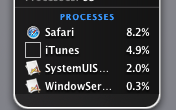
Can you get a screen shot of the processes like attached. THis will help a lot.
 

Attachments

  • Picture 1.png
    Picture 1.png
    18.3 KB · Views: 2,086
Actually go to Activity Monitor and show a screenshot of that, as it will show more details...
 
You might wanna look at this:
smcFanControl
I don't let my macs get over 160* F I really hate it when it gets to 155* F

We do have a operating temperature of up to 212 deg F or 100 deg C for the CPU Diode.

Seriously, you guys won't even keep the system for the length the hardware was designed for and you're worrying over a couple of degrees that'll probably shorten the life of the system LONG after you got it rid of it.
 
Depends on the room temperature too.

If the room is warm and stuffy, then the air being blown around your MacBook will have an effect.

Though, 65'C is pretty high for idle. What are the room conditions when you posted it?
 
bit oftopic question:

What is the minimum outside temp the new alubook wil run in?
cause i got in to some trouble yesterday with about 5 degrees celsius the macbook froze when i tryed to shut it down... and the battery wouldnt charge
 
Thanks for the answers guys, I actually found a fix: http://hgeldenhuys.org/?p=5

For some reason the process "mdworker" had been going on longer than it should, causing high CPU usage which made the fans go crazy at 5000+ RPM.

The mdworker process is the spotlight indexing service.

I followed the instructions in that web page and then re-enabled the indexing for my Leopard partition and everything went back to normal (46 C on CPU and 1700 RPM).

FYI:
My laptop is in a desk right by a window that has been open all day, snowing outside.
 
The same thing JUST happened to me, with mds, which i found out is another process linked to Spotlight... My fans went crazy high, and it was using up 50-70% CPU...
I just force quit the process, and then it seems to have gone back to normal..
Why would this happen?!?

EDIT: It's up again, to 70% CPU.. anybody have a solution?!

EDIT2: Apparently, I had 4 HIGH rez pictures in my Finder, and as soon as I deleted them, mds dropped back to normal and all is good now... Was Spotlight getting stuck indexing those pictures?!?
 
We do have a operating temperature of up to 212 deg F or 100 deg C for the CPU Diode.

Seriously, you guys won't even keep the system for the length the hardware was designed for and you're worrying over a couple of degrees that'll probably shorten the life of the system LONG after you got it rid of it.

I don't care, If its near car operating temp and hot enough to burn my lap I'm not running my computer at it.
 
I don't care, If its near car operating temp and hot enough to burn my lap I'm not running my computer at it.

Thats the diode temperature, not the bottom of the casing temperature. The enclosure temperature almost always never reach pass 40 deg C, and thats in like 120+ deg F weather w/ no AC in the room and the system encoding something.
 
Register on MacRumors! This sidebar will go away, and you'll see fewer ads.