I have: MacBook Pro 16-inch, 2021 Apple M1 Pro currently running 13.7.8
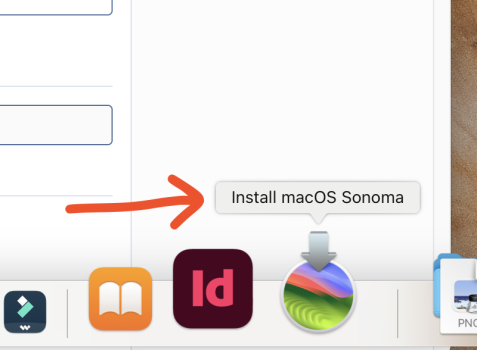
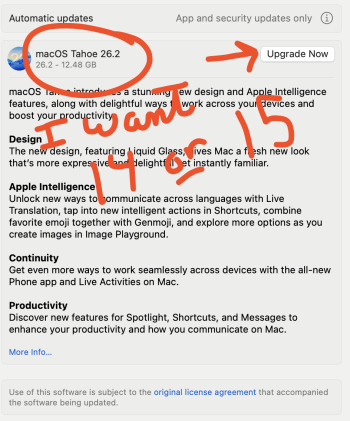
I need to install chatGPT to work with a client that requires it. SO, I wanted to upgrade my laptop to OS 14 (or OS15) since it's the minimum necessary. But, when I go in SYSTEM SETTINGS/GENERAL/SOFTWARE UPDATE The only OS available in there is OS 26. Now, I went on the APP store, found SONOMA and clicked the GET button and it downloaded like 12GB file and a screen popped saying... INSTALL MACOS SONOMA and I then QUIT because I was worried that it would wipe my files and install a new OS and not do an UPGRADE from 13 -> 14 and keep all my files intact.
Because for OS26 it says UPGRADE but for os14 it says INSTALL.
If OS 15 is better I have no problem upgrading to that. I just want to use CHATGPT, ADOBE PHOTOSHOP, ADOBE ILLUSTRATOR, ADOBE DREAMWEAVER... well all ADOBE STUFF!!, MAC MAIL...
I just want to UPGRADE and NOT ERASE everything on my mac to get the newer os... Hope this is making sense.
Thanks for any help on this!
I need to install chatGPT to work with a client that requires it. SO, I wanted to upgrade my laptop to OS 14 (or OS15) since it's the minimum necessary. But, when I go in SYSTEM SETTINGS/GENERAL/SOFTWARE UPDATE The only OS available in there is OS 26. Now, I went on the APP store, found SONOMA and clicked the GET button and it downloaded like 12GB file and a screen popped saying... INSTALL MACOS SONOMA and I then QUIT because I was worried that it would wipe my files and install a new OS and not do an UPGRADE from 13 -> 14 and keep all my files intact.
Because for OS26 it says UPGRADE but for os14 it says INSTALL.
If OS 15 is better I have no problem upgrading to that. I just want to use CHATGPT, ADOBE PHOTOSHOP, ADOBE ILLUSTRATOR, ADOBE DREAMWEAVER... well all ADOBE STUFF!!, MAC MAIL...
I just want to UPGRADE and NOT ERASE everything on my mac to get the newer os... Hope this is making sense.
Thanks for any help on this!