Become a MacRumors Supporter for $50/year with no ads, ability to filter front page stories, and private forums.

uplusd

macrumors 6502
Original poster
Apr 8, 2008
279
4
Silicon Valley
Hi all,

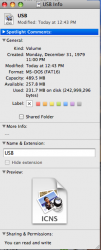
I downloaded an icon pack for a Sandisk cruzer USB drive. It contains 128x128 PNG, 512x512 PNG, and a 128x128 ICNS file. When i "Get info" on the USB drive and drag the PNG files over the default icon it replaces it with the generic Preview.app looking icon with "PNG" on it. Any ideas what the issue is?
 
Hi all,

I downloaded an icon pack for a Sandisk cruzer USB drive. It contains 128x128 PNG, 512x512 PNG, and a 128x128 ICNS file. When i "Get info" on the USB drive and drag the PNG files over the default icon it replaces it with the generic Preview.app looking icon with "PNG" on it. Any ideas what the issue is?

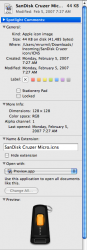
You need to use the icns file or use the developer tools to turn one of the PNG files into an icns file.
 
So you hit command-I on the icns file, select it's preview in the info window and hit command-C then command-V it onto the icon in the info window of the target file/folder?
 
Yeah that is what I did. Please see attachments.
 

Attachments

  • Picture 1.png
    Picture 1.png
    66.3 KB · Views: 257
  • Picture 3.png
    Picture 3.png
    58.5 KB · Views: 161
When you do the copy what is selected? It should be the image/icon in the top left of the info window. When you click on this it will get a light blue highlight. Then hit command-C.

I don't have a USB stick to play around with to test this on. It could be down to the format of the USB stick perhaps?
 
I tried this with a Kingston USB stick using the same ICNS file and it works fine. It has something to do with the Sandisk USB stick. I've compared both volumes in Disk Utility and don't see any differences. Both are formatted as FAT16.
 
I realize the thread's pretty old, but just in case the problem hasn't been solved yet....
I've had great success in converting such icons by using Img2icns.

Hope this helps.
 
Register on MacRumors! This sidebar will go away, and you'll see fewer ads.