Become a MacRumors Supporter for $50/year with no ads, ability to filter front page stories, and private forums.

MacRumors

macrumors bot
Original poster
Apr 12, 2001
70,397
42,019


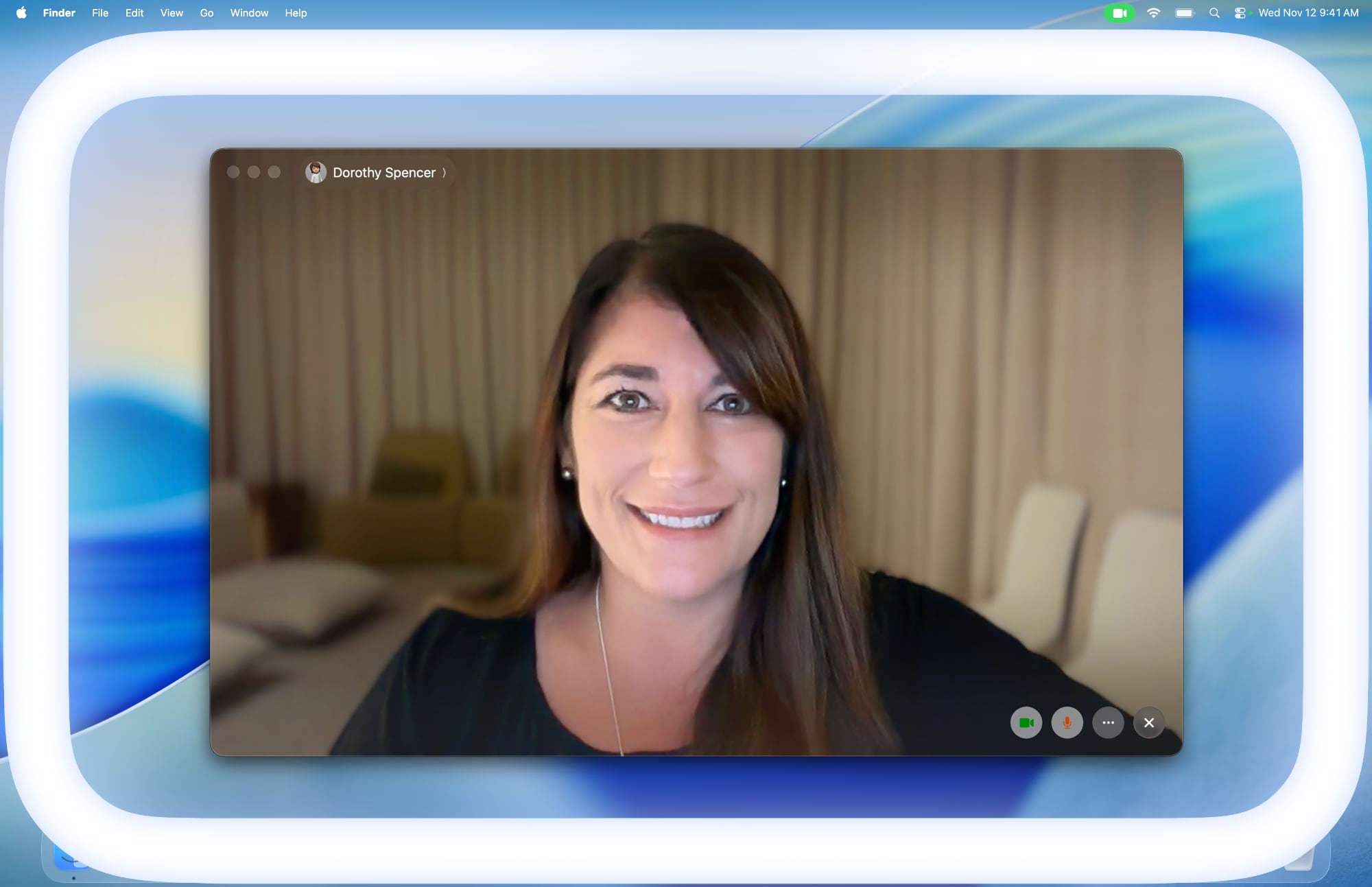
Apple in macOS Tahoe 26.2 introduced Edge Light, a clever new feature that turns your Mac's display into a virtual ring light during video calls. Instead of fumbling with external lighting equipment, your Mac can now illuminate your face automatically when you're sitting in a dark room.
apple-edge-light-macos-tahoe-26-2.jpg

Basically, Edge Light adds a soft glow around the edges of your display to brighten your face during video conferences. But it's far from just a simple screen border effect. Edge Light uses your Mac's Neural Engine to analyze your face, size, and position in the frame to deliver accurate lighting, while the Image Signal Processor fine-tunes brightness to match your environment.

The feature is even aware enough to know when your cursor approaches the display edge. When it does, Edge Light automatically recedes, allowing you to still access on-screen content without it interfering.

What You'll Need

Edge Light works on any Mac with Apple silicon (M1 or later). It's compatible with all video conferencing apps and even extends to external cameras and the Apple Studio Display when connected to an Apple silicon Mac.

How to Turn On Edge Light

Once you've updated to macOS Tahoe 26.2 or later, enabling Edge Light takes just a couple of clicks:
  1. Open a supporting video call app (FaceTime, Zoom, or WebEx, for example).
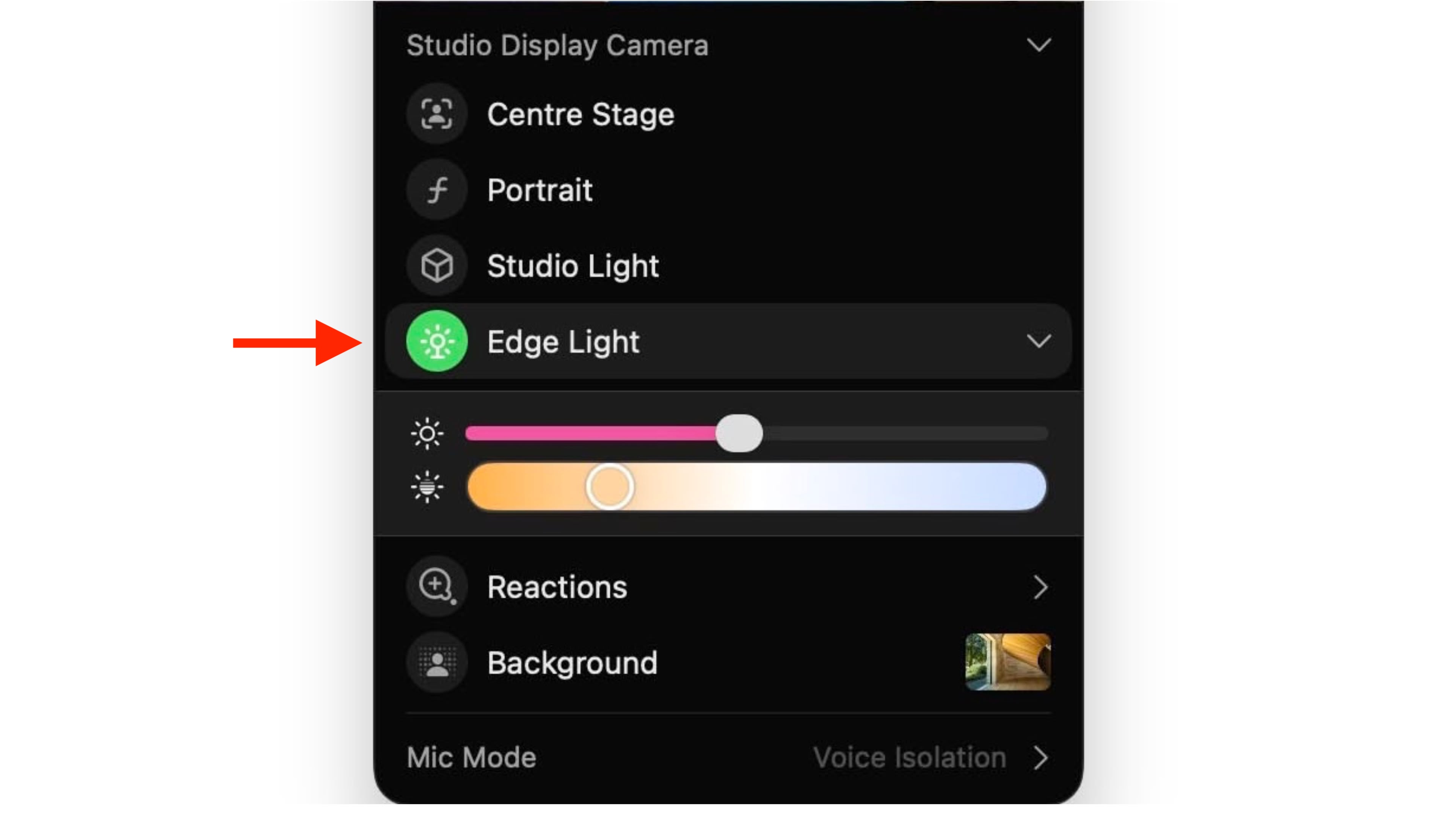
  2. Click the green video conferencing menu bar item at the top of your screen.
  3. Select Edge Light from the drop-down menu.
macos-edge-light@2x.jpg


To adjust the lighting intensity and color temperature, click the down chevron next to Edge Light. You'll see two sliders that let you customize the brightness and warmth of the effect to suit your preferences.

If you own a Mac released in 2024 or later, you can turn on automatic Edge Light activation. Once enabled, your Mac will detect when you're in a dimly lit environment and turn the feature on without any manual input. Simply look for the automatic toggle in the video call dropdown menu, immediately below the expanded Edge Light options.

Article Link: Use Edge Light for Better Video Calls in macOS
 
  • Like
Reactions: KeithBN
Alternative for those interested

Just a few months ago, developer Gui Rambo had an idea: instead of opening an about:blank Safari page or relying on a physical ring light, what if the Mac’s display itself could create a ring-light effect for video calls?

...

Skip to 2025, and lo and behold, Apple has just released macOS 26.2 with the Edge Effect feature, dimming areas and all. So he thought, “Alright, I guess the idea is validated,” and decided to take up his original project.


  • Like
Reactions: TwoBytes
It’s nice to have but it made such little difference to me I ended up turning it off.
It's a vanity feature for those who want to look good in video calls. Most people I know and have team meetings with don't care about looking good. The only exception is when we have meetings with clients, then we have to look professional.😗 Our sales people would love this feature.

On an unrelated note: that picture doesn't show the feature in action or the other side isn't using some other light source. The catch light in her eye is a solid rectangle. The catch light should be a hollow rectangle to match the light source.
 
I used it on a Zoom meeting last weekend, and asked the other participants if they could see any difference when I turned it on then off again. They were unable to detect any lighting difference. So it seems useless? That said - and this is important and I will text this next time - I didn't adjust its brightness.
FYI - I'm using a Mac mini and studio display.
 
I used it on a Zoom meeting last weekend, and asked the other participants if they could see any difference when I turned it on then off again. They were unable to detect any lighting difference. So it seems useless? That said - and this is important and I will text this next time - I didn't adjust its brightness.
FYI - I'm using a Mac mini and studio display.
yup made zero difference for me on my M3 iMac
 
I cannot get Edge Light to work on my ASD connected to an M3 MBP. It will only enable on the MBP display. Ideas?
 
Remember when watchOS needed a newer watch for you to use the finger tips touching as a feature even though in acceceability the movement war used for years on all watches?
 
Wow. Early returns are not good.

Is anyone getting any useful benefit out of this?
Sorta. It's only useful for me on my M4MBA in the dark. I FaceTime my girlfriend a lot at night and use the Edge so she can see me. It does hurt my eyes a bit though cause I'm light sensitive. It would be nice if I could change the color of the edge light and the brightness of it separate from the rest of the display. Automatically it goes wayyyy too bright for comfort but does a good job of lighting up my face.
 
On Studio Display and the edge light makes no difference with face lighting. It does make the screen less comfortable to look at, though, so not a complete waste!
 
  • Like
Reactions: DogHouseDub
Apple should focus on basics and less on new features that add to the size of the OS.

And how is a neural net needed to draw a rectangle.
 
  • Disagree
Reactions: kitKAC
Register on MacRumors! This sidebar will go away, and you'll see fewer ads.