Become a MacRumors Supporter for $50/year with no ads, ability to filter front page stories, and private forums.

etindle62

macrumors newbie
Original poster
Oct 12, 2011
7
0
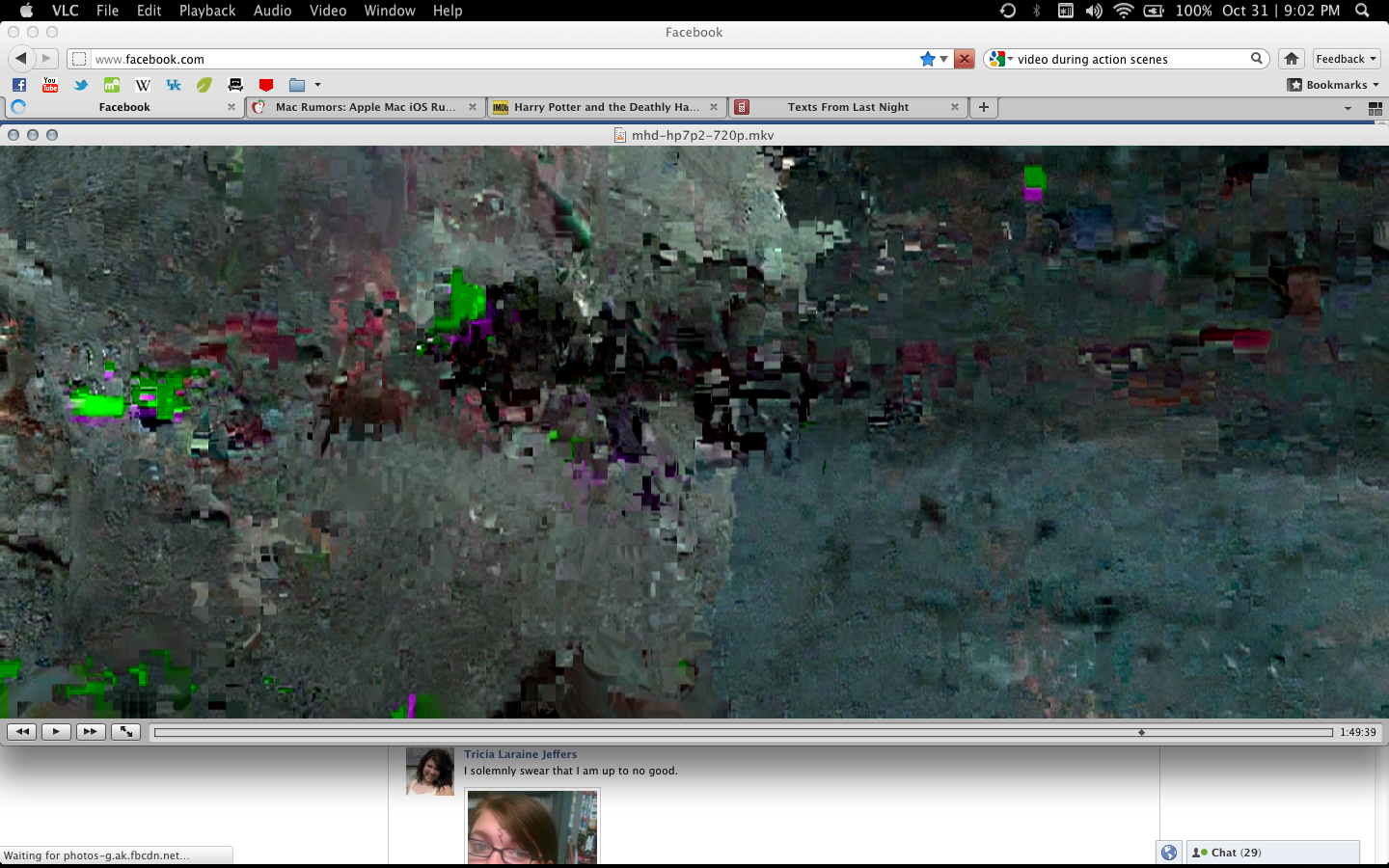
During action scenes or scenes with a lot of movement, the video pixelates and stutters to the point where it's unwatchable. It does it with all video files and with quicktime and vlc. I've tried reinstalling and still nothing. I've searched everywhere for a solution but I can't come up with anything. I have a 2011 MBP Core i7 2.0 GHz 8 GB Memory. Here's some images of what it looks like, maybe that will help.

10cjiw5.png

140aww6.png

t6zdd4.png
 
Last edited by a moderator:
What codecs do you have installed? What other apps are running in the background? Have you tried converting the video to some other format first? I know you said many formats, but can you be more specific?
 
I don't have anything installed other than the codecs that come with VLC and Quicktime. I've tried it without running any other apps and still get the same result. I haven't tried converting it, mostly because I feel like this shouldn't happen, and also because it does it with pretty much every file type. So far it's done it with avi, mp4, mkv, wmv, flv... pretty much everything I've thrown at it. I'm going to install Perian with Quicktime and see if anything changes.
 
I don't have anything installed other than the codecs that come with VLC and Quicktime. I've tried it without running any other apps and still get the same result. I haven't tried converting it, mostly because I feel like this shouldn't happen, and also because it does it with pretty much every file type. So far it's done it with avi, mp4, mkv, wmv, flv... pretty much everything I've thrown at it. I'm going to install Perian with Quicktime and see if anything changes.

You should also get the Perian Codec pack, and install that as well. See if it clears up the issue.
 
I did, Quicktime doesn't do what VLC does, but the video will stop while the sound plays, then the video will play really fast to catch up with it. Still does it with all file types.
 
That is quite strange, but not sure that it's hardware related.

Do you observe distortion anyplace else or is it only in video playback within these two apps?

You stated you have "reinstalled". Do you mean you did an erase & install of your OS and started fresh?

Do you have any other Macs or an external HD with a copy of a guaranteed known good OS installed on it that you could boot the machine to and test there? If not, Apple will and i'd suggest a visit to the genius bar to have them check it out.
 
By reinstall I meant removing VLC entirely and installing again. I've also reinstalled Lion and it's still done it. Another thing I've noticed somewhat similar to this is freezing at high volume. When I listen to music or something at a high volume, the screen will freeze and I'll get the spinning rainbow until I turn the volume down on the keyboard. I don't know what else to do. I'm afraid it is hardware, seeing as no one else seems to be having this problem. I'll probably make a trip to the apple store :/

----------

Forgot to answer your first question; no I don't have the distortion with youtube or any kind of online stream. It's only downloaded video.
 
By reinstall I meant removing VLC entirely and installing again. I've also reinstalled Lion and it's still done it. Another thing I've noticed somewhat similar to this is freezing at high volume. When I listen to music or something at a high volume, the screen will freeze and I'll get the spinning rainbow until I turn the volume down on the keyboard. I don't know what else to do. I'm afraid it is hardware, seeing as no one else seems to be having this problem. I'll probably make a trip to the apple store :/

----------

Forgot to answer your first question; no I don't have the distortion with youtube or any kind of online stream. It's only downloaded video.

Just to be sure, you aren't trying to stream this content from somewhere else right? You are playing from the internal drive on the mac in question.
 
Interesting as I have similar but more acute problems in viewing videos downloaded. I have a Powermac G4, yes it's old and have QT, VLC, Real Player, Movist, Divx, MPEG Streamclip and Elmedia, but I can't view an .mp4 or .wmv file without it freezing and only viewing by continual clicking the play button.
 
I have recently downloaded a newer version of VLC 0.9.0 - svn, Grischenko PPC/x86 and I get no picture, the progress bar runs, but just a black screen.
Any help would be appreciated.
 
Register on MacRumors! This sidebar will go away, and you'll see fewer ads.