Become a MacRumors Supporter for $50/year with no ads, ability to filter front page stories, and private forums.

maflynn

macrumors Broadwell
Original poster
May 3, 2009
77,155
48,767
Any early adopters to Vmware fusion 5?

Before upgrading to 5, I headed over to the vmware fusion forums and found a fair amount of threads complaining about lack of cut/paste between the guest and host OS, USB 3 compatibility problems, performance problems and so on.

Anyone experience any of these issues. I'm in no rush to upgrade, though it would be nice, since I have a rMBP and its supposedly retina compatible.
 
I haven't taken the plunge yet either
4.1.3 is working well for me and I don't see a need to spend the $$ yet
Are there any real advantages?
 
The marketing states it optimized for SSDs and the retina display. I think depending what they mean by that, I'd take the plunge.

Older versions of Fusion accessed the swap files way too much and perhaps the new version relies less on swap files - not sure though.

I cannot lose cut/paste between windows and OSX. That's a show stopper for me.
 
I was wondering the same thing. I'm still running 3.x which works fine with Lion, but ML broke it. So, it's one of those updates I gotta do before moving to ML.
 
I was wondering the same thing. I'm still running 3.x which works fine with Lion, but ML broke it. So, it's one of those updates I gotta do before moving to ML.

That's where I am as well. For me, it's also because my work needs to do the upgrade (there are 2 of us on Macs, and we both need to upgrade). But they don't want to pay for it. We'll see... Maybe eventually.
 
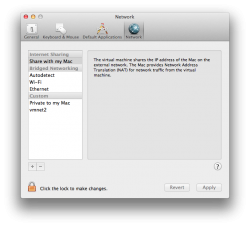
I've had no problems with Cut/copy/paste between host and guests (Vista, 7, 8, and ML) and performance seems to be much improved. The one bug I have found is that in the Pro version, theres a universal network option where one can select the options for VM's to use as far as networking goes, i.e. Share the connection, or bridge the connection and connect directly to the network, etc. The bug is that whenever I change it from the default (which is to share the connection) and restart Fusion, it goes back to the default.
 

Attachments

  • Screen Shot 2012-08-29 at 12.32.47 PM.png
    Screen Shot 2012-08-29 at 12.32.47 PM.png
    103.4 KB · Views: 87
The marketing states it optimized for SSDs and the retina display. I think depending what they mean by that, I'd take the plunge.

Older versions of Fusion accessed the swap files way too much and perhaps the new version relies less on swap files - not sure though.

I cannot lose cut/paste between windows and OSX. That's a show stopper for me.
I have been using version 5 for a few days now and do not have any issues with cut and paste between win7 and osx. I haven't run into any issues yet. I haven't used USB yet.

I'm using a rMBP BTW.
 
Good to know thanks.

Does it feel faster or about the same as the prior version?
 
Good to know thanks.

Does it feel faster or about the same as the prior version?
I think it runs smoother. I only used version 4 on my rMBP for about a week since I just got my rMBP a few weeks ago and just just upgraded a few days ago. so hard to really compare the 2 versions.

If you are that concerned just wait a few more weeks for all the early adopters to report any issues is any.
 
Thanks, I can wait (I think ;) ) So far vmware runs ok on my rMBP though I'd like to have it retina capable.
 
Last edited:
Have been using it since the beta. Works smoother and nicer than 4.1.3 and previous versions. No problems with the cut/paste (you do need to install the VMware Tools and when you upgrade you need to do it properly, quite a lot of people don't do that and some of them run into problems because of that) and no problems with usb3 (you need Windows 8 for that, Windows 7 doesn't come with usb3 drivers and VMware doesn't provide them which really sucks). The problems with usb3 are mostly related to OS X itself. There still are quite some compatibility problems where some usb2 devices don't work and some usb3 devices don't work but will work when you use a usb2 hub/cable.
 
Register on MacRumors! This sidebar will go away, and you'll see fewer ads.