Become a MacRumors Supporter for $50/year with no ads, ability to filter front page stories, and private forums.

Sensamic

macrumors 68040
Original poster
Mar 26, 2010
3,200
854
Hey all.

I want to buy my parents an Apple Watch SE 3, but have some questions about the calling features.

1. Is it possible to answer incoming calls just by voice? Or do you have to tap an icon in the screen to answer them?

2. Is it possible to make calls to specific contacts just by voice? Does this feature work well or is it a hit and miss?

3. Is it possible to dismiss an incoming call using a gesture or by voice?

4. Is it possible to end a call using a gesture?

Thanks for any help!
 
1. Yes, "Hey Siri answer phone call". However I've found if you have "Screen" phone calls from unknown contacts turned on Siri will say "Nobody is calling" even while it's ringing. Turning off Screen phone calls OR pressing the green answer button on the Apple Watch OR using a gesture will answer the call.

2. Yes, "Hey Siri call (contact)" or "Hey Siri call (number)". This actually works perfectly for me.

3. Kind of. Covering the watch face with your palm completely silences the call (no ring or vibration). It will still ring and goto voicemail though, so not technically dismissing.

4. Yes, on Apple Watches with the S9 chip or later (including the SE 3) you can double tap your thumb and index finger.
 
1. Yes, "Hey Siri answer phone call". However I've found if you have "Screen" phone calls from unknown contacts turned on Siri will say "Nobody is calling" even while it's ringing. Turning off Screen phone calls OR pressing the green answer button on the Apple Watch OR using a gesture will answer the call.

2. Yes, "Hey Siri call (contact)" or "Hey Siri call (number)". This actually works perfectly for me.

3. Kind of. Covering the watch face with your palm completely silences the call (no ring or vibration). It will still ring and goto voicemail though, so not technically dismissing.

4. Yes, on Apple Watches with the S9 chip or later (including the SE 3) you can double tap your thumb and index finger.

Thank you so much for your help!
 
  • Like
Reactions: cynics
4. Yes, on Apple Watches with the S9 chip or later (including the SE 3) you can double tap your thumb and index finger.
Even simpler (and more reliable) you can just turn your wrist upside down and back again to dismiss anything on a newer Apple Watch (including the SE3).
 
To add some more detail to what has already been shared:

1. Is it possible to answer incoming calls just by voice? Or do you have to tap an icon in the screen to answer them?
1. Yes, "Hey Siri answer phone call". However I've found if you have "Screen" phone calls from unknown contacts turned on Siri will say "Nobody is calling" even while it's ringing. Turning off Screen phone calls OR pressing the green answer button on the Apple Watch OR using a gesture will answer the call.
If the Announce Calls feature is enabled, it’s as simple as responding “Yes” to answer or “No” to decline.

The gesture is the double tap:

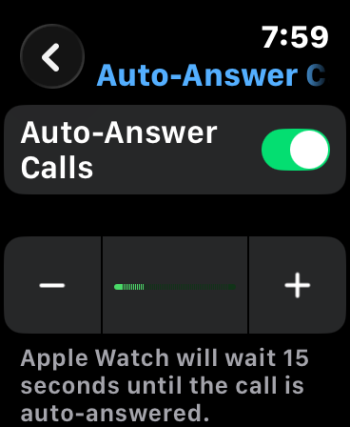
There is a third, related choice, to automatically answer calls following an adjustable delay. The feature is available within the accessibility options.
Apple_Watch_Accessibility_Auto-Answer-Calls.PNG


3. Is it possible to dismiss an incoming call using a gesture or by voice?
3. Kind of. Covering the watch face with your palm completely silences the call (no ring or vibration). It will still ring and goto voicemail though, so not technically dismissing.
Supposedly, a second wrist flick (after the mute/dismiss) will decline the call — or so I interpret.
You can use Wrist Flick to:
  • Dismiss incoming calls with a forward-back wrist flick (double flick to decline).
  • Mute alarms and timers.
  • Dismiss notifications on the lock screen.
  • Close Control Center or Smart Stack widgets.
  • Navigate back to watch face from apps.
By the way, this looks like a generally nice guide.

Even simpler (and more reliable) you can just turn your wrist upside down and back again to dismiss anything on a newer Apple Watch (including the SE3).
I wouldn’t say “upside down,” mostly just away from you. And the motion doesn’t need to even be fast (as demoed below), though you can do it aggressively — I haven’t had any problems with recognition.
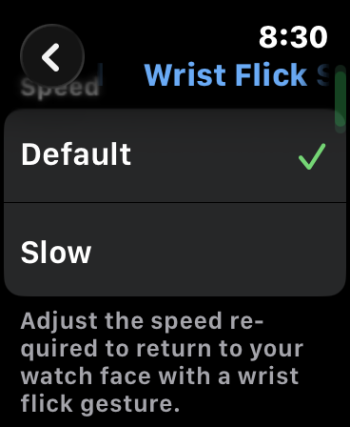
In fact, also in accessibility options:
Apple_Watch_Wrist-Flick-Speed.PNG

4. Is it possible to end a call using a gesture?
4. Yes, on Apple Watches with the S9 chip or later (including the SE 3) you can double tap your thumb and index finger.
Indeed. Unfortunately, the Call Hang Up feature doesn’t appear to be implemented on watchOS.


Related:

 
  • Like
Reactions: Sensamic
A couple things to keep in mind, since it sounds like you're new to watches, and may depend on their health and capabilities

the watch is an add on to an iPhone, it can't be used standalone. without a phone, you can't activate a watch.

There is a way to set up a cellular watch for a family member, it's more geared towards kids but would work for older adults. It is limited in features though.

Watches need to be charged daily. If they'll be unable to remember to do that, and put it back on, the watch will be useless.

Also without a phone nearby, the watch will drain quicker. Usually it uses bluetooth to your phone, If it can't find that it turns on wifi, if it can't find that it turns on cellular. Each of those radios draws more power than the previous one.


as a possible alternative, Homepods will allow you to do speaker phone calls with voice. and putting one in each room will be cheaper than 2 watches. They have an intercom feature, so you can reach out from your phone to all of the rooms in their house.
 
  • Like
Reactions: Sensamic
I also have original SE and I'm thinking of upgrading, however… I can't really find any new features, besides the new battery.
 
Register on MacRumors! This sidebar will go away, and you'll see fewer ads.