Become a MacRumors Supporter for $50/year with no ads, ability to filter front page stories, and private forums.

kthekuo

macrumors newbie
Original poster
Oct 25, 2011
16
0
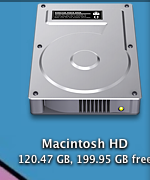
I think the picture explains it all.
When i select the show info from command+j for finder. Even though i only have 128GB of SSD but it shows that i have around 200 GB left! Whats going on??
 

Attachments

  • Screen Shot 2011-10-27 at 12.25.46 AM.png
    Screen Shot 2011-10-27 at 12.25.46 AM.png
    32.8 KB · Views: 124
Well, to check the two obvious things:

1) Have you run a Verify (or repair) on the drive via Disk Utility, to make sure the directory is okay? If not, do.

2) Is this an Apple-stock SSD, or a 3rd party one? If the latter, it's possible it's some kind of firmware weirdness, so you should check to make sure that the firmware on the SSD is up to date.
 
Register on MacRumors! This sidebar will go away, and you'll see fewer ads.