
Got a tip for us?
Let us know
Become a MacRumors Supporter for $50/year with no ads, ability to filter front page stories, and private forums.
Weird Privacy folder?
- Thread starter ghsDUDE
- Start date
- Sort by reaction score
You are using an out of date browser. It may not display this or other websites correctly.
You should upgrade or use an alternative browser.
You should upgrade or use an alternative browser.
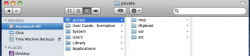


It's normally a hidden folder, but it's supposed to be there.
How can I hide it again?
How can I hide it again?
To show hidden files in Finder, enter the following two commands into a Terminal window
(press enter after each line):
defaults write com.apple.Finder AppleShowAllFiles TRUE
killall Finder
To hide hidden files in Finder, enter the following two commands into a Terminal window killall Finder
(press enter after each line):
defaults write com.apple.Finder AppleShowAllFiles FALSE
killall Finder
You can also get to that folder in Finder by Finder > Go > Go to Folder: > /privatekillall Finder
To hide hidden files in Finder, enter the following two commands into a Terminal window
(press enter after each line):
defaults write com.apple.Finder AppleShowAllFiles FALSEYou can also get to that folder in Finder by Finder > Go > Go to Folder: > /private
killall Finder
I did this and it's still there.
I did restore my MBP yesterday around that time.
So I shouldn't delete it?
Do you have that same folder?

How can I hide it again?
Open Terminal.app and type
Code:
sudo chflags hidden /privateOpen Terminal.app and type
Code:sudo chflags hidden /private
WTF man. I just did that and it gave me some big warning.
I hit Control-C to abort it...did I just mess something up?
You don't need to worry about it. It's not harming anything to leave the folder there.WTF man. I just did that and it gave me some big warning.
I hit Control-C to abort it...did I just mess something up?
Macintosh HD/private , why i am seeing this?
Why can I see the "private" folder in Macintosh HD?
"private" folder in Macintosh HD
Deleted hidden 'private' folder on Macintosh HD...
What is the "private" folder on my hd?
The first time you run a command in terminal that requires your password it displays that warning. It just means that mistakes can have catastrophic consequences. As long as you type in the command exactly you have nothing to worry about (copy and paste it). Also when terminal prompts you for your password, it gives no feedback when you type it in. Just enter your password and hit enter.
The first time you run a command in terminal that requires your password it displays that warning. It just means that mistakes can have catastrophic consequences. As long as you type in the command exactly you have nothing to worry about (copy and paste it). Also when terminal prompts you for your password, it gives no feedback when you type it in. Just enter your password and hit enter.
Are you sure? 100%
I did the command that was shown before and it didn't ask for my password.
I had to restore my computer (that's why I believe it's showing)
I thought you were trying to mess with me.
I looked up Sudo and it gives access to a substitute user.
So you're telling me if I type in what you told me that folder will be hidden?
Yes it will simply hide the folder.
Thanks man.
Sorry, when I saw that pop up I thought you were messing with me to erase something important.
It worked 😀
Jolly Jimmy would never do that. We're here to help, not hurt.Thanks man.
Sorry, when I saw that pop up I thought you were messing with me to erase something important.
Jolly Jimmy would never do that. We're here to help, not hurt.
I've been on some mean forums and seen kids do mean things to others to wipe their hard drive on PC's.
Glad I'm a Mac now 😉
Register on MacRumors! This sidebar will go away, and you'll see fewer ads.