G guru_ck macrumors 6502 Original poster Jan 24, 2005 435 0 Bay Area, CA Jun 24, 2008 #1 I've never been able to figure out what the purpose of these movable sliders do in Quicktime. Can someone explain? I highlighted them in red... Attachments Picture 6.png 530.1 KB · Views: 128
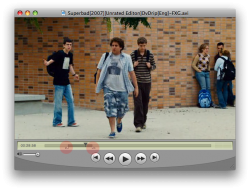
I've never been able to figure out what the purpose of these movable sliders do in Quicktime. Can someone explain? I highlighted them in red...
M MarkMS macrumors 6502a Aug 30, 2006 993 18 Jun 24, 2008 #2 So you can trim parts of a video or audio. When you go to Edit>Trim to Selection ... it trims everything but the darker portion between those sliders.
So you can trim parts of a video or audio. When you go to Edit>Trim to Selection ... it trims everything but the darker portion between those sliders.
richard.mac macrumors 603 Feb 2, 2007 6,292 5 51.50024, -0.12662 Jun 24, 2008 #3 QuickTime Player with QuickTime Pro added is like a little movie editor. you can cut, paste and trim video.
QuickTime Player with QuickTime Pro added is like a little movie editor. you can cut, paste and trim video.
D dalvin200 macrumors 68040 Mar 24, 2006 3,473 69 Nottingham, UK Jun 24, 2008 #4 i like the fact that you've downloaded the movie from the internet LMAO..
candyman macrumors regular Aug 1, 2007 232 31 Phoenix, Arizona Jun 24, 2008 #5 They are your 'in' and 'out' points. Basically what the others said above. So you can easily crop your video clip.
They are your 'in' and 'out' points. Basically what the others said above. So you can easily crop your video clip.