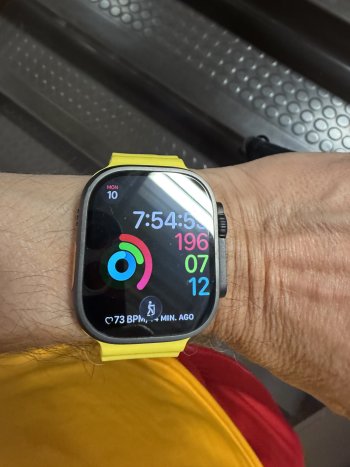
jbachandouris macrumors 603 Original poster Aug 18, 2009 6,102 3,358 Upstate NY Nov 10, 2025 #1 How do I get rid of the exercise icon on bottom? If it’s control panel I don’t see a setting. Attachments IMG_0070.jpeg 289.4 KB · Views: 58
MarkX macrumors 68000 Sep 10, 2015 1,639 2,197 Fochabers, Scotland Nov 11, 2025 #2 Looks like you have an activity running in the background.
jbachandouris macrumors 603 Original poster Aug 18, 2009 6,102 3,358 Upstate NY Nov 11, 2025 #3 Nope. No activities active. I swipe left and close everything. Either way I don’t want it period.
B babalougots macrumors regular May 5, 2021 152 331 Nov 11, 2025 #4 I get the swimming icon when I'm at my club ready to swim. Doesn't always show and I don't always swim when I'm there but I do swim 4-5 days weekly. Guessing the watchOS is learning my routines at that specific location.
I get the swimming icon when I'm at my club ready to swim. Doesn't always show and I don't always swim when I'm there but I do swim 4-5 days weekly. Guessing the watchOS is learning my routines at that specific location.
jbachandouris macrumors 603 Original poster Aug 18, 2009 6,102 3,358 Upstate NY Nov 11, 2025 #5 So where’s the setting to stop it? Just turned off Siri suggestions. Maybe that’ll do it.
B babalougots macrumors regular May 5, 2021 152 331 Nov 11, 2025 #6 Dunno. Maybe use scroll wheel and it will go away. I will try this next time I swim.
gsucyclist macrumors 6502 Oct 10, 2014 281 118 Nov 11, 2025 #7 That is a smart stack hint. If you go to settings on watch > Smart Stack > Widget Suggestions > Smart Stack Hints. Toggle it off
That is a smart stack hint. If you go to settings on watch > Smart Stack > Widget Suggestions > Smart Stack Hints. Toggle it off
B babalougots macrumors regular May 5, 2021 152 331 Nov 11, 2025 #8 Found it. Toggle off Widget Suggestions.