

Become a MacRumors Supporter for $50/year with no ads, ability to filter front page stories, and private forums.

jamesfowler2k5

macrumors newbie
Original poster
Apr 26, 2005
12
0
Hi all i brought a what i think is a

466mhz
128mb
30gb
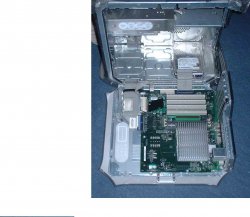
g4 powermac on close inspection of the heat sink it says dual? has this computer seen a upgrade of some kind?

I paid only £40 because it wont turn on at all my guess is the PSU.. Anyway i brought this ages ago and im basicly thinking about giving up on fixing it as i dont have the £90 apple want for a PSU!

But since opening this baby up again im wondering now if it has undergone a upgrade cause if so ill be wacking more ram in it and geting off this god for saken PC!

I have a picture that i will upload Please let me know :)
 

Attachments

  • DSCF0015small.JPG
    DSCF0015small.JPG
    88.6 KB · Views: 123
jamesfowler2k5 said:
Hi all i brought a what i think is a

466mhz
128mb
30gb
g4 powermac on close inspection of the heat sink it says dual? has this computer seen a upgrade of some kind?

I paid only £40 because it wont turn on at all my guess is the PSU.. Anyway i brought this ages ago and im basicly thinking about giving up on fixing it as i dont have the £90 apple want for a PSU!

But since opening this baby up again im wondering now if it has undergone a upgrade cause if so ill be wacking more ram in it and geting off this god for saken PC!

I have a picture that i will upload Please let me know :)

that looks like a Digital Audio.. It has 4 PCI slots, and only 3 memory slots.

A picture of the Back ports would help also.
 
yes i think its digital audio but i was wondering if someone had upgraded the cpu or is that standard heat sink

many thanks
 
jamesfowler2k5 said:
Hi all i brought a what i think is a

466mhz
128mb
30gb
g4 powermac on close inspection of the heat sink it says dual? has this computer seen a upgrade of some kind?

I paid only £40 because it wont turn on at all my guess is the PSU.. Anyway i brought this ages ago and im basicly thinking about giving up on fixing it as i dont have the £90 apple want for a PSU!

But since opening this baby up again im wondering now if it has undergone a upgrade cause if so ill be wacking more ram in it and geting off this god for saken PC!

I have a picture that i will upload Please let me know :)

You can try to boot it by playing with the Power management button on the Motherboard. When I built my Digital Audio project computer it wouldn't boot either. The problem was the Motherboard wasn't accepting power up commands from the front panel button.

it took me about 15 minutes to get it to boot the first time, but what I ended up doing was unplugging the G4, pushing and holding the button on the motherboard for 10 seconds, plug it back in, and try to boot it.. I ended up repeating this like 30 times, until it booted!!

That G4 looks like it is a Digital Audio, one of 2 models with a 133MHZ bus, and processor upgrades can get you up to Dual 1.4 GHZ G4 Processors. I would recommend buying a Quicksilver Processor to get the Cache advantages, and the prices on used Quickislver processors are decent.
 
my heat sink does not have the plastic cover on it just metal ... its a 466mhz with 1mb cache it says on back...

So this problem how do u do it please? thanks a lot x
 
jamesfowler2k5 said:
my heat sink does not have the plastic cover on it just metal ... its a 466mhz with 1mb cache it says on back...

So this problem how do u do it please? thanks a lot x

What problem? the booting problem?

I had to mess with the power management button on the Motherboard, it is near the processor.

Your processor is stamped with a speed?
 
I see so its just a standard thing.. with this mac i get no power at all is there any way to test a psu for failure i see a little grey button very near the battery is that the power man thing? how did u do it?
 
cant get any power pressing the little grey button near batt once then trying again.. If the PSU has gone im not intrested in paying like £100 quid for a new PSU but ive heard that you can modify a normal pc psu to work on a G4 if this is the case anyone got any links tips...
 
So miss my macintosh :( Right hers the deal, My mac case is open im guessing this doesnt prevent anything from starting? Im sure it can power up when case is open? Ok the grey little button pressing for 10secs then trying power button no luck :( pressing just once no luck etc..

Is there a way to test a psu without any special tools
 
Unless I'm missing something, the G4 in the pic you posted does NOT have a PSU at all. Thus the no booting thingy. :)

http://www.welovemacs.com/66124121.html

The power supply at that link should work for you. I didn't bother checking around or anything, so you could possibly find it cheaper on eBay or something.


And also, as far as I know, normal ATX power supplies for PC's are NOT compatible with your model of G4. I believe the Yikes and Sawtooth models are the only ones compatible with ATX.


enoch
 
sorry yeh psu is currently external i just had a rather intresting yet scarey experience lol. Me being the person i am (cant wait for anything) decided to change the fuse being a 10amp fuse and me only having 13amp decided to give it ago, i guessed a fuse is only a problem when like somethings not right lol.

Anyway on chaning that around i pluged in and i got a buzz a bit of fire and brown pants!

After checking over the psu again all i see is a little bit of burn nothing major all conectors are all still in place.. do you think if im more clever this time and get a 10amp fuse itll work? do you think its pos that its simpily a dodgy fuse inside the psu?

Many thanks :eek:
 
Ok, this is getting wierd. What are you doing to that mac? First of all if it didn't work with a 13amp fuse it won't work with a 10amp. was the 10amp fuse blown? If so then there is a problem and the fuse blew to stop a bigger problem. BUT if you put a 13amp fuse in there you might have just created a bigger problem.

Explain what you are doing and why and maybe we can help you better.
 
You risk destroying the computer by screwing around with the PSU outside of the computer and using those higher rated fuses. Belive me, in a less intelligent moment I have blown some stuff up by doing that.

Search around on ebay and save up your pennies to get a proper working PSU. Then boot and check to see what kind of CPU it has.
 
Register on MacRumors! This sidebar will go away, and you'll see fewer ads.