Become a MacRumors Supporter for $50/year with no ads, ability to filter front page stories, and private forums.

Jashue

macrumors member
Original poster
Feb 3, 2014
76
31
Syracuse
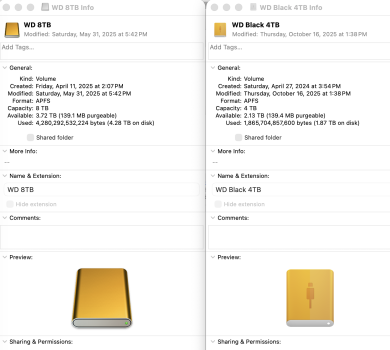
I have two external SSDs — both Western Digital — the only difference being capacity. They are both housed in Acasis enclosures. Why are the icons different?
Screenshot 2025-10-31 at 2.34.28 PM.png
 
The one on the left looks like it's using a custom icon that you or someone else gave it. To delete a custom icon, click on the small icon at the top left of that info window and press delete.
 
  • Love
Reactions: SalisburySam
The one on the left looks like it's using a custom icon that you or someone else gave it.

I don't think so. All my external disk icons look like the one on the left in the OP's screenshot. For example...

Screen Shot 2025-11-01 at 9.38.43 AM.png


"ortho" is a 2tb WD Black USB SSD, "work" is a 2tb Samsung T7 external SSD. This is on a 2018 Mini currently running Monterey, but it was still on Catalina when I got those two disks. Both are formatted as APFS but were initially formatted for Windows when purchased and I wiped them with Disk Utility. I have not used any custom icons.

An external hard disk formatted as MacOS Extended also has the same icon. I also have two 4tb Samsung T7's and an 8tb Samsung T5 with the same icons and they were purchased after I upgraded to Monterey.
 
Looking at the pics in the original post...

It looks like the icon on the left is the "default" icon used by the OS.
The icon on the right is a "custom" icon.

OP:
Do you want them both the same?
Or... doesn't make any difference?

As I think about it, it might be better to have them DIFFERENT, so as to make the two drives easier to distinguish from one another...
 
Last edited:
Yes, my WD icons look like the left one in post #1 also. I agree that having different style icons for two different drives would be my preference. Not such a bad thing, but curious.

What is the difference in age between the two? Maybe WD changed their icons.

Edit: Maybe that's not their prerogative.
 
Last edited:
I am having the exact same experience as the OP. (I don't have permissions to post screenhots in macrumors as I'm a new member, however will try and describe my set up)


I have a Samsung 1TB T5 plugged in via a USB C to a USB Hub to my mac
I have an 4TB SSD also using an Acasis enclosure plugged directly into my mac studio thunderbolt port.

My icons look exactly like the OP's and I am not using an custom icons.
 
Register on MacRumors! This sidebar will go away, and you'll see fewer ads.