Become a MacRumors Supporter for $50/year with no ads, ability to filter front page stories, and private forums.

Joka80

macrumors newbie
Original poster
Mar 14, 2020
8
1
UK
Hello all
So I’ve been trying for the last few days to get Windows 11 installed on my Mac Pro. 128Mb Ram, 3.46Ghz, 1080Ti flashed etc.

My issue is that before I was on the 138.0.0.0 Boot Rom. I could simply put a USB in created in Rufus and select EFI Boot from the boot picker and it would load. However i then decided I wanted a dual boot system with macOS. So I thought about having Monterey with OpenCore as a method of getting into an OS should Windows fail or whatever. Then I realised my Boot Rom was out of date so I thought to go back to High Sierra and use the Mojave installer to get the Boot Rom update. This completed successfully and now displays 144.0.0.0

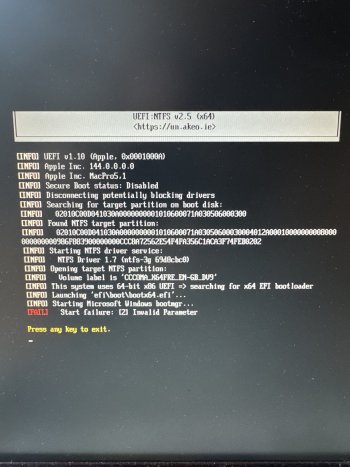
However since then I have been unable in any way possible to get it to boot windows 8, 10, 11 usb sticks created by Rufus. I attach the screenshot's showing what’s happening. Once I select the EFI BOOT from the picker to load up the USB, the fans just spin up, it crashes solid and then eventually unfreezes and goes to the verbose mode screen. I’ve tried multiple NVRAM resets, 4 in succession, holding Alt and all sorts. The computer responds if I want to boot macOS it’s fine. Or if I use an OCLP installer to install macOS it’s fine. I’ve even tried loading OpenCore onto a USB and then going into the EFI Boot of OpenCore symbol and then selecting UEFI_NTFS and it just displays a black screen.

I’m at a total loss what to do next. Please help & advise.
 

Attachments

  • IMG_2748.jpeg
    IMG_2748.jpeg
    454.4 KB · Views: 24
I installed Opencore legacy patcher on my Mac partition, than used windows 11 usb created with Rufus through OpenCore to install win 11 on another drive.
 
However since then I have been unable in any way possible to get it to boot windows 8, 10, 11 usb sticks created by Rufus. I attach the screenshot's showing what’s happening. Once I select the EFI BOOT from the picker to load up the USB, the fans just spin up, it crashes solid and then eventually unfreezes and goes to the verbose mode screen. I’ve tried multiple NVRAM resets, 4 in succession, holding Alt and all sorts. The computer responds if I want to boot macOS it’s fine. Or if I use an OCLP installer to install macOS it’s fine. I’ve even tried loading OpenCore onto a USB and then going into the EFI Boot of OpenCore symbol and then selecting UEFI_NTFS and it just displays a black screen.

I’m at a total loss what to do next. Please help & advise.

Did you tried @Sergey-Galan Windows Install tool from macOS? No doubt the easiest way to install Windows with a MacPro5,1.

This is the reference thread https://forums.macrumors.com/thread...mode-in-cmp-with-boot-camp-assistant.2386309/
 
  • Like
Reactions: seefees
Did you tried @Sergey-Galan Windows Install tool from macOS? No doubt the easiest way to install Windows with a MacPro5,1.

This is the reference thread https://forums.macrumors.com/thread...mode-in-cmp-with-boot-camp-assistant.2386309/
Yes, indeed this is the fastest Windows install tool!!! But unfortunately Windows 11 are not compatible with 12 cores cpu. Windows 10 way better for my Mac Pro 5.1, dual core cpu x5680, 96 gb of ram, 1Tb Nvme Samsung 970 EVO Plus and rx590 nitro+ gpu. So after 2 weeks of using Windows 11 and trying every possible way to fix random crashes I downgraded to Windows 10 and everything is fine.
 
Did you tried @Sergey-Galan Windows Install tool from macOS? No doubt the easiest way to install Windows with a MacPro5,1.

This is the reference thread https://forums.macrumors.com/thread...mode-in-cmp-with-boot-camp-assistant.2386309/
I thought that windows 11 was bad for 5,1 mac pros? has the situation changed? I have made some purchases based on my flawed or outdated understanding. I see you all over this forum and appreciate the huge amount of support you have provided for all of us over the years.
 
I thought that windows 11 was bad for 5,1 mac pros? has the situation changed? I have made some purchases based on my flawed or outdated understanding. I see you all over this forum and appreciate the huge amount of support you have provided for all of us over the years.

I'm only using Windows 11 25H2 with my single CPU tray Mac Pro and works fine if you install it via CSM/BIOS with @Sergey-Galan Windows Install tool and already have EnableGop injected to the BootROM + a compatible GPU, to avoid the black screen while installing or doing updates.

Some people are having issues with dual CPU trays and everyone have issues with apps/games that require SecureBoot or AVX instructions.
 
Yes, indeed this is the fastest Windows install tool!!! But unfortunately Windows 11 are not compatible with 12 cores cpu. Windows 10 way better for my Mac Pro 5.1, dual core cpu x5680, 96 gb of ram, 1Tb Nvme Samsung 970 EVO Plus and rx590 nitro+ gpu. So after 2 weeks of using Windows 11 and trying every possible way to fix random crashes I downgraded to Windows 10 and everything is fine.

You can use ESU for one further year of updates or move to IoT LTSC for updates until the end of 2027 or up to the beggining of 2032, if you move to Enterprise IoT LTSC.
 
  • Like
Reactions: seefees
I installed Opencore legacy patcher on my Mac partition, than used windows 11 usb created with Rufus through OpenCore to install win 11 on another drive.
Sounds interesting, but a bit more information would be helpful, considering the person asking for help is stuck.

Why did you install OCLP (which version?) on your Mac partition?
And what Rufus settings did you use to create the Win11 25H2 USB drive?
What role does OpenCore play?
 
You can use ESU for one further year of updates or move to IoT LTSC for updates until the end of 2027 or up to the beggining of 2032, if you move to Enterprise IoT LTSC.
This is very interesting! Are you talking about Windows 11 or 10 Enterprise IoT LTSC? Are they compatible with Blender cycles rendering and Davinci resolve studio?
 
This is very interesting! Are you talking about Windows 11 or 10 Enterprise IoT LTSC?

Windows 10 21H2.

Are they compatible with Blender cycles rendering and Davinci resolve studio?

Never tested these, but never had issues for any ofthe apps that I use. Anyway, I've read that some apps check just the 21H2 and balk.
 
Last edited:
  • Like
Reactions: seefees
Do you mean Windows 10 Enterprise LTSC 2021, 21H2? Because there are no Windows 10 Enterprise LTSC 22H1

There is an Extended Security Updates (ESU) program for consumers that offers monthly Windows 10 security updates through October 2026 for free or at nominal cost, depending on how you sign up for it. Requirements and enrollment information are in the linked article. (Note: There is a separate program for businesses or individuals who have more complicated needs.)
 
@All

Is there a specific reason why different versions of Windows 10/Windows 11 are being used here than the usual ISOs 22H2 & 25H2

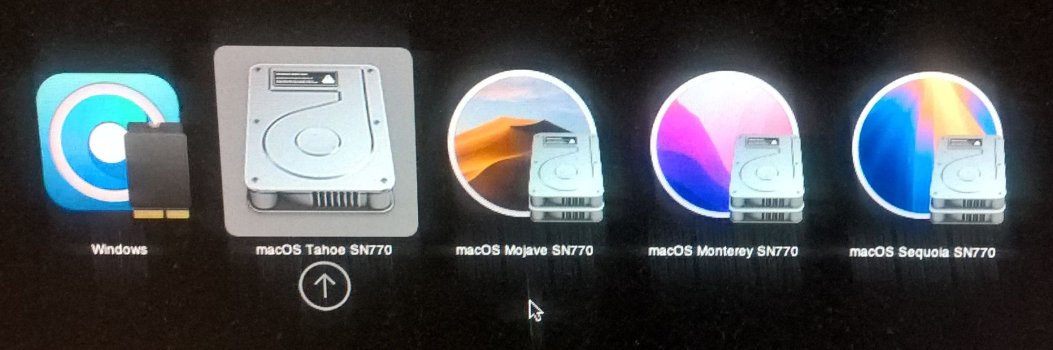
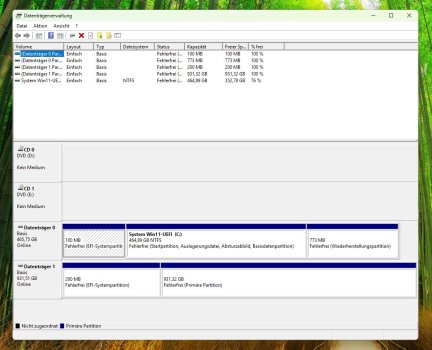
I've installed Windows 11 on almost all my Macs: on the iMacs via Boot Camp (a step-by-step process, since Boot Camp requires an ISO) and on the Mac Pro 5.1 2010 (2x X5680) on an M.2 MVMe drive (970 EVO Plus on a PCIe-Card) in UEFI mode.

Win11-UEFI-02.jpg

Win11-UEFI-01.jpg

This uses a slightly different procedure, and OC(LP) plays a crucial role here.

Speed tests show that using an M.2-MVMe-SSD makes a significant difference compared to a SATA SSD.

1768383552331.png
 
Last edited:
Register on MacRumors! This sidebar will go away, and you'll see fewer ads.